
The Ultimate Monthly Website Maintenance Checklist for Law Firms

When’s the last time you checked in on your law firm’s website health?

For many attorneys, the website is their firm’s first impression — a virtual office lobby where potential clients decide in seconds whether you look credible, trustworthy, and professional. 

However – if your site is slow, full of broken links, or running outdated software, it silently chips away at that reputation (and your revenue stream).

Minor issues like slow load times, outdated attorney bios, or broken intake forms can add up fast. And unlike other businesses, law firms have even more at stake: client trust, confidentiality, and compliance.

One study found that nearly 40% of people will abandon a website if it takes more than 3 seconds to load. 

For lawyers, that could mean losing a case worth $4,000–$10,000+ before the potential client even reads about your services.

That’s why consistent, proactive website maintenance is essential. It’s not just about keeping things from breaking — it’s about protecting your firm’s reputation and keeping your pipeline of new clients strong.

This monthly website maintenance checklist for law firms will help you stay ahead of problems, keep your site secure, and ensure your prospective clients have the smoothest experience possible.

Key Takeaways

  • Website maintenance directly impacts SEO, client trust, and lead generation.
  • Speed matters: a slow website signals unprofessionalism and costs you clients.
  • Security updates are non-negotiable: attorneys must safeguard sensitive data.
  • Regularly update attorney bios, case results, and practice pages to stay credible.

Monthly reviews of analytics reveal which practice areas generate the most leads.

Why Website Maintenance Matters for Law Firms

Think about how your clients choose an attorney. 

They’re searching online for someone they can trust with their case, money, and often their future. If your site is outdated, confusing, or insecure, it sends the wrong message.

  • Client Perception: An old blog post from 2019 or an attorney bio with outdated bar admissions suggests the firm is out of touch.
  • Confidentiality & Ethics: A site without proper security updates risks exposing client inquiries or intake forms. That’s an ethics and compliance risk no firm can afford.
  • Search Rankings: Google rewards well-maintained sites. Neglect leads to lower visibility, especially in competitive “near me” searches.
  • Lead Flow: Every broken form, slow-loading page, or 404 error is a lost consultation.

Think of maintenance like legal research: the details matter, and keeping things current gives you the advantage.

The Law Firm Website Maintenance Checklist (Monthly)

1. Check Your Site Speed

  • Run a test with Google PageSpeed Insights or GTmetrix.
  • Compress attorney headshots and case study PDFs to have a small file size
  • Enable lazy loading for images and video testimonials.
  • Make sure your site loads fast on mobile — most clients will look you up right after a referral.

Pro Tip: Even a 1-second delay in load time can reduce conversions by 7%. For a firm handling high-value cases, that’s thousands of dollars lost.

2. Back Up Your Site

  • Schedule automatic backups (UpdraftPlus, BlogVault, or your hosting provider).
  • Store backups securely off-site — think cloud or encrypted external drive.
  • If your firm posts blogs or videos weekly, back up at least once a week.

Losing your site data is like losing your case files — don’t risk it.

3. Perform Website Code Security Updates

  • Update your CMS (WordPress, etc.), plugins, and themes.
  • Use tools like Wordfence or Sucuri to scan for malware.
  • Check your SSL certificate to ensure your intake forms remain secure.

Law-specific reminder: Many state bar associations emphasize cybersecurity diligence. An insecure site could expose you to ethical complaints or malpractice claims.

4. Review and Remove Unused Plugins or Integrations (if your site is in WordPress)

  • Audit your installed plugins.
  • Delete inactive or outdated ones (deactivation isn’t enough).

Double-check integrations with legal CRMs like Clio, Lawmatics, or MyCase to ensure they’re secure and functioning.

5. Look for Broken Links

  • Run a scan with Screaming Frog or Ahrefs.
  • Fix broken links in blog posts, attorney bios, or practice area pages.
  • Update links to courts, statutes, or bar associations.

Broken links look sloppy to potential clients and signal neglect to search engines.

6. Review the Entire Website for Content Accuracy

  • Update attorney bios with recent bar admissions, awards, or community involvement.
  • Refresh practice area pages with current laws and procedures.
  • Remove or update old blog posts with outdated legal references.

A site with stale content undermines your authority. Clients expect you to be current — so should your website.

7. Review Your Google Stats

  • Use Google Analytics 4 (GA4) and Google Search Console (GSC).
  • Identify which practice pages get the most traffic (e.g., “Divorce Lawyer Pittsburgh” vs. “Estate Planning Lawyer Cleveland”).
  • Review bounce rates — are visitors leaving before they contact you?
  • Track conversions: form fills, calls, and chat usage.

Data shows you which areas are driving leads — and where you may need to optimize.

8. Test Your Intake Forms & Contact Paths

  • Fill out your “Schedule a Consultation” form like a client would.
  • Confirm that:

    • Emails are delivered to your intake team.

    • Auto-replies are professional and on-brand.

    • Phone numbers and “click to call” links work on mobile.

Nearly 70% of law firm websites fail at basic intake form follow-up. Don’t let yours be one of them.

9. Check for Accessibility & Professionalism

  • Review your site for ADA compliance: alt text, proper color contrast, and screen reader compatibility.
  • Proofread pages for typos or outdated language.
  • Ensure images and messaging reflect your firm’s professionalism.


Accessibility isn’t just about compliance — it’s about making your services available to every potential client.

Reviewing and Updating Your Website Checklist

Your law firm website will evolve — new attorneys join, practice areas shift, blog content grows. That means your maintenance checklist should evolve, too.

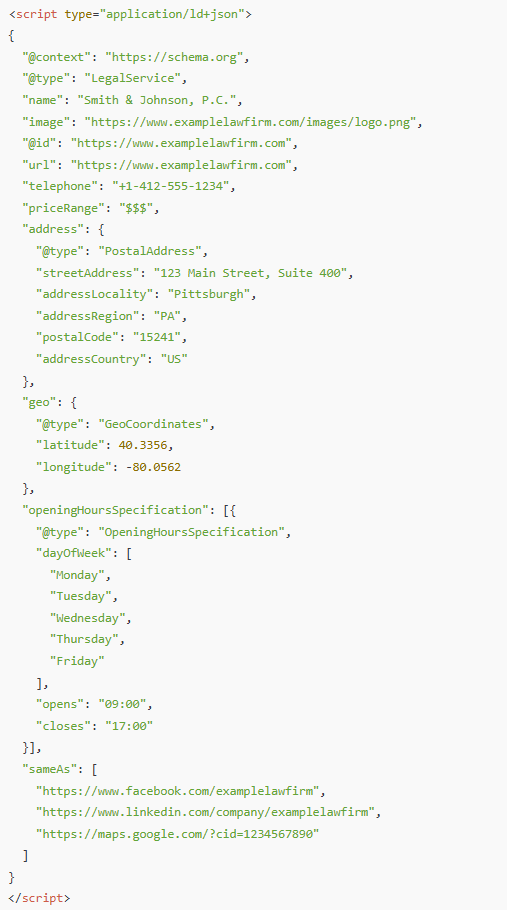
  • Quarterly: Add checks for accessibility, schema markup, and updated intake workflows.
  • Responsibility: Assign the checklist to a marketing partner or internal staff member.

Consistency ensures nothing falls through the cracks.

Want a checklist to follow for this whole process?  Download it here.

Website FAQs for Law Firms

What does website maintenance include for a law firm? 

Regular speed tests, backups, security updates, plugin audits, broken link fixes, content updates, analytics reviews, and intake form tests.


How often should law firms update their websites?

At least monthly, with backups and content updates more frequently depending on your activity.


Why is maintenance so important for lawyers?

Because potential clients judge you within seconds. A slow, outdated, or insecure site costs you leads and damages your credibility.

Get Started Today!

Website maintenance may not feel urgent, but neglecting it leads to real risks:

  • Lost clients
  • Lower search rankings
  • Security vulnerabilities
  • Damaged credibility

Just like a strong case requires regular preparation, your website requires consistent attention. With a clear checklist and routine process, you’ll stay ahead of problems and keep your law firm’s digital presence sharp, secure, and client ready.

 Don’t forget to download our free checklist for website maintenance here 

How Law Firms Can Pass Google Business Verification the First Time (Without Having an In-House Marketing Team)

Has this happened to your firm? 

You’ve submitted your law firm’s information to Google, followed the steps to create your Business Profile, and waited patiently for approval—only to be met with another rejection.

Does it sound all too familiar? 

You’re not alone. Many small and mid-sized law firms struggle to get through Google’s verification process, especially if they don’t have an in-house marketing team to handle the details…and the process just keeps getting more complicated each year.

But here’s the truth that no one likes to hear: Google’s verification system isn’t random – It’s designed to weed out fake listings and ensure only legitimate businesses show up in search results. 

And while that’s a good thing for consumers, it can be frustrating when you know your firm is real—but still get denied.

Want to hear the good news? 

You can absolutely get verified, and we are going to show you how.

After helping tons of businesses navigate this exact issue, we’ve identified the three most important things Google looks for—and how you can easily provide them, without needing a marketing degree (or a visit to a psychic).

Let’s break down exactly how to pass Google’s verification on your first (or next) try—and finally start showing up where your future clients are searching.

Why Does Google Verification Matter for Law Firms?

If you’re running a small or mid-sized law firm, especially one without a marketing department, Google Business verification might seem like a minor administrative task. But in reality, it’s the gatekeeper to one of your most powerful local marketing tools.

Once your firm is verified, it becomes eligible to appear in Google Maps and the coveted “local pack” of search results—that set of three to five firms that shows up when someone searches for phrases like “family lawyer near me” or “estate planning attorney in [your city].” 

Without verification, your firm won’t appear there, no matter how great your website or reviews are.

For law firms, where trust and proximity matter, being seen in local search is critical. Clients often look for someone nearby, and they trust Google to recommend reputable professionals. If your profile isn’t verified, you’re effectively invisible to those potential clients.

Verification also signals credibility—not just to Google, but to the people searching for legal help. A verified business is seen as legitimate, established, and worth considering.

The problem? Many law firms operate out of shared office spaces, coworking setups, or less traditional environments, which can trigger red flags in Google’s system. That’s why understanding exactly what Google is looking for—and how to show it—is key to getting through the process successfully.

Up next: the first (and most overlooked) requirement that trips up law firms—signage.

Verification Pillar 1 – Signage: The Non-Negotiable

If there’s one thing Google will not compromise on, it’s this: your law firm must have visible, permanent signage at the location listed on your Google Business Profile.

Yes, even if you’re in a shared office, coworking space, or executive suite.

Google uses signage as physical proof that your business exists and operates at the listed address. Without it, you’ll likely be stuck in a loop of rejections—even if everything else checks out.

What Counts as Acceptable Signage For Google Verification?

  • A door sign with your firm’s full name
  • A plaque or panel on a directory inside the building
  • A mounted sign near your office entrance
  • A vinyl sticker on a glass door or window (if it looks permanent and professional)
  • You can even use an Etsy retailer to create a sign for you

Most importantly, the business name must match exactly what’s listed on your Google Business Profile. If your GBP says “Anderson & Wells Legal Group, LLC” but your door sign just says “Anderson & Wells,” that inconsistency could get you flagged.

For Firms in Shared or Virtual Spaces:

  • If you’re using a shared office suite, make sure your firm’s name is listed on the suite directory or signage board.
  • If you’re in a coworking space like Regus or WeWork, see if you can get your firm’s name on a door placard or even a branded nameplate at reception.
  • Virtual offices are generally not allowed unless you have exclusive access to the space and permanent signage.

The Good News:

You don’t need a $1,000 custom sign. A $75–$150 professionally printed plaque or door decal from a local sign shop or online printer like Vistaprint is usually enough—as long as it looks permanent and is clearly visible in person or on video.

Google’s goal is simple: to prevent fake listings and ensure customers can find your business in the real world. With signage in place, you’re one-third of the way to verification.

Verification Pillar 2 – Matching Legal Documentation

Even with perfect signage, Google still wants to verify that your firm is legally established and operating at the location you’ve provided. That’s where documentation comes in—and it’s where many law firms slip up.

What Documents Should You Have Ready To Verify Your Firm? [h3]

At minimum, Google typically wants to see:

  • Company formation documents or a DBA (Doing Business As) certificate

  • Proof of address, such as:

    • A utility bill in your firm’s name (internet, gas, electric)
    • A signed lease or sublease agreement listing your firm as the tenant
    • A business bank statement with the correct address

The name and address on these documents must match your Google Business Profile exactly.

Here Is Where Most Law Firms Get Tripped Up:

Let’s say your Google profile says:
“Smith & Blackwell LLP, 123 Main Street, Suite 400, Pittsburgh, PA”

That means your documentation needs to say:
“Smith & Blackwell LLP” (not just “Smith & Blackwell”)
“123 Main Street, Suite 400” (not “123 Main St., Ste. 400” or “123 Main Street #400”)

Google can and will reject listings for tiny differences in spelling, abbreviations, or punctuation.

Tips to Make Sure Everything Matches:

  • When updating your GBP, copy/paste the address from your business documents to avoid discrepancies.
  • Double-check for suite numbers, commas, abbreviations like “St.” vs “Street,” etc.
  • If your business recently moved, make sure you’ve updated your address everywhere—bank accounts, utilities, lease agreements—before attempting verification.
  • If your firm is listed under your personal name in utilities or banking, update it to your law firm’s name where possible. Google wants to see business-to-business alignment.

Bonus Tip:

If you’re missing any of the stronger documents above, here is how you can add some extra credibility: 

  • Branded invoices
  • Letterhead
  • Legal correspondence that include your firm’s name and address

This documentation is Google’s way of cross-referencing your online presence with real-world operations. It’s not about bureaucracy—it’s about building trust.

Verification Pillar 3 – Video Verification Walk-Through

Once your signage and documentation are in order, there’s one final hurdle—video verification. This step is Google’s way of virtually “walking through” your office to confirm everything lines up.

For law firms, this is often the most intimidating step—especially if you’re operating without a marketing team. But with a little preparation, it’s completely manageable.

What Happens During Video Verification?

Google may prompt you to either:

  • Record a video and upload it, or
  • Join a live video call with a Google representative

In both cases, they’ll want you to walk through your office and show specific items that prove you’re a legitimate, operational business at the listed location.

What to Show in Your Video:

  • Your signage – Start outside or at your suite door to clearly show your firm’s name on a sign or directory
  • Reception or entry area – Even if it’s modest, show desks, chairs, or any welcoming space
  • Workspaces – Computers, desks, phones, bookshelves, or any area where legal work happens
  • Industry-specific materials – Law books, filing cabinets, client files (blurred if necessary), or your legal diplomas on the wall
  • Branded items – Business cards, letterhead, firm-branded mugs, brochures, etc.
  • Legal software or systems – A quick glimpse at your practice management dashboard, if appropriate

Pro Tips for Law Firms:

  • Clean and organize your space before the video. Clutter looks unprofessional.
  • Check lighting – Make sure the area is well-lit so all signage and materials are visible.
  • Have your documents ready – In some cases, they may ask to see your lease or utility bill in the video.
  • Practice once before recording – Do a dry run to make sure your walkthrough is smooth and that you have everything that you need.

This process may seem tedious, but contrary to popular opinion, Google isn’t trying to trip you up—they just want to see that your firm is operating at the listed address and offering real services. A strong walkthrough is often the final key to unlocking verification.

What to Avoid – Common Mistakes That Get Law Firms Rejected

Even experienced attorneys can stumble over the little details that lead to rejection. Here are the most common pitfalls we’ve seen (and helped law firms fix):

No Visible Signage

This is the most frequent reason for rejection. A taped-up paper sign or nothing at all simply won’t pass. Google needs to see permanent, professional signage with your exact firm name.

Inconsistent Business Name or Address

Minor differences like “Main St.” vs “Main Street” or “LLP” vs nothing can result in an automatic rejection. Your Google Business Profile, legal docs, and video must all match down to the last comma.

Using a Virtual Office or PO Box

Google wants to verify real businesses operating at physical locations. If you’re using a PO box, mailbox service, or virtual office without dedicated access and signage, it will likely be flagged.

Empty or Inactive-Looking Office in Video

If your walkthrough looks like a vacant room or storage space, it won’t inspire confidence. Make sure your video shows signs of an active, working law firm.

Unfinished Google Business Profile

Even before you verify, your profile should include:

  • Correct hours of operation
  • Service areas or specialties (e.g. family law, estate planning)
  • A description of your firm
  • Photos of your office, logo, or attorneys
  • Website and phone number

Get Verified and Get Found

Google’s verification process might feel like a hassle—especially for law firms without a full-time marketing team—but it’s not just a bureaucratic hoop to jump through. It’s a necessary step to getting your firm seen by potential clients searching for legal help in your area.

With the right preparation, you can pass verification the first time:

  • Clear, permanent signage with your exact business name
  • Legally matching documentation with no inconsistencies
  • A video walk-through that shows you’re a real, operating law firm

Skip just one of these, and you may be stuck in verification limbo. Nail all three, and you’ll unlock one of the most powerful tools in local SEO—visibility in Google Maps, local pack rankings, and increased trust from searchers. 

Ready to Make Google Business Verification Easy?

At IFTS, we help law firms like yours get verified, ranked, and visible—without the tech headaches.

Download our free “Google Verification Checklist for Law Firms” to make sure you’re covered step-by-step. Or, if you want help getting this done fast, book a free strategy call and we’ll walk you through the process.

Don’t let a failed verification keep your firm hidden.  Get the visibility—and clients—you deserve.

PS – After you are verified, you will want to optimize your profile – check out this free book for a step-by-step guide

How to Turn Your Law Firm’s Website Into a Client-Generating Machine with Content and Video

If you’re like most attorneys, you know your website should be helping you attract new clients — but you’re not sure what content actually works.

The truth is, your potential clients aren’t searching for your name first. They’re searching for answers to their legal problems.

They’re typing things like:

  • “Do I need a will in Georgia?”
  • “How long does a DUI stay on your record?”
  • “What happens if I miss a custody hearing?”

If your website provides clear, local, and trustworthy answers to those questions, you gain their attention and earn their trust — and that leads directly to new consultations.

In this post, I’ll walk you through how to build a content system that turns search traffic into signed clients — using:

Let’s get into it.

1. Create One Service Page Per Practice Area

Many law firms still rely on a single “Practice Areas” page — a big list of everything they do. That approach is outdated and bad for SEO.

Instead, create a dedicated page for each legal service you offer, such as:

  • /dui-defense
  • /child-custody
  • /estate-planning
  • /probate-litigation

Each page should be built around one primary keyword like “estate planning lawyer in Pittsburgh.” Include:

  • A clear headline that mentions your service and location
  • A plain-English explanation of the service
  • Mentions of your city or county
  • Internal links to related blog posts and FAQs
  • A bold call to action (CTA), like “Schedule a Free Consultation Today”

Done right, these pages become your website’s most valuable asset — working 24/7 to rank in search, build trust, and convert visitors into leads.

2. Write Blog Posts That Answer Real Questions

Your blog is not a press release section. It’s a place to answer your potential clients’ most pressing legal questions.

Here’s what to write about:

  • Client questions you hear again and again during consultations
  • Recent law changes in your practice area or state
  • Step-by-step guides like “How to Prepare for a Custody Hearing”
  • Case studies or anonymized examples of how you helped someone
  • Myths vs. truths about common legal processes
  • “What to do if…” posts, like “What to do if you’re served divorce papers”

Keep it simple and conversational. Break your posts into sections with headings. Use internal links to your related service pages. And always end with a clear CTA.

Even just one or two well-written blog posts per month can dramatically improve your visibility and trust factor.

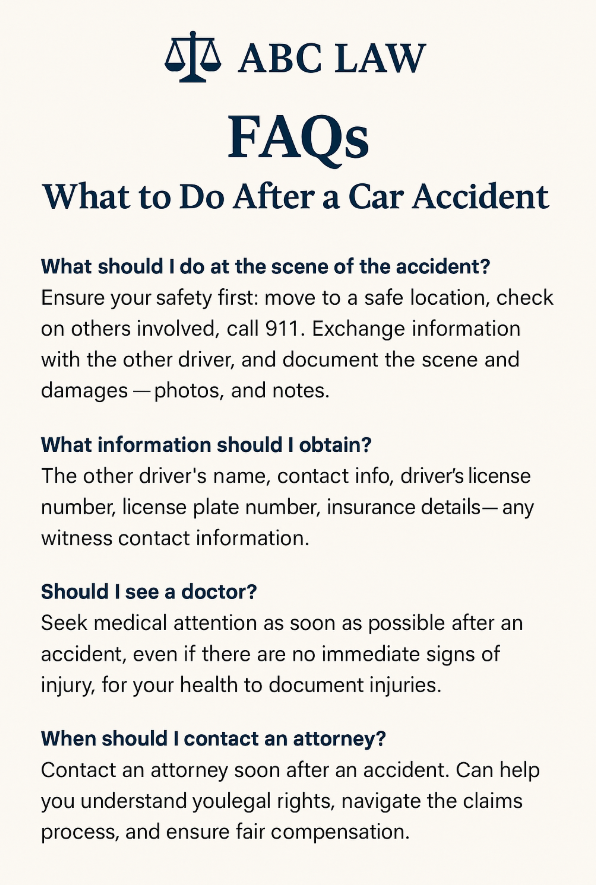
3. Build Topic-Specific FAQ Pages

FAQs aren’t just for saving your receptionist’s time — they’re powerful SEO tools and trust-builders.

Instead of one massive FAQ page, break them into topic-specific pages like:

  • DUI Defense FAQs
  • Estate Planning FAQs
  • Family Law FAQs in [Your County]

Use plain language and keep answers short. If possible, add FAQ schema markup to improve your chances of getting featured in Google’s “People Also Ask” or rich results.

And don’t forget to link out to relevant blog posts or service pages when a question deserves a deeper explanation.

When someone lands on your FAQ page and finds the exact answer they were looking for, they’re already one step closer to booking a consultation.

4. Turn Written Content Into Video (With Help from AI)

People love video — especially when it’s short, simple, and informative.

The good news? You don’t need a studio or hours of prep to make it happen.

Start by using a blog post or FAQ you’ve already written. Then:

  • Use AI to help turn it into a short video script
  • Record yourself answering the question (even just with your phone)
  • Post the video to YouTube, your blog, Instagram, and your Google Business Profile
  • Embed it wherever it fits on your website

For example, one short video like:
“Do I need a lawyer for probate in Pennsylvania?”
Can be repurposed into:

  • A YouTube video
  • A Facebook Reel
  • An FAQ answer
  • A blog with transcript
  • A GBP post

With just a few pieces of reusable content, you’ll start standing out in a market where most attorneys still haven’t tried video at all.

Final Thoughts: Don’t Overcomplicate It

You don’t need a complicated funnel or a massive content calendar to succeed.

Just focus on these four content assets:

  • Dedicated service pages that clearly explain what you do
  • Blog posts that answer real client questions
  • FAQ pages that build trust and authority
  • Short videos, powered by AI, that scale your message across platforms

This simple system can turn your website from a static brochure into a true marketing engine.

Want a Shortcut?

If you’d like a step-by-step guide to implement this, download your free copy of our book, First in Search, First in Court.

It’s packed with checklists, templates, and strategies we use to help law firms outrank the competition and consistently book new clients.