
Law Firm Video Retargeting: Bring Website Visitors Back

How Law Firms Can Use Video Retargeting to Bring Website Visitors Back

Someone visits your law firm’s website. They read your divorce page or your estate planning page. Maybe they even look at your attorney bio.

And then they leave.

That doesn’t necessarily mean they chose another firm. They may have been interrupted, needed to speak with a family member, or simply not been ready to contact an attorney yet.

But if you never reach them again, you’re relying on that person to remember your firm when they are ready.

This is one of the biggest opportunities we see small law firms overlooking. You may already be getting interested people to your website. The question is what happens after they leave.

Start With One Question Your Attorney Already Answers

Let’s say you’re an estate planning attorney. You record a three-minute answer to a question you hear all the time: “Do I need a trust, or is a will enough?”

You could upload the video to YouTube and hope someone finds it. That’s a start. But you’ve already put your time and expertise into the answer. 

Why use it only once?

At IFTS, we would also turn that answer into a blog post, embed the video on a relevant page of your website, and pull out a shorter clip for social media. Someone researching wills and trusts now has several ways to encounter your explanation. They can read it, watch it, or come across a short excerpt while scrolling.

That’s the organic side of the strategy. It gives your answer more than one place to live and more than one chance to be useful. We walk through other ways to use a single recording in our article on turning YouTube videos into law firm leads.

But what about someone who has already visited your website and left without calling?

What Is Video Retargeting for a Law Firm?

Retargeting is a way to show ads to an eligible audience of people who previously interacted with your website or content. Google’s explanation of audience segments, for example, includes past website visitors and people who have interacted with a business on Google or YouTube.

Instead of showing those people another generic “Call us today” ad, you could show them a short video of an attorney answering a helpful question.

Imagine someone visited your estate planning page but wasn’t ready to book. Later, they encounter your attorney explaining what factors to consider when deciding between a will and a trust. They’ve seen your firm’s name before. Now they can hear how you explain an issue they’re researching.

Depending on the campaign setup and audience eligibility, a firm may be able to use video to reconnect with interested people across YouTube, other Google ad placements, Facebook, and Instagram. Each platform has its own setup and rules, so this takes more thought than uploading the same ad everywhere.

The goal is to offer another useful interaction with your firm while someone is making a decision.

Because this is legal marketing, privacy and wording matter. A video ad should answer a general question without assuming or announcing anything about a viewer’s personal legal situation. The firm should also review its ads against the applicable platform policies and state attorney advertising rules.

Why Show an Attorney Video Instead of Another Generic Ad?

Think of someone comparing three law firms. Each firm has a professional website. Each might also run an ad asking the person to schedule a consultation.

Now imagine one attorney appears on video and explains what happens during the first meeting. The person can hear the attorney’s voice and get a sense of how they communicate. If the answer helps, that person has a reason to return to the website when they’re ready to take the next step.

That’s why we don’t look at attorney videos as a way to collect views. We want the right people to see a useful answer and feel more comfortable contacting the firm.

The video also needs a clear next step. After watching, someone should be able to reach a relevant practice area page, learn about the consultation process, or contact the firm easily. Our article on turning YouTube views into actual clients explains why that path matters.

How IFTS Used Video as Part of a Larger Law Firm Marketing System

We used this approach as part of a broader marketing system for Bononi & Company, a Pennsylvania law firm.

Their attorneys answered common legal questions on video. We turned those answers into blog posts, shared them on social media, placed them on YouTube, and used videos in retargeting ads.

Across the broader digital campaigns, we tracked more than 1,530 calls and contact form submissions. Their YouTube videos received more than 17,000 views. Those results are from the combined marketing system; they aren’t results we can attribute to retargeting alone.

That’s why this example matters to us. Search and ads helped people find the firm. Blog posts and videos answered their questions. Retargeting provided another opportunity for interested people to see the attorneys before deciding whether to reach out.

No single video or ad gets all the credit. The strategy is in connecting the pieces.

How to Choose Your First Retargeting Video Topic

If your firm already gets website visitors, ask yourself:

What would those visitors benefit from hearing from us before they decide to call?

The answer might be:

  • “What happens at our first consultation?”
  • “How long does probate usually take?”
  • “What affects the cost of a divorce?”

Choose a question that matters to the clients you want to serve and that you can answer clearly without knowing the details of a particular case.

Then use the answer in more than one place: on your website, in a related blog post, in shorter social clips, and, where appropriate, in a thoughtful retargeting campaign. If you need a framework for planning the topics and measuring the results, see our video content strategy guide for law firms.

Make More of the Website Traffic You Already Have

Putting this together takes time. You need to choose topics, edit the recordings, add captions, create blog posts and clips, set up eligible ad audiences, and track whether people actually contact the firm.

That’s the work we handle at Integrity First Technology Solutions. Our process can turn four short attorney answers each month into YouTube videos, blog posts, short clips, and content for organic and paid distribution – with 30 minutes or less of your time per month.

You already have the expertise. You’re already answering these questions. We help those answers reach people who are considering your firm, including visitors who weren’t ready to call the first time they saw your website.

Want to see how that could work for your law firm? Book a call with IFTS.

Mastering Marketing Terminology: A Guide to Key Concepts for Business Success

Navigating the world of digital marketing can be daunting, especially with the plethora of terms and acronyms that are frequently used. 

Whether you’re a seasoned professional or working with an agency in the industry, understanding these key concepts is crucial for optimizing your marketing strategies. 

This guide will break down essential marketing terms that you will encounter on our website, in our case studies and throughout our social posts, providing clear definitions and practical examples for working with us or any marketing agency.

ROI (Return on Investment)

Definition: ROI measures the profitability of an investment. It’s calculated by dividing the net profit from an investment by the cost of the investment.

Example: If you spend $1,000 on a marketing campaign and generate $2,000 in sales, your ROI is 100%. This means you’ve doubled your investment.

Retention

Definition: Retention refers to the ability of a company to keep its customers over time.

Example: A subscription service that maintains 95% of its subscribers each month has a high retention rate, indicating customer satisfaction and loyalty.  This also indicates that they lose 5% of their subscribers every month.

Churn

Definition: Churn is the rate at which customers stop doing business with a company.

Example: If a company has 100 customers at the start of the month and loses 17 by the end, the churn rate is 17%. 

High churn rates suggest there are issues that need to be addressed to improve customer satisfaction.

Conversions

Definition: A conversion occurs when a user completes a desired action, such as making a purchase or filling out a form.  You frequently have to define conversions for Google Ads and Google Analytics.

Example: If an e-commerce site gets 600 visitors and 30 of them make a purchase, the conversion rate is 5%.

Call To Action (CTA)

Definition: A CTA is a prompt on a website or ad that encourages the user to take a specific action.  It should be simple, direct and easy to understand.  It should also be something that stands out, like a brightly colored button.

Example: “Get a Free Quote” or “Sign Up Now” are common CTAs that guide users toward a desired action, such as filling out a form or making a purchase. 

Landing Page

Definition: A landing page is a standalone web page created specifically for a marketing or advertising campaign.  This is the page that you send ads to, not the home page.  Everything on this page has one purpose – get the site visitor to buy your product or service.

Example: A page designed solely to promote a special discount on a product, with a clear CTA to “Buy Now,” serves as a good landing page .

SEO (Search Engine Optimization)

Definition: SEO is the practice of optimizing a website to rank higher in search engine results organically.

Example: Using relevant keywords, creating quality content, and obtaining backlinks are strategies to improve SEO and drive more organic traffic to your website.

Backlink

Definition: A backlink is a link from one website to another, which is important for SEO.  For a more in-depth look at backlinks, check out this article from IFTS.

Example: If a popular blog in your space links to your business website, that backlink can improve your site’s authority and search engine ranking.

Citation

Definition: In SEO, a citation is a mention of your business’s name, address, and phone number (NAP) on other websites.

Example: Listings on directories like Yelp or Yellow Pages include citations that can help boost your local SEO by making your business more discoverable in search engines.

NAP (Name, Address, Phone Number)

Definition: NAP consistency refers to having the same business name, address, and phone number across all online platforms.  Tools like Yext can help you maintain this easily.

Example: Ensuring your business’s NAP information is identical on your website, social media profiles, and directory listings helps improve local SEO.

Bounce Rate

Definition: The bounce rate is the percentage of visitors who leave a website after viewing only one page.

Example: If 1,000 people visit your website and 500 leave after only viewing the homepage, the bounce rate is 50%. 

A high bounce rate may indicate that visitors aren’t finding what they’re looking for on your website.

SEM (Search Engine Marketing)

Definition: SEM involves using paid advertising to increase a website’s visibility on search engines.

Example: Running a Google Ads campaign or a Google Local Services Ad to appear at the top of search results when users search for “best local coffee shop” is an example of SEM.

PPC (Pay Per Click)

Definition: PPC is an advertising model where advertisers pay a fee each time one of their ads is clicked.  This is most typically used when referring to a Google Ads campaign.

Example: A business runs a Google Ads campaign and pays $0.55 for each click. If their ad gets 1,000 clicks, they spend $550 in total on the PPC campaign.

Target Audience

Definition: The target audience is the specific group of people most likely to be interested in your product or service.  You will want to think about age, location, psychographics, etc when defining your target audience

Example: For an Orlando-based wedding photography business, the target audience would be engaged couples planning their weddings in the Orlando area.

Understanding these fundamental marketing terms will empower you to make informed decisions and effectively communicate your needs and goals.

For more detailed explanations and examples, feel free to reach out to our team or explore our other resources.

Get the Top 3 Social Media Post Templates for Painting Companies to Grow Your Following and Get New Clients

Engage with prospects and save time with your FREE Canva template kit. This kit features the top 3 social media posts for painting companies and directions on how to brand them for your own business in 5 minutes or less.

Enter your email below and get the templates sent directly to your inbox along with an instructional video on how to make personalized edits.

Attorneys – Elevate Your Online Presence By Removing These NINE Key Elements From Your Law Firm’s Website

Are you tired of your website feeling more like a legal labyrinth that requires a map and guide than a client-friendly portal?

Are visitors on the site lost in a sea of legal jargon, unable to figure out what action to take?

Do you always have to tell people where information is on your website rather than them easily being able to find it?

Well, you are in the right place because your law firm website makeover starts now.

Picture this: a website that not only showcases your legal abilities but also captivates online visitors from the moment that they land on your site.  Imagine a digital platform that not only informs, but engages users, turning them from information seekers to eager clients that want to pay you for your services.

In today’s fast-paced digital landscape, where you get 50 milliseconds for a person to judge your website, make it count.  Your site is your virtual storefront, your best salesperson and your online greeter all rolled into one…it’s also your ticket to reaching a broader audience full of potential clients.

Here’s the kicker – in order for your website to thrive in the competitive world of online legal marketing, you have to ditch outdated tactics and embrace a fresh approach that speaks directly to your target audience.

So, if you are prepared to say good-bye to cookie-cutter sites and hello to an amazing new website that gets you clients, let’s get started!  It’s time to unleash the power of your legal acumen and make a lasting impression in the digital realm.

So, what are the 9 elements that you need to remove from your law firm’s website to accomplish all of this?

Element 1 To Remove - Unclear Brand Messaging

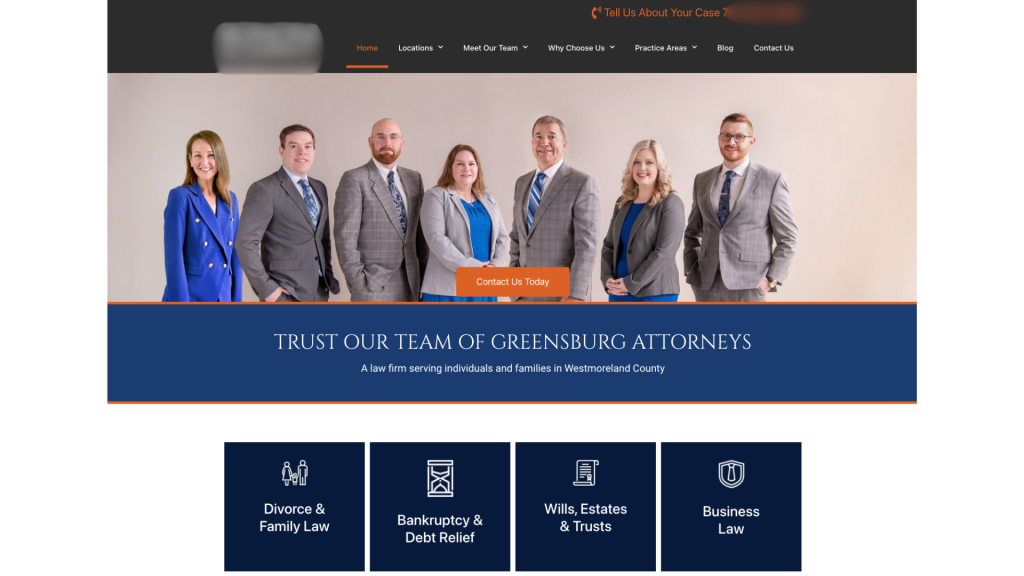
Make sure that your homepage communicates your firm’s specialty in a succinct way, right at the top of the page.  Don’t make site visitors guess what you do.  They need to know immediately that they are in the right place with the right firm.

Avoid using vague headlines like “Leading Law Firm” or “We Get You Legal Results Fast”.

Instead, opt for more descriptive statements such as “Expertise in Corporate Law For Startups” or “We Take Women Through Every Step Of A Divorce”.

If you can call out your ideal client and how you will help them, you will have great messaging that makes them want to learn more and stay on the site.

Element 2 To Remove - Ambiguous Navigation Labels

Site visitors need to know where to go on your website intuitively.

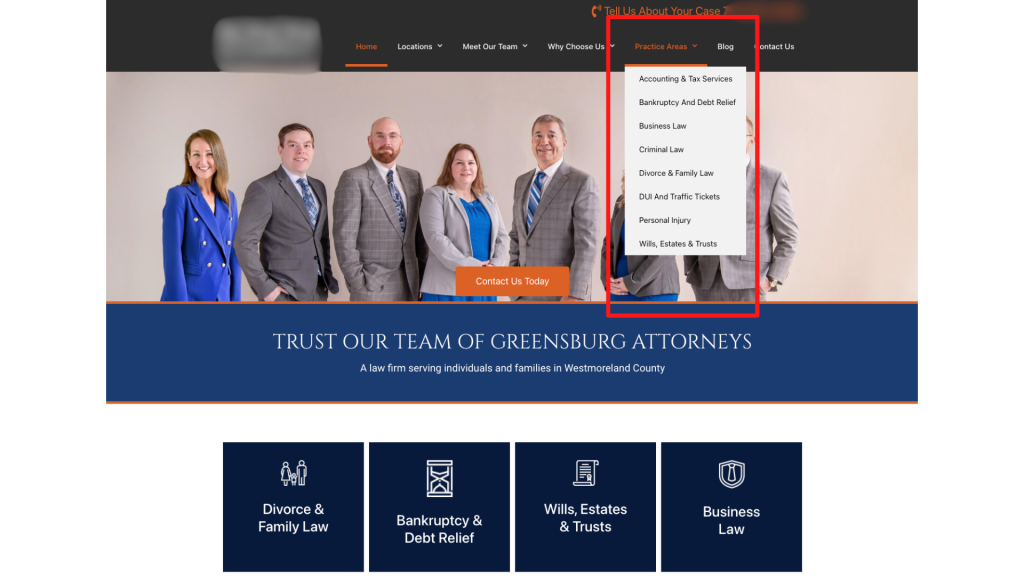
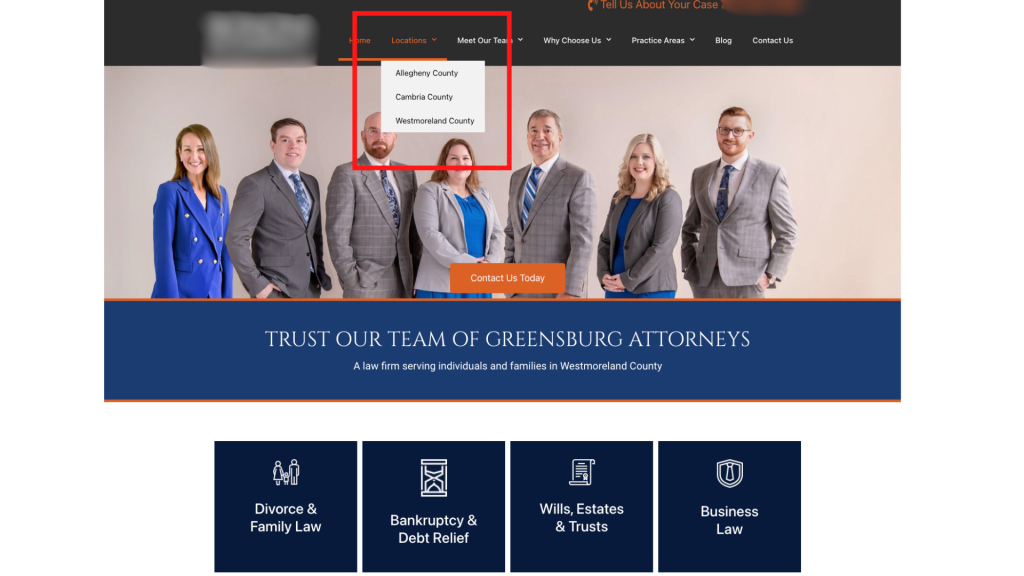
Instead of having a page that lists out all of your areas of practice, create one page per practice area.  Not only does this make navigation easier, but it helps with your website’s SEO as well by having keywords in the menu.

practice areas listed in menu

You should also do this with the areas that you serve.  Instead of having one page that talks about your service area, create independent pages for each of the cities or towns.  This makes it much easier for a site visitor to know that your firm is in his or her area and can help.

service areas listed in menu

Element 3 To Remove - Generic Subheadings On Website Pages

Get the attention of your visitors with specific subheadlines that engage them immediately.  

You want them to say “This firm is for me” when they are reading the text on your site.

Instead of using a header like “Our Services”, try something more descriptive like:

  • “Comprehensive Family Law Representation”
  • “Strategic Criminal Defense Tactics”
  • “Starting A Business in 7 Steps”

When you make the subheadings specific, it allows a site visitor to self identify as a potential client.

In addition, more specific subheaders are great for telling the search engines like Google what your firm does and should help with your site rankings.

Element 4 To Remove - Slideshow Overload

Avoid overwhelming your visitors with excessive slideshows with multiple slides.

Streamline your pages to highlight key services or unique selling points effectively. Important information should not be hidden in a slide that someone has to wait for.

Not only that, but slideshows do not do well with accessibility for anyone accessing your site with a disability, so they may not get the information that they need. 

Our bodies are hardwired to react to movement, so if you have a moving element on your website, it’s distracting.  You never want anything on your website to distract from your messaging and stop someone from hiring you.

Element 5 To Remove - Inauthentic Imagery

Yes, stock images with pretty people and perfect lighting make your website pretty for YOU to look at.  Your web designer probably thinks that it is pretty too.

However, it comes across as really inauthentic and boring.

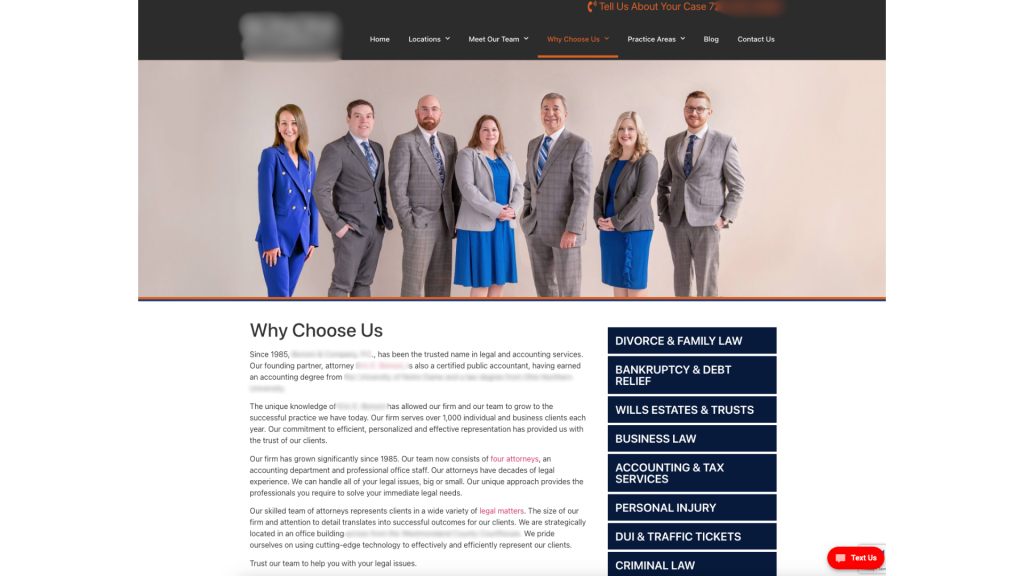
When people are looking for a lawyer, they want to be able to see YOU and your team.  People hire people, they don’t hire businesses.  They want to make a connection. Stock images make it impossible for a potential client to make a connection.

It doesn’t matter if the lighting is a bit off or you need to lose those extra 5 pounds, an authentic picture comes across as a human that they can trust.

Build trust with potential clients by using authentic images that reflect your firm’s identity.  Replace generic stock photos with genuine pictures of your team, office or clients (with consent of course) to convey credibility.

Bonus points if you let them know just a bit about your personal life, like sharing a picture of your dog or you at a local baseball game.  You’d be surprised by how many people connect with you in that way.

Element 6 To Remove - Social Media Distractions

Have you ever noticed the websites that have the firm’s social media icons at the top of the page above the menu?

Well, I can guarantee you that they are losing more traffic than they would like.

By putting the social icons at the top of the page, you are just begging your visitors to click off of your page…and get sucked into the attention time sink that is social media. By the time that they are done checking their notifications and seeing the latest Reels, they may have completely forgotten that they started at your website.

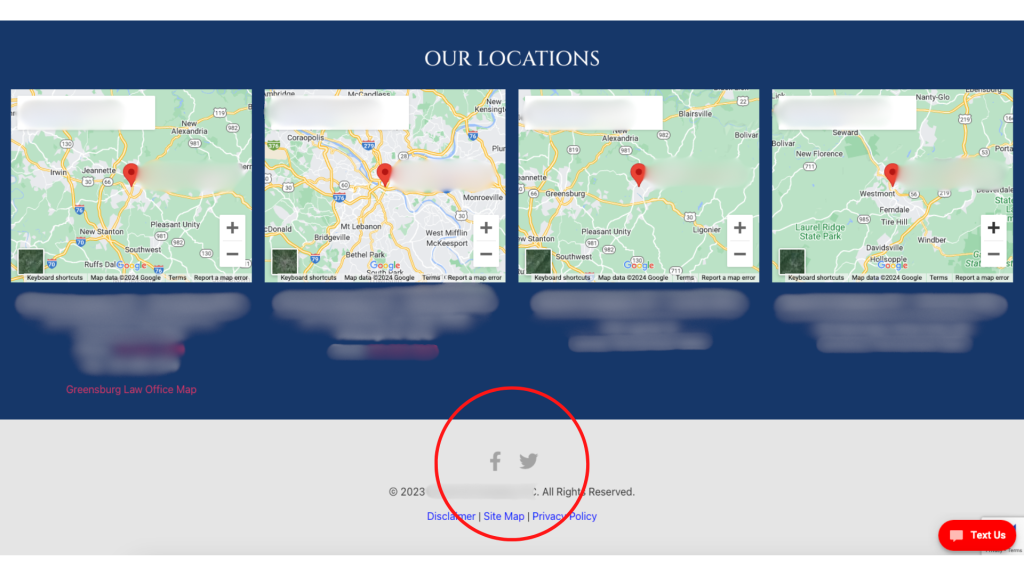
Minimize this distraction by moving the social media icons to your footer and on your “Contact Us” page.  This prevents visitors from being redirected away from your site and maintains their focus on your legal services.  It also puts your social media pages at an easy to find spot.

Element 7 To Remove - Outdated Content

Keep your website relevant by updating or removing outdated content.

If your blog templates have dates on them, remove them.  If the date is important, put it in the title or the text.

Most legal articles will be evergreen, so you don’t want people to click away because the article is 10 years old.  If it’s still good information, they should read it.  Don’t make it easy for them to dismiss.

Element 8 To Remove - Unreadable Content Blocks

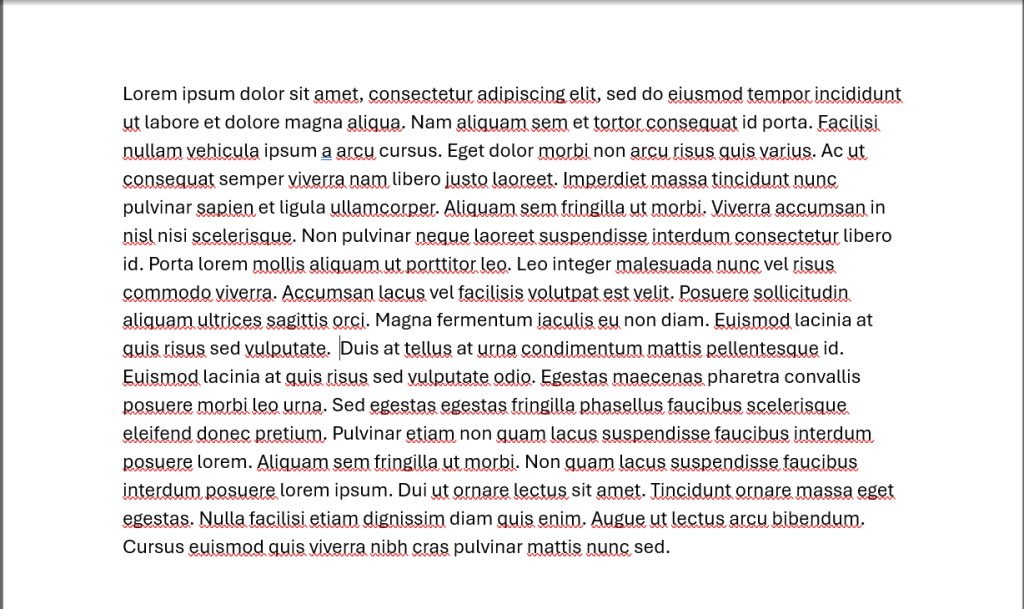
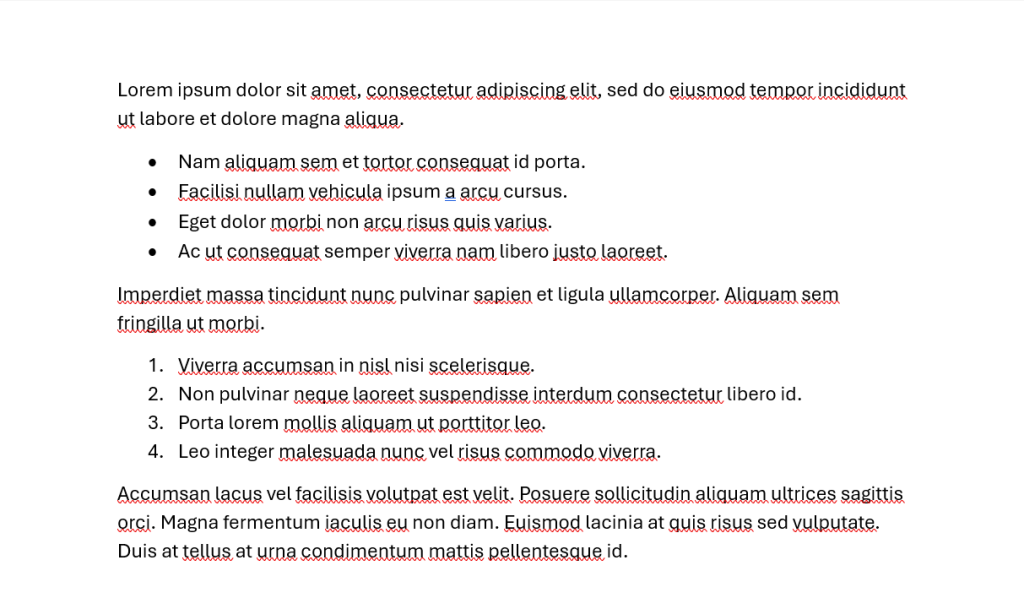
Which paragraph looks easier to read?

content block that is difficult to read
Option 1

or

easy-to-read content block
Option 2

I think that most people would agree that Option 2 is much easier to read than option 1.  It has whitespace and gives the eye somewhere to rest.

Improve readability by breaking up dense paragraphs.  Some of the ways that you can do this include:

  • Shorter sections
  • Utilizing bullet points
  • Use easy to understand headlines
  • Highlight or bold key points that you want to draw the eye to

See what I did above?  I just made that easier for you to read by breaking it up into bullet points.

You want to do your best to enhance the user experience by making information more digestible and accessible. 79% of people scan new pages that they come across, so the text needs to be formatted to grab their attention.  Blocks of text just won’t work.

Element 9 To Remove - Excessive Legal Jargon

Simplify your website’s language by eliminating excessive legal jargon that may alienate or confuse visitors. 

Yes, your content may sound “legal” or impress your colleagues, but that’s not who your website is for.  

When writing your content, ask yourself (just like in law school), cui bono, who benefits? 

If the answer to your question is not “My potential or current clients”, you know what to do.

Instead of bombarding potential clients with complex legalese, strive for clear and concise communication that everyone can understand. Remove dense paragraphs filled with technical terms and replace them with plain language that resonates with your target audience.

By cutting through the legal mumbo-jumbo, you’ll make your website more accessible and user-friendly, ultimately fostering stronger connections with potential clients through authenticity and trust building.

You can even try a tool like quillbot to rewrite sentences with a certain reading level in mind.

What Is Next For My Firm’s Website?

In conclusion, optimizing your law firm’s website is essential for staying competitive in today’s digital landscape. 

By removing outdated elements and enhancing user experience, you can create a more engaging and effective online presence that attracts and converts potential clients. 

Let’s recap the nine key areas we’ve discussed:

  1. Ensure clarity in your brand messaging and homepage headlines.
  2. Use specific navigation labels to guide visitors effectively.
  3. Craft engaging subheadings that capture attention and provide value.
  4. Streamline your homepage to prioritize essential information.
  5. Opt for authentic imagery that builds trust with potential clients.
  6. Minimize distractions by strategically placing social media links.
  7. Keep your website content relevant and up-to-date.
  8. Enhance readability by breaking up dense paragraphs and utilizing formatting.
  9. Simplify your language by eliminating excessive legal jargon.

By implementing these changes, you can transform your website into a powerful marketing tool that showcases your expertise and attracts your ideal clients.

Now, it’s time to take action! 

Review your website with a critical eye and identify areas for improvement based on the principles outlined in this article. Whether you choose to make small tweaks or undergo a complete overhaul, remember that every change you make contributes to a more user-friendly and effective online presence for your law firm. 

Don’t hesitate to reach out to IFTS, Inc. or call for assistance if needed.

Your website is your digital face to the world—it’s time to make it shine. Start implementing these strategies today and watch as your online presence grows and flourishes. 

Here’s to a brighter, more successful future for your law firm!