How to Optimize Your Google Business Profile Listing

Is your Google Business Profile optimized to the fullest extent?

If not, you could be missing out on amazing clients!

You can build a Google Business Profile listing, but it might not be as potent and dynamic as it could be. That’s because it takes more than just putting up a sign with your company’s name, address, and phone number for people to know who you are.

To be shown in the “Google Map Pack”, which is the set of 3 results that Google shows with the local map, you have to be what Google considers one of the best results for the searcher.
There probably are more than three other companies in your field operating in the immediate area. So, you’ll need to know what to include and how to fully optimize your listing if you want it to appear in the top three slots. The result will be the highest possible placement in relevant searches.

Use the advice below as a guide.

Don’t Forget the Details

Listing information, such as the company’s name, address, and phone number, should be consistent and include all necessary information. Use the full street name, not the abbreviation “Main St.” if your website states that your company is located on Main Street. If you want the same high search engine rankings across the board, it’s important that your name, address, and phone number (NAP) are consistent throughout all directories, including Google.

Don’t lose sight of the big picture when you’re making progress on the little things. The category “Italian Food” will boost the visibility of a restaurant more than the generic “Restaurant” would.  Be specific to attract the right people.

After you’ve mastered the fundamentals, you may shift your attention to the finer points of your profile. Upload your company’s logo, a profile background and a short slogan or tagline. You may increase your internet visibility, your audience, and the likelihood that they’ll become paying customers by maintaining this kind of consistency.

Don’t forget to include a description of your company; doing so will reassure potential clients that you are who they think you are. Don’t forget to use relevant keywords when creating that description; Google will appreciate it and you might even move up in the rankings as a result.  Make sure to use location words, such as the name of your city, as well.

Make Sure Your Website is Worth Visiting

There is more to your Google Business Profile than just the listing itself. Your website is also a part of this.

Listings get a boost when you have a website that is engaging and informative for visitors. Having an interesting website that provides value to readers and has helpful and useful information helps your listing, too. Google prioritizes readability and usefulness above all other ranking elements.

However, Google’s internal algorithm and rankings are also important considerations. To help Google find your site, it is crucial that you make extensive use of keywords and metadata.  Be sure to follow their SEO rules.
You should also work to increase the number of inbound links to your site; Google sees each link as a vote in favor of your site, and a higher number of links improves your position in the search engine results.

Make Sure You’re Mobile and Know How to Use it

Mobile internet search is quickly becoming the norm, and this development cannot be reversed. Today, mobile device usage far outstrips that of desktops, laptops, and tablets combined. Google’s algorithm takes this into account, giving preference in search results to sites that are optimized for mobile use. This highlights the significance of not only making your website mobile-friendly, but also understanding the differences between the search habits of desktop and mobile consumers.

In-the-moment mobile users are more likely to look up practical information like a store’s opening hours and physical location. Desktop and laptop users, on the other hand, are more likely to be looking for detailed product or service information.

Include Images and Videos

Nowadays, people who spend time on the internet prefer to look at video and photos rather than read walls of text. Not only does this visual component apply to your Google Business Profile, but it also has to do with the listing itself.

Your listing will stand out more and attract more attention if you include videos and photos.

At least three videos and six photos should be uploaded to your listing; they don’t need to be professional quality, but they should be of high enough resolution and not too grainy to be easily discerned. This second variety will not only put off potential customers, but will also make your company appear incompetent.

Make sure to add new images on a regular basis.

Use Google Business Profile Posts

Google began including posts in Google Business Profile listings last year, and every business owner should take use of them. Posts to a Google My Business profile are distinct from blog entries. These are miniature advertising that appear directly in your Google Business Profile listing, taking the place of lengthy descriptions. Moreover, they are an excellent method of maximizing the promotional value of these postings.

You can provide information about a corporate event, a sale, a new blog post, freshly arrived products, or seasonal greetings.

This type of article can be used for more than just “talking at” your target audience. There is room for graphics, calls to action, and even external links.

Use the Booking Button Feature

Adding a “book now” button is yet another innovation from Google. This is especially helpful for any business that relies on scheduled client visits, like house painting businesses. Customers can make appointments online with the booking button function, increasing business.

Messaging Feature

Customers can now send you messages right from your Google Business Profile, another new addition. Customers can send you messages whenever they like by clicking the “Chat” icon on your Google Profile.
If someone leaves you a message, you’ll be notified immediately so you may reply. If you choose, you can even set up a pre-recorded message that will be sent to anyone who messages your company.

Questions and Answers

Another Google addition lets clients ask you questions directly from the listing.  Using this function benefits both you and your clientele because of the increased communication it enables.

Remember that if one consumer has a query, there is a strong probability that another customer has the same query.

Be sure to answer these questions quickly and with detail.

Want Some Help?

IFTS specializes in helping companies get found on Google.  For a free consultation on how we can optimize your profile, call us at 412.715.6266.
6 Signs Your Painting Business Website Needs To Be Updated

Remember when it was trendy to have scrolling banners, a website visitors counter, blinking text or Adobe Flash on your website?

Does your website still have those…or does it look like it was designed when boy bands were still cool?

If so, it is definitely time for an update.

Here are 6 more signs that it’s time to redo your website:

✅ Your Website Isn’t Responsive

Does your website look as good or better on a phone than it does on a desktop?

If not, it’s time for an update. 

Your website should adapt and look good on all devices.

Why?

Well, first of all, this could actually be hurting you in the organic search rankings.  Google has started to penalize websites that are not designed for mobile devices because they determine the rankings using the mobile version.  If Google prioritizes a mobile-friendly website, you should, too. Unfortunately, the vast majority of painting businesses actually do the opposite.

Secondly, your customers will think that you don’t care about them having a good experience.  

More of your customers are going to your website using their phones instead of a desktop than ever before.  If they have to pinch, zoom and swipe their way through a non-optimized website, there is a good chance they’ll move on to the next painting company quickly.

If your website was built several years ago, even if it is responsive, it may not be as user-friendly on mobile devices as it could be. There has been a shift in both best practices, loading time acceptability and user expectations. 

In order to determine whether or not your site is mobile-friendly, you can use Google’s own mobile-friendly test tool: https://search.google.com/test/mobile-friendly

✅ Your Website Isn’t Easy For Your Target Market To Navigate

Can your ideal client easily navigate your website?

If not, it’s time for an update.  A client should be able to get to any page they want within 3 clicks.

3 clicks is what the average person finds acceptable while browsing for information.  In this increasingly fast-paced world where attention span is at a premium, prospects should find your website intuitive.

Typically, when business owners prioritize “pretty” websites over functionality and clever wordplay over straightforward descriptions, this is where you can lose people.

Some other common issues that we see:

  • Menu isn’t mobile friendly
  • Too many menu items
  • Too few menu items
  • Inability to navigate back a page or up a level
  • Blogs with no navigation
  • No site menu

If these are a problem on your site as well, you want to start thinking about a change.

✅ Your Website Isn’t Updated Regularly

When was the last time that you updated your website?

If you can’t remember, or if it was more than 3-4 years ago, it’s time for an update.  You want to make the best first impression you can, and that includes what people think of your online properties as well.  In fact, most people will judge a website within the first .05 seconds of seeing it.

An updated website is important for many reasons.

  • Aesthetic trends change, so a layout or graphic scheme that was popular before may not be popular now.  This can date your website.
  • Security protocols will update or change, which may leave you vulnerable to hacking.
  • Embedded code protocols from third parties (like YouTube or Rumble) will change as well, which could break the functionality on your website.

One way to evaluate your website is to compare it to your competition.  Look at the websites of 5 local competitors.  If all of them have nicer looking websites, it’s time to update yours.

Remember, people make assumptions about you based on what your website looks like.  If it looks old or sloppy with broken functionality, they may assume that’s how your business is run as well.

You might not give much thought to an out-of-date website, but it’s the digital equivalent of a high end boutique with bad lighting or a law office with holes in the waiting room upholstery. Putting in no effort to the appearance suggests that you don’t care about how you come across to others.

Customers and prospects want to be cared about.

✅ Your Website Doesn’t Convert Visitors Into Clients

When someone visits your website, do they normally become a client?

If you don’t convert a decent percentage of website visitors into clients, it is time for a website update.

Having a website is essential for any business today. However, merely existing online is not enough. Your website’s purpose is to promote your company.  It should be your BEST (and easiest to control) salesman.

A few ways that you can improve your conversion rate:

  • Be sure to have clear calls to action that stand out on every page
  • Be consistent in your messaging across all platforms
  • Provide helpful content about your business as well as why someone should work with you
  • Add your phone number and email address at the top of the website and make sure they are clickable
  • Adding a chat bot makes it easy to ask questions and helps a prospect decide to go with your services on the spot
  • A scheduler widget that allows a prospect to create their own appointment with you to accommodate a busy schedule
  • Ask for only a small amount of information so it’s easy for a prospect to fill out a form and submit.  The key is for you to get in touch quickly after the submission.

A good metric to look at if you have Google Analytics installed on your site is called Bounce Rate.

Bounce Rate tracks the percentage of first-time visitors that depart your webpage without navigating any further. While it’s normal for some pages to have a larger bounce rate than others, consistently high rates across the board indicate that something is wrong with your website.

✅ Your Website Doesn’t Follow Google’s Rules To Rank Well

Does your website play by Google’s SEO (search engine optimization) rules?

If you haven’t optimized your website in the past year or two, it’s time for an update.  Google constantly is changing/adding to their SEO rules.

SEO lays the foundation for having your website rank well and show up on the first page of results.  For more in depth information on SEO, check out this article from IFTS on “SEO for House Painting Companies”.

A few of the most important SEO rules:

  • Your website should have an SSL certificate
  • Load time for the site should be under 3 seconds
  • Popular keywords associated with your business should be used in the URL, page titles and headers
  • The meta description and page title field should be filled in
  • There are no bugs in the website code
  • There are no security vulnerabilities

While it is true that sometimes a combination of different approaches might solve these issues, if your website is more than a few years old, it is usually best to start from scratch. There is a limit to how many times you can fix a broken website by applying temporary fixes.

✅ Your Website Doesn’t Have Multiple Ways For People To Contact You

If I go to your website, are there multiple ways to get in touch with your business?

If you don’t have a phone number, a contact form and an email address easily available, it is time for an update.  Because people communicate and learn in different ways, it’s important to make it easy to contact you using multiple methods.

A great first step is to add the phone number, email address and social media property links to the top of your header.  These will be easily accessible no matter what page of the website a prospective customer is visiting.

A chat bot can be a valuable tool as well.  The easier you make it for prospects to get their questions answered and any fears allayed, the better chance you have of getting that person as a client.

Finally, a contact form on your website that can be navigated to easily (one click) makes the perfect trifecta of website communication.

🤔Thinking That Your Website Is Ready For An Update?

After reading this list, you may be convinced that a website redesign is in order and you are probably right!

Want help?

Using the newest responsive design trends, search engine optimization (SEO), and other cutting-edge features, our developers will craft a unique website for your company.  Call IFTS today at 412.715.6266 to get started!

Get the Top 3 Social Media Post Templates for Painting Companies to Grow Your Following and Get New Clients

Engage with prospects and save time with your FREE Canva template kit. This kit features the top 3 social media posts for painting companies and directions on how to brand them for your own business in 5 minutes or less.

Enter your email below and get the templates sent directly to your inbox along with an instructional video on how to make personalized edits.

How To Set Up A Google Business Profile

Want to know the best free way to promote your business online?

Google Business Profile!

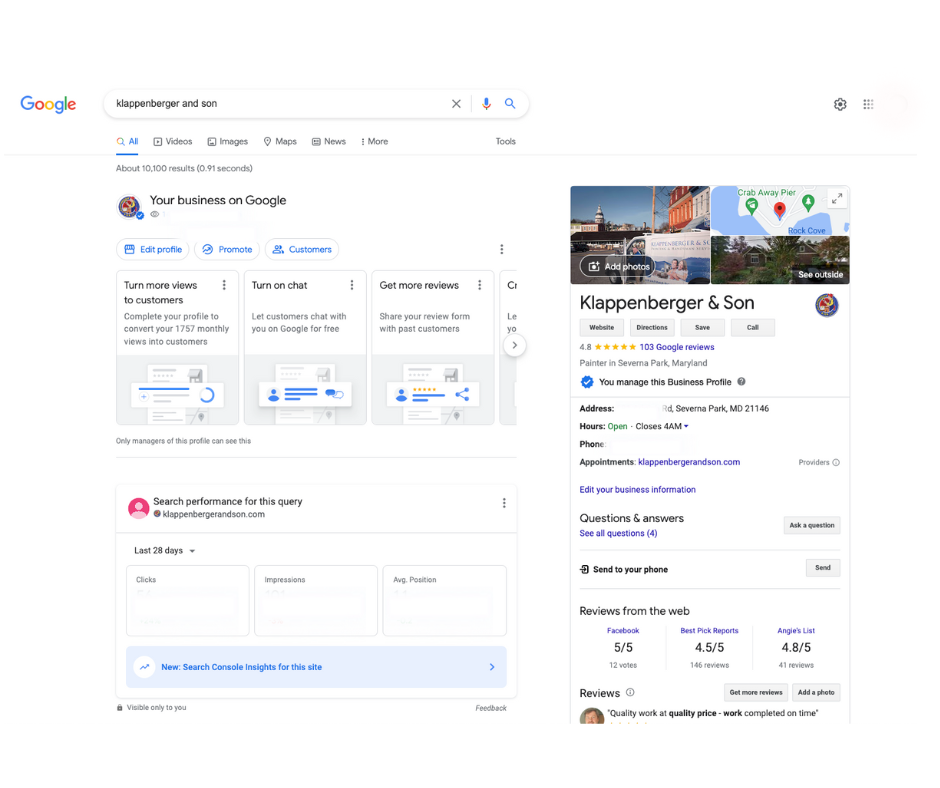
Google Business Profile (previously known as Google My Business) is a free and simple tool for companies to manage their online presence across all Google services, such as Search and Maps. 

You can connect with your clients using Google Business Profile, keep your company profile up to date, provide pictures of your office/staff and keep track of how Google users interact with your company.

Businesses can now directly claim their profiles from Search and Maps, which is a brand-new feature that comes with the new name.

Google announced a name change for the platform in November of 2021, something that didn’t come as a surprise to many because this is not the first time Google has changed the name.

Read on to learn about the new changes to Google Business Profile and how to set up your profile with some optimization tips for each section!

New Changes for 2022

Access Options

The decision to discontinue the GMB app in 2022 and urge company managers to view their accounts through “an enhanced experience” on Google Search or Google Maps is a significant step. This option has actually been accessible for some time; all you need to do is type in a search for your company name, or, if you’re signed in, the term “my business,” and then click on the profile that pops up. If you’re a business with only one location, this could be an easier way to access your profile.

Setting Up Your Google Business Profile

To get started, you need to sign in or create a Google account.

If you don’t have a Google account, head over to the create an account page. If you already have a Gmail address, then you can use that to sign in.

Claim Your Google Business Profile

A quick way to see if your business already has a GMB listing is to do a search on Google. If you see your business pop up, great! If not, don’t worry, you can easily create a new listing.

If you do have a listing, but it’s unclaimed, you’ll want to claim it as soon as possible. An unclaimed listing means anyone can edit your business name, address, and hours- which isn’t ideal.

To claim your listing, head to the Google Business Profile homepage and click on “manage now” in the top right-hand corner.

If you don’t have a listing, you’ll be prompted to create one.

Enter Your Business Name

When creating your GMB profile, you will be prompted to enter a company name. Ensure that this information is correct in order for clients to locate your business. Your profile name, as well as the name that appears on your signs and logo, need to be consistent with one another.

Phone Number

It is crucial to have a company phone number in order to receive business. If customers can’t reach you, they may go to a competitor.

Address

How will customers locate you if you don’t have an address? Make sure to enter your address as accurately as possible. All abbreviations on your website, social media presence, and elsewhere should be consistent. The difference between “street” and “ST” may not appear to be important, yet it might result in your account being marked for inconsistency.

Website

By linking your website to your Google Business Profile, you may generate more leads while giving potential clients access to your contact information and a detailed description of what you offer.

Hours

Simply specify your business’s open hours to complete the hours section. Customers will know when to call, when to visit, and when you may be reached for business inquiries.

Profile Images

Photos are an excellent way to show potential customers what they can expect when they visit your business. Showing photos of your business’ interior and exterior will give searchers a realistic idea of your business’ space.

Photos of the people involved with your business can also be uploaded to show potential customers the faces behind your business. These could be pictures of employees, team members, or even yourself!

Including high-quality images is essential to building trust with potential customers.

Here’s what to include:

  • Pictures of the inside of your business
  • Photos from outside of your business
  • Images of those who work there

Business Description

This is possibly the most significant component of your GMB profile is the description. You want this to be enlightening and SEO-friendly (search engine optimized). An effective strategy for this is to respond to frequently asked questions about your company and include keywords that your website targets.

For instance, describe what you do, where you are located, and the people you work with.

This area has a character limit of 750, therefore we advise using every last one of them.

Service Categories

Categories describe your business. They expose you to people that are looking for your products or services.

Google gives business owners the option to choose up to nine other categories in addition to a primary category that best describes their company.

For example, as a painting company, these categories may include:

  • Painter
  • Painting
  • Painting company
  • Painting contractor

Keep in mind that the categories you select will have an impact on your organic search results. Ensure that these are as accurate as possible and reflect your company’s interests.

Logo and Cover Image

The minimum size for your logo is 250 × 250 pixels; make sure it’s not too big or too little, and that it’s square. Your logo is how customers identify and relate to your company. 

In addition to providing your company logo, you must also submit a cover photo. This has a minimum size of 480 x 280 pixels and a maximum size of 2120 x 1192 pixels. When submitting your cover image, make sure it’s in JPEG or PNG format to ensure the maximum quality resolution for your profile.

Ask and Answer a Question

As a business owner, you may use Google to ask and answer common questions. For example, as a painting company, you may ask, “Do you offer power washing?” “Can you paint my deck?” or “How do I contact you?” These questions and answers give users hassle-free responses without the need to contact your company ahead of time.

Reviews

Reviews on Google provide valuable information about your business to both you and your customers. Business reviews appear next to your listing in Maps and Search, and can help your business stand out on Google.

To get reviews on Google, encourage your customers to spread the word about your business by following these best practices:

  • Encourage your consumers to post reviews. Inform them that leaving business reviews on mobile devices or desktop computers is quick and simple.
  • Respond to reviews to gain the trust of your customers. Customers will see that your company appreciates their feedback and will be more willing to post additional reviews in the future.
  • Verify your business so that it can exist on Maps, Search, and other Google services. Only companies that have been verified may respond to reviews.

As previously stated, clients may post reviews based on their interactions with your business. You will be able to respond to these reviews after your account has been verified. Keep it short and courteous, and thank your reviewers regardless of their feedback.

Check out this article for further information on how to deal with both positive and negative reviews.

Verify Your Business

Verifying your business allows it to appear in search results and maps for customers. This will also enable you to reply to reviews, as well as provide other management benefits. Visit this page for more information about business verification.

Get Started Today!

You can help your customers find you, interact with your business, and learn more about what you have to offer by creating a Google Business Profile. Additionally, your Business Profile makes it easy for customers to reach you and creates a lasting impression after they’ve viewed your website or interacted with your business on Google.

Have questions about setting up or improving your Google Business profile? Contact IFTS today at 412-715-6266 and we will get you started with a free 13-point profile assessment.