
Why SEO Is Dead and AEO Is the Future for Law Firms

The death of page one?

For decades, search engine optimization (SEO) has been the backbone of online visibility. Law firms invested thousands of dollars optimizing their websites, chasing Google rankings, and building backlinks—all in hopes of landing on the coveted first page of search results.

But here’s the truth: the game has changed.

If your law firm is still playing by the old SEO rules, you risk being left invisible in a world where clients expect one definitive answer delivered instantly by AI.

This shift is called Answer Engine Optimization (AEO). 

In this blog, we’ll explore what AEO is, why it’s replacing SEO, and what your firm needs to do today to future-proof your marketing.

(If you’d rather watch than read, here’s a short video where I break this down:)

From Ten Blue Links on Page One to One Direct Answer

Think back to the early days of Google. 

If someone searched “best divorce lawyer near me,” they’d get a non-cluttered page of 10 blue links. 

SEO was about climbing that ladder—optimizing content, adding keywords, and hoping you landed above your competitors.

Fast forward to today where a prospective client asks Siri or Alexa:

“Who’s the best personal injury attorney in Pittsburgh?”

They don’t get a list. They don’t scroll…They just get one answer directly from the AI.

That’s the future of search: winner-takes-all. 

And if your firm isn’t the answer, you don’t even exist at that moment.

What Exactly Is AEO?

Answer Engine Optimization (AEO) is the practice of positioning your law firm to be the trusted, definitive answer AI engines like ChatGPT, Perplexity, Google Gemini, and Grok deliver when someone asks a legal question.

Here’s how it works:

  • Traditional SEO: Google lists 10+ links, and the user chooses.
  • AEO: AI selects one clear, concise, authoritative answer and delivers it directly to the user

Bluntly put – SEO makes you part of the conversation.  AEO makes YOU the conversation.

Why SEO Alone Won’t Save Your Rankings

SEO is not “dead” in the sense that you should stop optimizing your site. Keywords, backlinks, and technical hygiene still matter—but they’re no longer enough.

The shift to AI-powered search introduces three massive challenges for law firms:

  1. Zero-Click Searches: Clients no longer click through to websites if AI answers their question directly.
  2. Voice Search: Voice assistants deliver one choice—your firm or someone else’s.
  3. Trust & Authority Signals: AI engines don’t just crawl for keywords; they evaluate credibility. If your firm isn’t structured properly, you’ll be ignored.

If your strategy is “just do more SEO,” you’ll watch your visibility shrink as AI-driven answers take over.

Why AEO Is a Game-Changer for Law Firms When It Comes To Getting More Clients

Here’s why this matters more for attorneys than almost any other profession:

  • High-stakes questions. People don’t casually look for a “fun lawyer fact.” They ask things like “Do I need a lawyer after a car accident?” or “How much does a will cost in Pennsylvania?” These are questions where clients expect authoritative, direct answers.
  • Local intent. Legal services are location-specific. AI assistants are primed to deliver a single nearby solution.
  • Credibility matters. Law firms thrive on authority and trust signals—exactly what AEO rewards.

In short: AEO levels the playing field. 

Even a small two-attorney firm can outrank national competitors if they provide clear, structured, up-to-date answers.

Real Example: SEO vs. AEO in Action

Let’s compare.

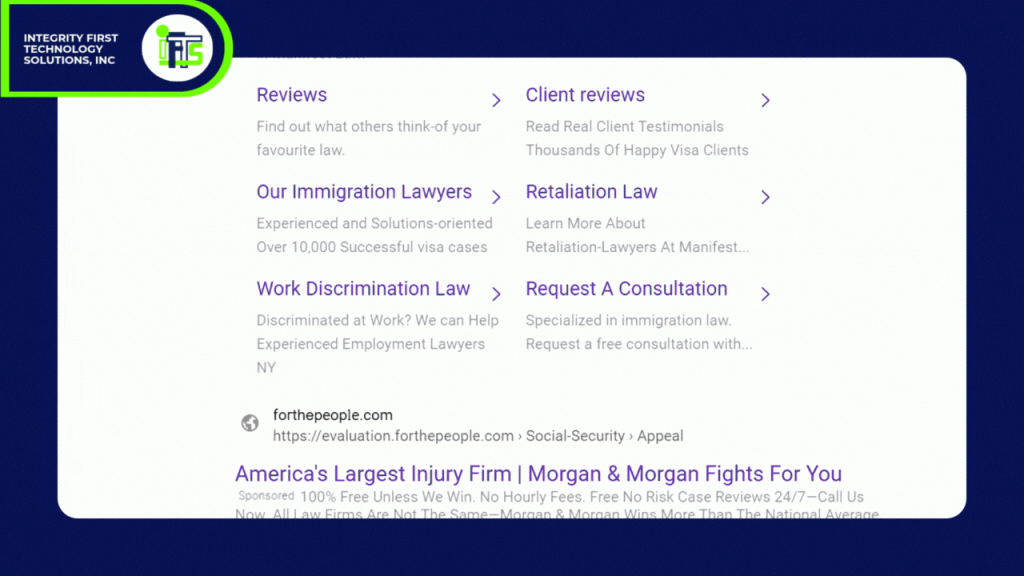
  • SEO Result (Old World): 

Someone types “estate planning lawyer near me.” 

They see 10–15 law firm websites, read a few, and maybe fill out a form.
  • AEO Result (New World): 

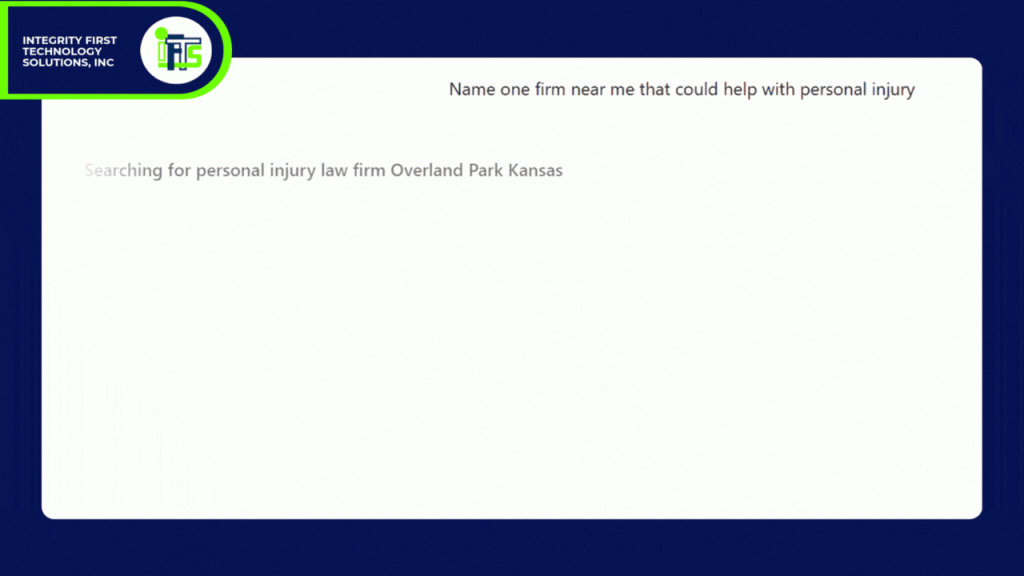
Someone asks ChatGPT, “Who’s the best estate planning lawyer near me for a large estate?” 

Siri pulls one name or two, backed by online citations and trust signals.

Which firm gets the client?

The one that has embraced AEO!
How Law Firms Can Prepare for AEO and AI

So, what should you do right now to adapt? Here are three practical steps:

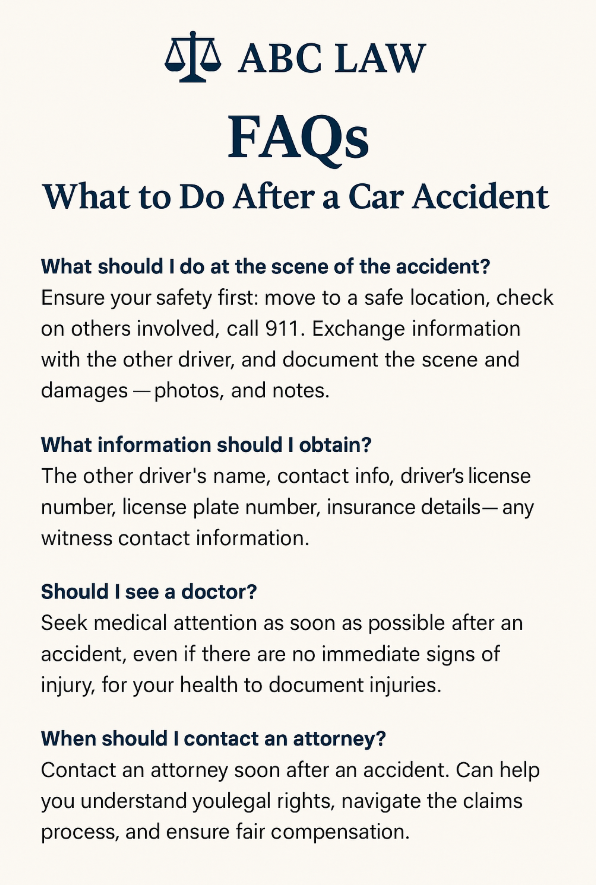
  1. Rework Your FAQ Pages
    • AI loves clear Q&A formats.
    • Example: Instead of a 1,000-word article on “What to do after a car accident,” break it down into direct Q&A sections
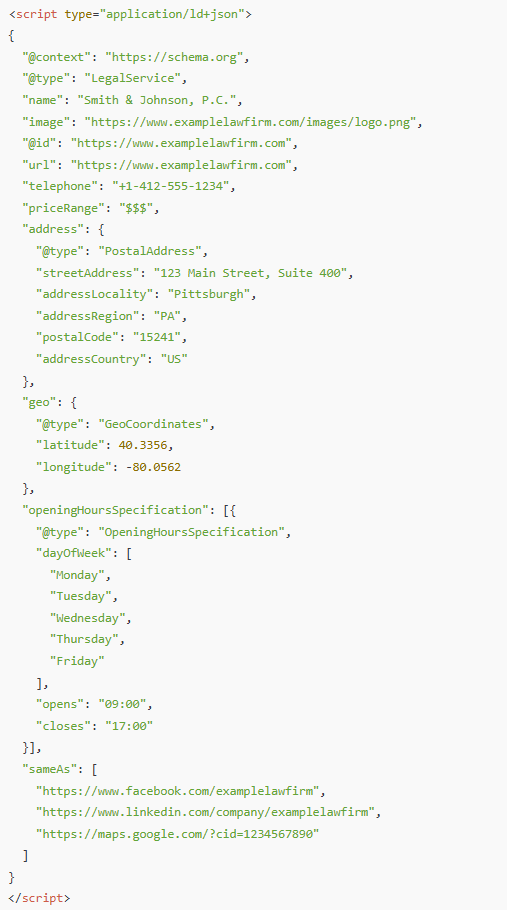
  •  2. Add Schema Markup (Structured Data)
    • Schema tells AI engines who you are, what services you offer, and why you’re credible.
    • Use “Attorney,” “FAQ,” and “Local Business” schema types.
    • Check out our sample schema below

You’d place this inside the <head> of your site or via a schema plugin

  1. Focus on Authority & Recency

    • Update blogs regularly.
    • Showcase reviews, testimonials, and case results (where ethically appropriate).
    • Keep your content fresh so AI sees you as relevant.

Why Ignoring AEO Could Cost You Clients

Imagine your competitor embraces AEO, and you don’t.

Clients in your market start asking AI questions like:

  • “Who’s the top workers’ comp attorney near me?”
  • “How much does a custody lawyer cost?”
  • “What’s the statute of limitations for medical malpractice in Ohio?”

If AI doesn’t pick you as the answer, your firm will never even be considered.

That’s the danger.

It’s not about being one of many anymore—it’s about being the only answer.

Related Resource: The Law Firm Client Magnet Method

Want to take your marketing further? Download The Law Firm Client Magnet Method — a step-by-step guide to using AI + video to attract more cases automatically, even if you don’t have a large marketing team. With this book, you’ll learn:

  • How to turn simple videos into trust-building machines
  • How to repurpose one video into 20+ formats using AI
  • How to automate follow-up so you convert more leads into clients

Download the Book & Get Bonus Tools →

So, Be the Answer They’re Looking For

The shift from SEO to AEO is not coming—it’s already here. 

Answer engines like ChatGPT, Perplexity, Grok, and Google Gemini are transforming how clients search for lawyers.

The question is simple – Will your law firm be the answer AI recommends?

…Or will your competitor take that spot?

The good news is, you don’t need a massive budget or a 10-person marketing team. You just need the right strategy, the right structure, and the willingness to adapt.

Next Steps

This blog is the first in our AI Search for Lawyers series. 

In the next article and video, we’ll cover:  “What Is AEO and Why Should Lawyers Care?”

Don’t miss it—subscribe to our YouTube channel, bookmark our blog and stay ahead of the curve.

And if you’d like help making your firm the definitive answer in your market, reach out—we specialize in AEO strategies for law firms – https://iftsdesign.com/aeo 

The Ultimate Monthly Website Maintenance Checklist for Law Firms

When’s the last time you checked in on your law firm’s website health?

For many attorneys, the website is their firm’s first impression — a virtual office lobby where potential clients decide in seconds whether you look credible, trustworthy, and professional. 

However – if your site is slow, full of broken links, or running outdated software, it silently chips away at that reputation (and your revenue stream).

Minor issues like slow load times, outdated attorney bios, or broken intake forms can add up fast. And unlike other businesses, law firms have even more at stake: client trust, confidentiality, and compliance.

One study found that nearly 40% of people will abandon a website if it takes more than 3 seconds to load. 

For lawyers, that could mean losing a case worth $4,000–$10,000+ before the potential client even reads about your services.

That’s why consistent, proactive website maintenance is essential. It’s not just about keeping things from breaking — it’s about protecting your firm’s reputation and keeping your pipeline of new clients strong.

This monthly website maintenance checklist for law firms will help you stay ahead of problems, keep your site secure, and ensure your prospective clients have the smoothest experience possible.

Key Takeaways

  • Website maintenance directly impacts SEO, client trust, and lead generation.
  • Speed matters: a slow website signals unprofessionalism and costs you clients.
  • Security updates are non-negotiable: attorneys must safeguard sensitive data.
  • Regularly update attorney bios, case results, and practice pages to stay credible.

Monthly reviews of analytics reveal which practice areas generate the most leads.

Why Website Maintenance Matters for Law Firms

Think about how your clients choose an attorney. 

They’re searching online for someone they can trust with their case, money, and often their future. If your site is outdated, confusing, or insecure, it sends the wrong message.

  • Client Perception: An old blog post from 2019 or an attorney bio with outdated bar admissions suggests the firm is out of touch.
  • Confidentiality & Ethics: A site without proper security updates risks exposing client inquiries or intake forms. That’s an ethics and compliance risk no firm can afford.
  • Search Rankings: Google rewards well-maintained sites. Neglect leads to lower visibility, especially in competitive “near me” searches.
  • Lead Flow: Every broken form, slow-loading page, or 404 error is a lost consultation.

Think of maintenance like legal research: the details matter, and keeping things current gives you the advantage.

The Law Firm Website Maintenance Checklist (Monthly)

1. Check Your Site Speed

  • Run a test with Google PageSpeed Insights or GTmetrix.
  • Compress attorney headshots and case study PDFs to have a small file size
  • Enable lazy loading for images and video testimonials.
  • Make sure your site loads fast on mobile — most clients will look you up right after a referral.

Pro Tip: Even a 1-second delay in load time can reduce conversions by 7%. For a firm handling high-value cases, that’s thousands of dollars lost.

2. Back Up Your Site

  • Schedule automatic backups (UpdraftPlus, BlogVault, or your hosting provider).
  • Store backups securely off-site — think cloud or encrypted external drive.
  • If your firm posts blogs or videos weekly, back up at least once a week.

Losing your site data is like losing your case files — don’t risk it.

3. Perform Website Code Security Updates

  • Update your CMS (WordPress, etc.), plugins, and themes.
  • Use tools like Wordfence or Sucuri to scan for malware.
  • Check your SSL certificate to ensure your intake forms remain secure.

Law-specific reminder: Many state bar associations emphasize cybersecurity diligence. An insecure site could expose you to ethical complaints or malpractice claims.

4. Review and Remove Unused Plugins or Integrations (if your site is in WordPress)

  • Audit your installed plugins.
  • Delete inactive or outdated ones (deactivation isn’t enough).

Double-check integrations with legal CRMs like Clio, Lawmatics, or MyCase to ensure they’re secure and functioning.

5. Look for Broken Links

  • Run a scan with Screaming Frog or Ahrefs.
  • Fix broken links in blog posts, attorney bios, or practice area pages.
  • Update links to courts, statutes, or bar associations.

Broken links look sloppy to potential clients and signal neglect to search engines.

6. Review the Entire Website for Content Accuracy

  • Update attorney bios with recent bar admissions, awards, or community involvement.
  • Refresh practice area pages with current laws and procedures.
  • Remove or update old blog posts with outdated legal references.

A site with stale content undermines your authority. Clients expect you to be current — so should your website.

7. Review Your Google Stats

  • Use Google Analytics 4 (GA4) and Google Search Console (GSC).
  • Identify which practice pages get the most traffic (e.g., “Divorce Lawyer Pittsburgh” vs. “Estate Planning Lawyer Cleveland”).
  • Review bounce rates — are visitors leaving before they contact you?
  • Track conversions: form fills, calls, and chat usage.

Data shows you which areas are driving leads — and where you may need to optimize.

8. Test Your Intake Forms & Contact Paths

  • Fill out your “Schedule a Consultation” form like a client would.
  • Confirm that:

    • Emails are delivered to your intake team.

    • Auto-replies are professional and on-brand.

    • Phone numbers and “click to call” links work on mobile.

Nearly 70% of law firm websites fail at basic intake form follow-up. Don’t let yours be one of them.

9. Check for Accessibility & Professionalism

  • Review your site for ADA compliance: alt text, proper color contrast, and screen reader compatibility.
  • Proofread pages for typos or outdated language.
  • Ensure images and messaging reflect your firm’s professionalism.


Accessibility isn’t just about compliance — it’s about making your services available to every potential client.

Reviewing and Updating Your Website Checklist

Your law firm website will evolve — new attorneys join, practice areas shift, blog content grows. That means your maintenance checklist should evolve, too.

  • Quarterly: Add checks for accessibility, schema markup, and updated intake workflows.
  • Responsibility: Assign the checklist to a marketing partner or internal staff member.

Consistency ensures nothing falls through the cracks.

Want a checklist to follow for this whole process?  Download it here.

Website FAQs for Law Firms

What does website maintenance include for a law firm? 

Regular speed tests, backups, security updates, plugin audits, broken link fixes, content updates, analytics reviews, and intake form tests.


How often should law firms update their websites?

At least monthly, with backups and content updates more frequently depending on your activity.


Why is maintenance so important for lawyers?

Because potential clients judge you within seconds. A slow, outdated, or insecure site costs you leads and damages your credibility.

Get Started Today!

Website maintenance may not feel urgent, but neglecting it leads to real risks:

  • Lost clients
  • Lower search rankings
  • Security vulnerabilities
  • Damaged credibility

Just like a strong case requires regular preparation, your website requires consistent attention. With a clear checklist and routine process, you’ll stay ahead of problems and keep your law firm’s digital presence sharp, secure, and client ready.

 Don’t forget to download our free checklist for website maintenance here 

How Law Firms Can Pass Google Business Verification the First Time (Without Having an In-House Marketing Team)

Has this happened to your firm? 

You’ve submitted your law firm’s information to Google, followed the steps to create your Business Profile, and waited patiently for approval—only to be met with another rejection.

Does it sound all too familiar? 

You’re not alone. Many small and mid-sized law firms struggle to get through Google’s verification process, especially if they don’t have an in-house marketing team to handle the details…and the process just keeps getting more complicated each year.

But here’s the truth that no one likes to hear: Google’s verification system isn’t random – It’s designed to weed out fake listings and ensure only legitimate businesses show up in search results. 

And while that’s a good thing for consumers, it can be frustrating when you know your firm is real—but still get denied.

Want to hear the good news? 

You can absolutely get verified, and we are going to show you how.

After helping tons of businesses navigate this exact issue, we’ve identified the three most important things Google looks for—and how you can easily provide them, without needing a marketing degree (or a visit to a psychic).

Let’s break down exactly how to pass Google’s verification on your first (or next) try—and finally start showing up where your future clients are searching.

Why Does Google Verification Matter for Law Firms?

If you’re running a small or mid-sized law firm, especially one without a marketing department, Google Business verification might seem like a minor administrative task. But in reality, it’s the gatekeeper to one of your most powerful local marketing tools.

Once your firm is verified, it becomes eligible to appear in Google Maps and the coveted “local pack” of search results—that set of three to five firms that shows up when someone searches for phrases like “family lawyer near me” or “estate planning attorney in [your city].” 

Without verification, your firm won’t appear there, no matter how great your website or reviews are.

For law firms, where trust and proximity matter, being seen in local search is critical. Clients often look for someone nearby, and they trust Google to recommend reputable professionals. If your profile isn’t verified, you’re effectively invisible to those potential clients.

Verification also signals credibility—not just to Google, but to the people searching for legal help. A verified business is seen as legitimate, established, and worth considering.

The problem? Many law firms operate out of shared office spaces, coworking setups, or less traditional environments, which can trigger red flags in Google’s system. That’s why understanding exactly what Google is looking for—and how to show it—is key to getting through the process successfully.

Up next: the first (and most overlooked) requirement that trips up law firms—signage.

Verification Pillar 1 – Signage: The Non-Negotiable

If there’s one thing Google will not compromise on, it’s this: your law firm must have visible, permanent signage at the location listed on your Google Business Profile.

Yes, even if you’re in a shared office, coworking space, or executive suite.

Google uses signage as physical proof that your business exists and operates at the listed address. Without it, you’ll likely be stuck in a loop of rejections—even if everything else checks out.

What Counts as Acceptable Signage For Google Verification?

  • A door sign with your firm’s full name
  • A plaque or panel on a directory inside the building
  • A mounted sign near your office entrance
  • A vinyl sticker on a glass door or window (if it looks permanent and professional)
  • You can even use an Etsy retailer to create a sign for you

Most importantly, the business name must match exactly what’s listed on your Google Business Profile. If your GBP says “Anderson & Wells Legal Group, LLC” but your door sign just says “Anderson & Wells,” that inconsistency could get you flagged.

For Firms in Shared or Virtual Spaces:

  • If you’re using a shared office suite, make sure your firm’s name is listed on the suite directory or signage board.
  • If you’re in a coworking space like Regus or WeWork, see if you can get your firm’s name on a door placard or even a branded nameplate at reception.
  • Virtual offices are generally not allowed unless you have exclusive access to the space and permanent signage.

The Good News:

You don’t need a $1,000 custom sign. A $75–$150 professionally printed plaque or door decal from a local sign shop or online printer like Vistaprint is usually enough—as long as it looks permanent and is clearly visible in person or on video.

Google’s goal is simple: to prevent fake listings and ensure customers can find your business in the real world. With signage in place, you’re one-third of the way to verification.

Verification Pillar 2 – Matching Legal Documentation

Even with perfect signage, Google still wants to verify that your firm is legally established and operating at the location you’ve provided. That’s where documentation comes in—and it’s where many law firms slip up.

What Documents Should You Have Ready To Verify Your Firm? [h3]

At minimum, Google typically wants to see:

  • Company formation documents or a DBA (Doing Business As) certificate

  • Proof of address, such as:

    • A utility bill in your firm’s name (internet, gas, electric)
    • A signed lease or sublease agreement listing your firm as the tenant
    • A business bank statement with the correct address

The name and address on these documents must match your Google Business Profile exactly.

Here Is Where Most Law Firms Get Tripped Up:

Let’s say your Google profile says:
“Smith & Blackwell LLP, 123 Main Street, Suite 400, Pittsburgh, PA”

That means your documentation needs to say:
“Smith & Blackwell LLP” (not just “Smith & Blackwell”)
“123 Main Street, Suite 400” (not “123 Main St., Ste. 400” or “123 Main Street #400”)

Google can and will reject listings for tiny differences in spelling, abbreviations, or punctuation.

Tips to Make Sure Everything Matches:

  • When updating your GBP, copy/paste the address from your business documents to avoid discrepancies.
  • Double-check for suite numbers, commas, abbreviations like “St.” vs “Street,” etc.
  • If your business recently moved, make sure you’ve updated your address everywhere—bank accounts, utilities, lease agreements—before attempting verification.
  • If your firm is listed under your personal name in utilities or banking, update it to your law firm’s name where possible. Google wants to see business-to-business alignment.

Bonus Tip:

If you’re missing any of the stronger documents above, here is how you can add some extra credibility: 

  • Branded invoices
  • Letterhead
  • Legal correspondence that include your firm’s name and address

This documentation is Google’s way of cross-referencing your online presence with real-world operations. It’s not about bureaucracy—it’s about building trust.

Verification Pillar 3 – Video Verification Walk-Through

Once your signage and documentation are in order, there’s one final hurdle—video verification. This step is Google’s way of virtually “walking through” your office to confirm everything lines up.

For law firms, this is often the most intimidating step—especially if you’re operating without a marketing team. But with a little preparation, it’s completely manageable.

What Happens During Video Verification?

Google may prompt you to either:

  • Record a video and upload it, or
  • Join a live video call with a Google representative

In both cases, they’ll want you to walk through your office and show specific items that prove you’re a legitimate, operational business at the listed location.

What to Show in Your Video:

  • Your signage – Start outside or at your suite door to clearly show your firm’s name on a sign or directory
  • Reception or entry area – Even if it’s modest, show desks, chairs, or any welcoming space
  • Workspaces – Computers, desks, phones, bookshelves, or any area where legal work happens
  • Industry-specific materials – Law books, filing cabinets, client files (blurred if necessary), or your legal diplomas on the wall
  • Branded items – Business cards, letterhead, firm-branded mugs, brochures, etc.
  • Legal software or systems – A quick glimpse at your practice management dashboard, if appropriate

Pro Tips for Law Firms:

  • Clean and organize your space before the video. Clutter looks unprofessional.
  • Check lighting – Make sure the area is well-lit so all signage and materials are visible.
  • Have your documents ready – In some cases, they may ask to see your lease or utility bill in the video.
  • Practice once before recording – Do a dry run to make sure your walkthrough is smooth and that you have everything that you need.

This process may seem tedious, but contrary to popular opinion, Google isn’t trying to trip you up—they just want to see that your firm is operating at the listed address and offering real services. A strong walkthrough is often the final key to unlocking verification.

What to Avoid – Common Mistakes That Get Law Firms Rejected

Even experienced attorneys can stumble over the little details that lead to rejection. Here are the most common pitfalls we’ve seen (and helped law firms fix):

No Visible Signage

This is the most frequent reason for rejection. A taped-up paper sign or nothing at all simply won’t pass. Google needs to see permanent, professional signage with your exact firm name.

Inconsistent Business Name or Address

Minor differences like “Main St.” vs “Main Street” or “LLP” vs nothing can result in an automatic rejection. Your Google Business Profile, legal docs, and video must all match down to the last comma.

Using a Virtual Office or PO Box

Google wants to verify real businesses operating at physical locations. If you’re using a PO box, mailbox service, or virtual office without dedicated access and signage, it will likely be flagged.

Empty or Inactive-Looking Office in Video

If your walkthrough looks like a vacant room or storage space, it won’t inspire confidence. Make sure your video shows signs of an active, working law firm.

Unfinished Google Business Profile

Even before you verify, your profile should include:

  • Correct hours of operation
  • Service areas or specialties (e.g. family law, estate planning)
  • A description of your firm
  • Photos of your office, logo, or attorneys
  • Website and phone number

Get Verified and Get Found

Google’s verification process might feel like a hassle—especially for law firms without a full-time marketing team—but it’s not just a bureaucratic hoop to jump through. It’s a necessary step to getting your firm seen by potential clients searching for legal help in your area.

With the right preparation, you can pass verification the first time:

  • Clear, permanent signage with your exact business name
  • Legally matching documentation with no inconsistencies
  • A video walk-through that shows you’re a real, operating law firm

Skip just one of these, and you may be stuck in verification limbo. Nail all three, and you’ll unlock one of the most powerful tools in local SEO—visibility in Google Maps, local pack rankings, and increased trust from searchers. 

Ready to Make Google Business Verification Easy?

At IFTS, we help law firms like yours get verified, ranked, and visible—without the tech headaches.

Download our free “Google Verification Checklist for Law Firms” to make sure you’re covered step-by-step. Or, if you want help getting this done fast, book a free strategy call and we’ll walk you through the process.

Don’t let a failed verification keep your firm hidden.  Get the visibility—and clients—you deserve.

PS – After you are verified, you will want to optimize your profile – check out this free book for a step-by-step guide