Creating Video Marketing Content with Canva: Useful Strategies for Your Small Painting Business

Creating Video Content with Canva: Useful Strategies for Your Small Painting Business, PART 1

Marketing videos can be a great way to promote your small business or house painting services. They allow you to showcase your skills and services in an engaging and visually appealing way. However, creating high-quality marketing videos can be challenging, especially if you don’t have the resources to hire a professional videographer or video editor.

What if we told you there’s an easier way to create those videos yourself?

We’re talking high-quality, friends – images and videos that will make your video look like a million bucks (even if it only cost you $12.99 a month for Canva Pro).

That’s right, you can make professional-looking videos yourself using Canva, which is a user-friendly graphic design tool that will have you making amazing videos in a matter of minutes. In the past, we’ve covered making social media posts quicker and easier using Canva, but in this blog, we’ll give you some of our most useful pointers for making marketing videos, specifically for small businesses and house painters. 

Creating marketing videos for a small business or painting company can seem daunting. But with Canva, you can create an amazing video without having to be a professional videographer.

Have a Plan For Your Marketing Videos

How Can Small Painting Businesses Use Videos to Market Their Products and Services?

Like with social media post creation, you need a plan for your video marketing. This doesn’t have to be complicated. Decide how you want to promote your services and who your audience is.

For instance, if you own a painting company, you may want to use video to showcase your team at work, customer reviews, tips and tricks, or a recent project, highlighting your attention to detail.

Here are some ways small painting businesses can use videos to market their products and services:

  • Showcasing Products

You can create videos that show your products in action, such as videos of painting techniques, before and after shots of painting projects, or your favorite paint brands.

  • Sharing Expertise

As a painting business owner, you have expertise in the field that your customers can benefit from. You can create videos that share your expertise, such as videos on how to choose the right paint color, how to paint a room like a pro, or how to prepare a surface for painting.

  • Behind-the-Scenes Videos

Behind-the-scenes videos are a great way to show your customers what goes on behind closed doors. You can create videos that show your team at work, your painting process, or a day in the life of your painting business.

  • Promoting Events

Videos can be used to promote events such as workshops, or charity events. You can create videos that showcase what your customers can expect at the event, including the painting project they will work on, the tools they will use, and the techniques they will learn.

  • Sharing Testimonials

Customer testimonials are a powerful marketing tool, and videos can be used to showcase them. You can create videos that feature satisfied customers talking about their experience with your painting business, including the quality of your work, your customer service, and your attention to detail.

These decisions will help you create an effective video that resonates with your target viewers.

Be sure you stay on brand, though. If your brand is fun and upbeat, go ahead and reflect that in your videos!

First Things First - Getting Started in Canva

Create A Canva Account

To start creating videos in Canva, follow these easy steps: 

  1. Log in to your Canva account. If you don’t have one, you can easily sign up for a free account. 
  2. Once you’re logged in, click on the “Create a design” button and select “Video” from the dropdown menu. 
  3. Once you’re in the design screen, you’ll need to upload your video footage. Canva makes this easy by allowing you to upload videos directly from your computer.

*Pro-Tip* – If you’re feeling a little camera shy, you can even access various stock footage that is specifically designed for businesses and house painters and add your own uploaded audio files as the background. 

This footage can be a great way to add an extra layer of professionalism to your video and make it stand out from the crowd!

Choose the Right Template

So, you know your brand and your audience, but you may not know how (or have the time) to create the overall style of your video from scratch.

This is where Canva Pro is worth the upgrade. With hundreds of templates for making marketing videos and other graphics, it’s easier than ever to choose the right template for your needs!

*Pro Tip* – If your brand colors are blue and green, you might want to choose a video template that already incorporates overlays and graphics with those colors or one that uses shapes that mimic the shapes used on your website.

Keeping it Simple-Streamline the Editing Process

Once you’ve uploaded your audio and/or video files and chosen a template, incorporating the style and colors of your brand, it’s time to start editing. When it comes to editing a marketing video using Canva, it can be helpful to approach the editing process in a step-by-step way.

Break down the editing process into smaller tasks and complete each task one at a time, rather than jumping back and forth between tasks. This will make it easier to stay focused and keep track of what you’ve completed and what still needs to be done so you can avoid getting bogged down in one aspect of the editing process and losing momentum.

To use a sequential editing process in Canva, here are some rules to go by:

Adjusting the Size and Scale Of Your Video

To do this, you’ll need to crop the footage first so that only the parts of the clip that are relevant to your message remain in the final product. It’s important to keep in mind that cropping a video will remove any parts of the footage that fall outside of the crop box.

Additionally, if you want to maintain the original aspect ratio of the video, you should ensure that the crop box is proportionally sized. Canva makes this easy by allowing you to select specific parts of your video and delete anything else by following these steps:

  1. After uploading your video into Canva, select the video on the timeline that now shows on the timeline bar at the bottom of the editing screen.
  2. Click on the crop icon located on the toolbar above the timeline.
  3. Use the crop handles that appear on the edges of the video to adjust the size and shape of the footage.
  4. Move the crop box over the area of the video you want to keep and adjust the size and shape as needed.
  5. Click the “Apply” button to crop the video to the selected dimensions.
  6. If you want to adjust the crop again, simply select the video and click the crop icon to reopen the cropping tool.

*Pro tip* –  Aspect Ratio requirements vary between social media platforms. Instead of cropping your video manually, with Canva’s pro feature, you can copy and resize your video to fit any format automatically. You may have to adjust your video to fit the new screen size, but it is a quick way to create videos for a variety of social media outlets. So if you know you will be posting a video on several sites, this is a helpful tool.

Add Your Logo

Continue the editing process by adding your logo to the video first, before cutting the footage. This ensures that your branding is prominently displayed throughout the video and creates a cohesive look and feel. Here’s how:

  1. Select the “Uploads” tab or the “Brand Hub” tab (See our previous article about using Canva’s Brand Kit to save all of your logos, fonts, and colors in one area for easy access in this tab)and upload or select your company logo.
  2. Drag and drop your logo onto the video timeline and adjust its size and position as necessary.
  3. You can also add other branding elements, like your company name or contact information, at this stage.
  4. Don’t forget to change out any of the pre-designed template fonts with the fonts you use on your website or with a font very similar to your other marketing documents.

Cut Your Footage

Cutting a video is an essential step in creating a marketing video using Canva, as it allows you to remove any unnecessary footage that doesn’t add value to your message. There are a couple of ways to do this, but here is the easiest way we’ve found to cut a video in Canva:

  1. Select the small thumbnail of your video in the timeline tab at the bottom of the editing screen so that it is outlined with a purple box.
  2. Play your video back in the editing screen and simply hit the “S” key on your keyboard to cut the video at a certain point. You can also hit the pause button and then hit the “S” key.
  3. Repeat the split tool process to cut your video footage into different segments, depending on how many different clips you want to include in your final marketing video.
  4. You now can simply select and delete any portions you want to remove from your final video. Remember to keep your audience in mind when selecting which portions to include and which to cut, as their engagement is key to the success of your video marketing efforts.

*Pro tip* –  If you want to have an image or one of Canva’s stock videos playing over your video, but still be able to hear the sound, simply select your video in the main editing screen. A three-dot tab will appear and when clicked on, choose the option to detach your video from the background. Then, select the checkerboard icon at the top of the screen and adjust the transparency of your video to zero.

Now that you’ve got a plan and the basics down, look for our next article, Part 2, where we will jump right into adding some flair to your videos with all of our favorite Canva creative tips to make your videos really pop!

Need more help? Contact our social media experts at IFTS, and we will get the job done for you! Give us a call today at 412-715-6266, and we’ll get you started on creating videos that will take your business to the next level.

Get the Top 3 Social Media Post Templates for Painting Companies to Grow Your Following and Get New Clients

Engage with prospects and save time with your FREE Canva template kit. This kit features the top 3 social media posts for painting companies and directions on how to brand them for your own business in 5 minutes or less.

Enter your email below and get the templates sent directly to your inbox along with an instructional video on how to make personalized edits.

Blog Post and Content Creation Tips for House Painting Companies

They say that when it comes to SEO that “Content is King”, but how exactly does that apply to house painting businesses?  

Well, you are about to find out!

Good website and blog content is a prerequisite for good online traffic, which should turn into leads.  But, how do you know what to write about?

FINDING THE RIGHT TOPIC

There are many strategies for choosing a relevant topic to write about.  We are going to cover 4 popular ones.

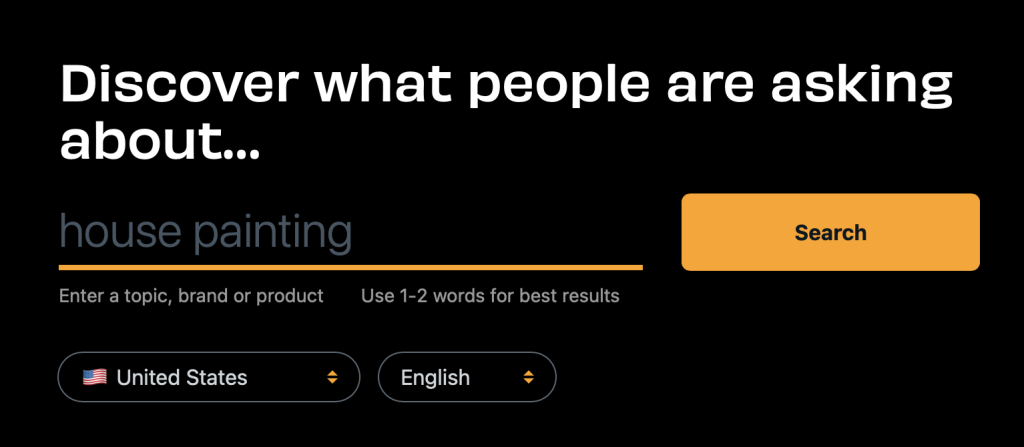
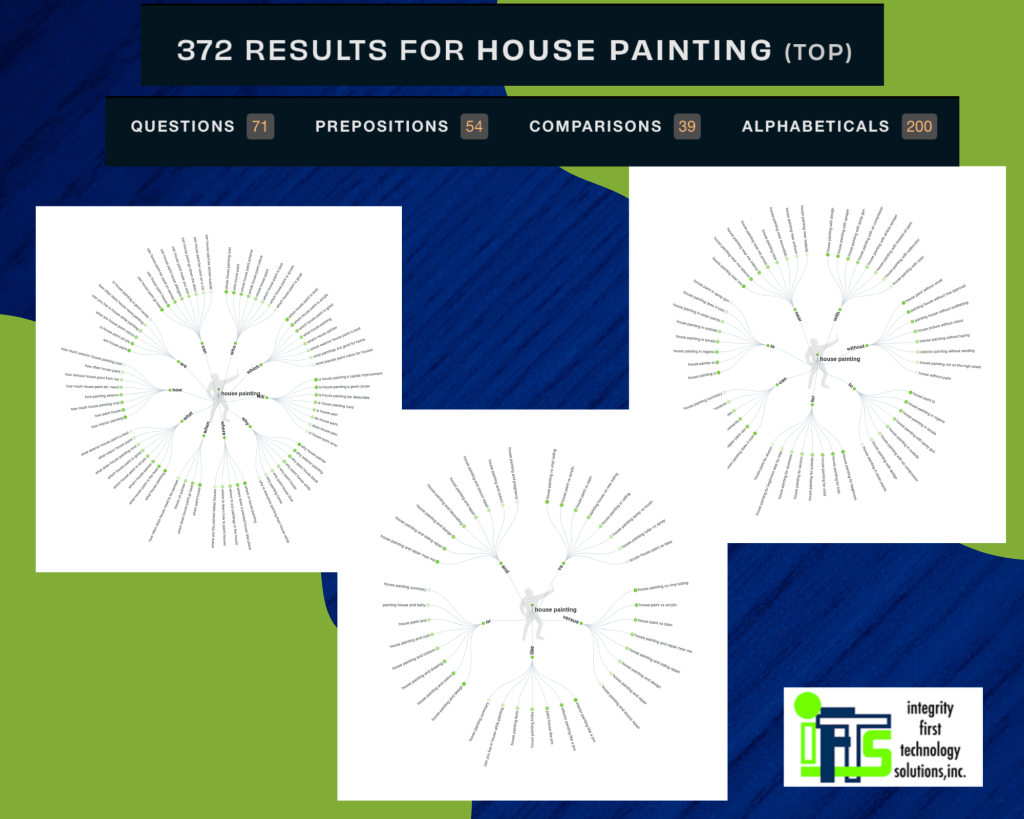
All you have to do is enter a keyword or phrase into their search box and it will return a bunch of popular ideas about your topic.

In the example below, we used “house painting” and look at all of the different subjects you could use:

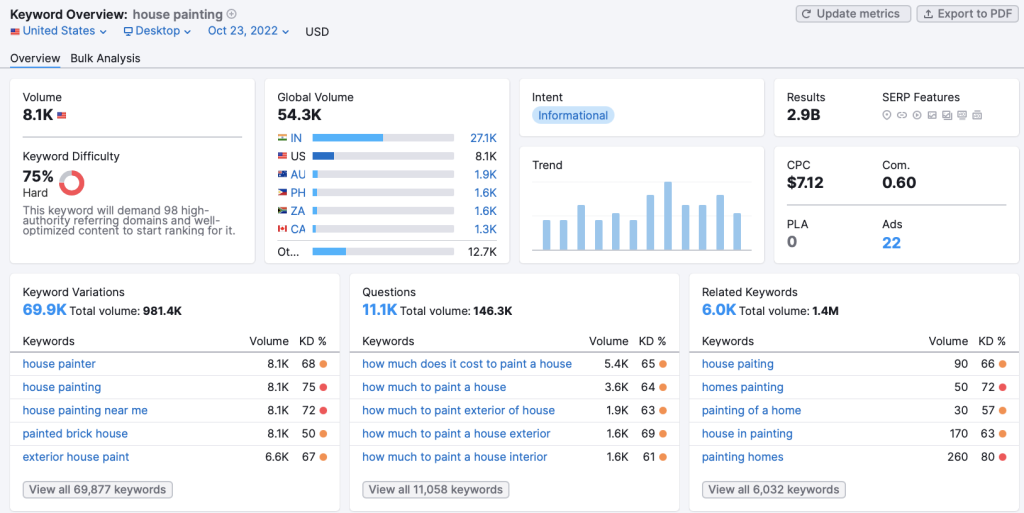
This is a tool (that has a free version) which will tell you how popular a search term is.  It will also give you common questions that people Google about your search term.  

Check out the example below.  We used the same term “house painting” and these are the free results that Semrush gives us about our topic:

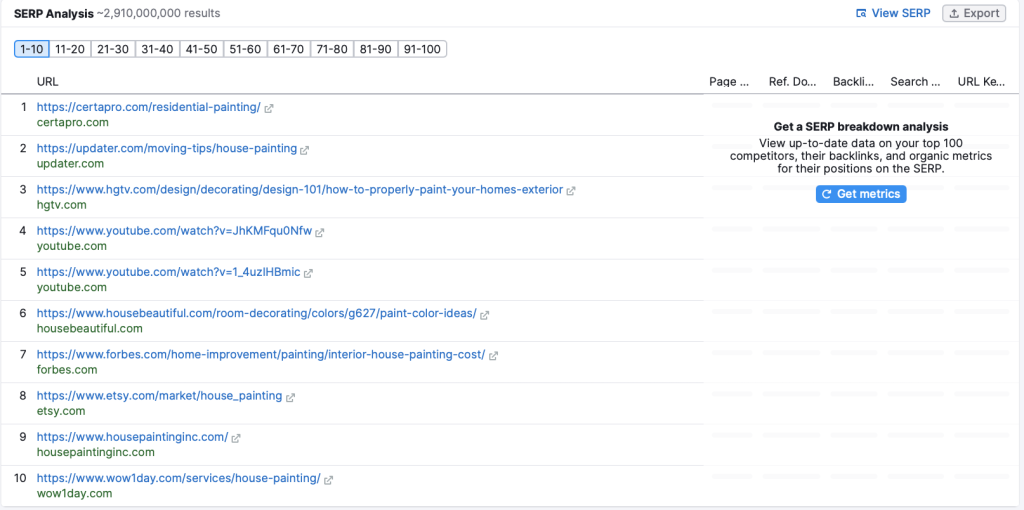
Feeling stuck or not sure what to write?  The Semrush results also include the top 10 pages that rank for your keyword.  Open them up and do a little “spying” on your competition to see what they are writing about.

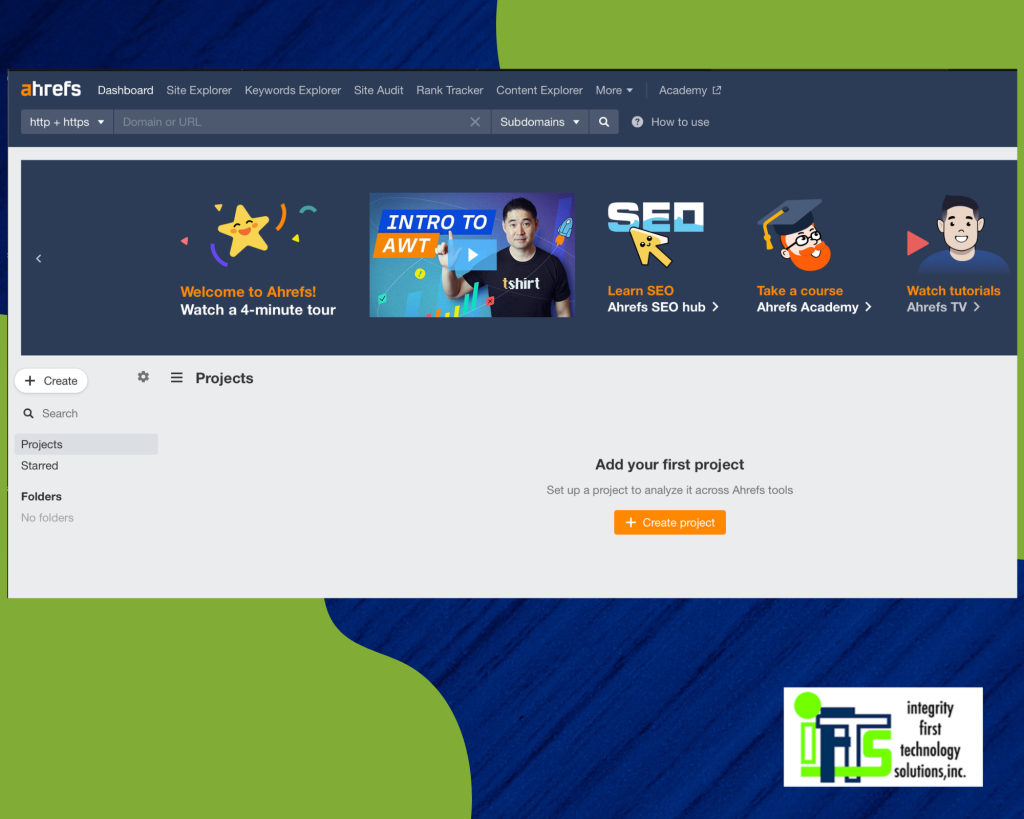
Ahrefs is a tool that is very similar to Semrush.  You can find the popularity of a keyword, relevant questions that are on topic, competitor links and more.

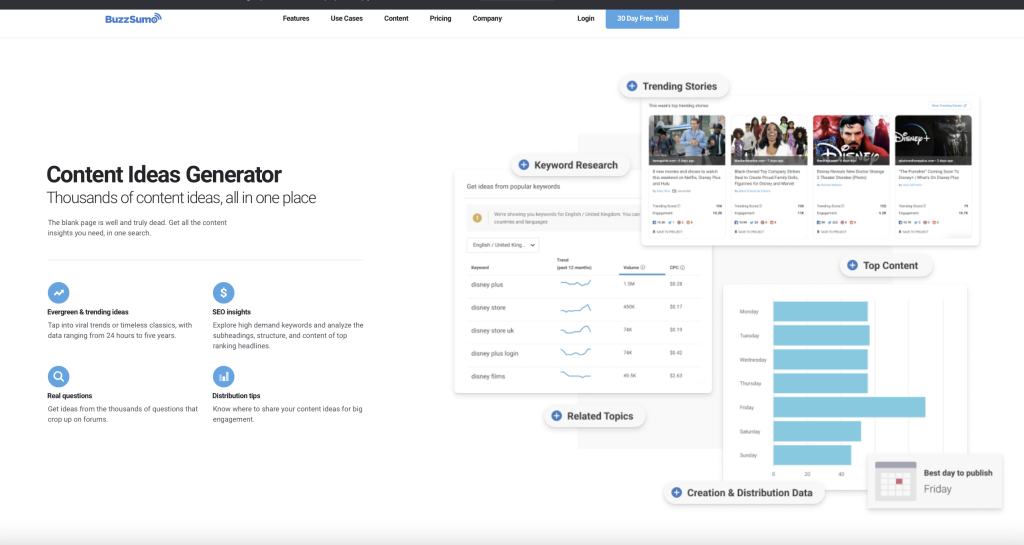
Strategy 4 for finding a topic - BuzzSumo’s “evergreen score”

Buzzsumo’s evergreen score can show you popularity trends of a subject.  You can see if the content is long lasting or if it was short lived.  You may be able to grab some ideas from the longer lasting posts.

Once you have a topic chosen, you’ll need to decide how to present your information. 

FINDING THE RIGHT BLOG TEMPLATE

There are many common blog templates that you can use.

Blog Template 1 - Expanded List Post

The list posts template consists of a compiled set of tips/tricks that readers can implement in a variety of settings.  The only difference between a standard list post and an expanded list post is the adding of further information for each item on your list.

Here’s an example: Power Washing Tips & FAQ

Blog Template 2 - Case Study From Your Business

Your Case Study Post offers a solution to a challenge that the audience you are trying to reach frequently encounters. By showing that you can fix this problem, you are quickly regarded as a knowledgeable authority on the subject. There is just one caveat to this. You have to demonstrate that your solution is effective.

Here’s an example: Stain or Paint A Deck: Best Practices

Blog Template 3 - Tools We Use

This provides a rundown of several resources that can be utilized in a particular field. It is not restricted to tools; rather, it can be a strategy, a practice, or even a life hack in addition to a tool. As long as the list provides value to your user, you have latitude in what all in can encapsulate.

Here’s an example: Painting over and/or removing wallpaper: 3 Rules, 6 Steps

Blog Template 4 - The Ultimate Guide

It’s like having all of the answers for your reader in one place. This is the bible, the ultimate manual.  The user may get all the data in one convenient location. These types of guides are often used to get backlinks to your website.

Here’s an example: Grow Your Painting Business by A Factor of 10 With These 5 Steps

Blog Template 5 - The Complete List

A complete list is comparable to an ultimate list in that you just compile all of the information—every suggestion, item, tool, technique, strategy, example, and case study—into a single article.

Here’s an example: The Complete Guide to Online Reputation for Small Businesses: How to Grow Your Business, Improve Your SEO & Get Found Online

The last thing that you need to choose is your headline.  

CREATING THE RIGHT HEADLINE

Headlines are the most important part of your content because they get people to actually click and read the blog.

Some helpful tips for writing your headline:

  • make sure that it is no longer than 18 words long
  • include your main keyword in the headline
  • make it interesting by adding [brackets] or (parentheses) around a phrase
  • use “emotional” words to invoke a response (this includes things that will make the reader happy, sad, angry etc.)

Now that you have chosen your headline, topic, and template, it’s time to start writing that blog for your painting business!

Let’s start at the beginning, it’s a very good place to start (or so says Julie Andrews in the Sound of Music).

Your introduction should be short, catchy and to the point.  Common ways to pull people in are:

  • ask a question
  • make a statement contrary to popular belief
  • state a fact with a weird number in it

You’ll want to keep your introduction around 4-7 sentences.  Pull in the reader and tell them what they are going to learn.  To see an example of this, look no further than the beginning of this article.

It starts with a question to draw you in and then tells you about what you are going to be reading about.

After your introduction, you will transition into the meat of your blog and cover your topic in depth.  Most articles that rank well on Google have at least 1000 words and are formatted for SEO.  For more on SEO, check out this IFTS article.

While you are writing, remember to keep these tips in mind:

  • use short paragraphs because people typically skim, so it’s best for your content not to appear as a wall of text
  • use section sub headers to divide the information into digestible chunks that are easier to read
  • use the active voice when writing (here’s a little info to help you remember active vs passive voice from middle school…don’t worry, I had to look it up too)
  • use a font about 14 pts so the text is easy to read on all devices
  • people are visual creatures, so any time you can include a picture, chart, infographic, screenshot, video – the better

The final paragraph will be your conclusion, which is your second most important section next to the introduction.  The intro gets people to read, the conclusion gets people to stay on your site or buy your service.

A good strategy for writing the conclusion is called TAC.

T – Transition

A – Ask

C – Call to Action

The TRANSITION to the conclusion is how you want to end your blog information.  Then, you’ll want to ASK your readers a question, normally about a problem that you can solve.  It’s best if the problem relates to what the main blog text is about.  Finally, you’ll want a CALL TO ACTION, where you tell them to get in touch about the problem. To see an example of this, check out the ending of this blog.

A really easy way for house painting businesses to create content is with the “Case Study” template.  Use before and after pictures/videos from a job that you recently worked on.  Talk about the issues that the owners were having and how you solved it with your services, using your visuals as proof.

A case study really lends itself to being local SEO-friendly because your keyword phrase would be “house painting in [location]” or “Cabinet Painting in [Location]”.

FINDING THE RIGHT HELP

If this sounds like something you would be interested in having someone else do, let us know!  IFTS specializes in helping house painters create quality SEO-friendly content for their websites to get more leads.  Call 412-715-6266 or send an email to si@iftsdesign.com to get started.

Get the Top 3 Social Media Post Templates for Painting Companies to Grow Your Following and Get New Clients

Engage with prospects and save time with your FREE Canva template kit. This kit features the top 3 social media posts for painting companies and directions on how to brand them for your own business in 5 minutes or less.

Enter your email below and get the templates sent directly to your inbox along with an instructional video on how to make personalized edits.

10 Of Our Favorite Marketing Hacks For House Painting Companies In 2022

Would you like to know about our 10 favorite super sneaky marketing hacks that you can implement today?

We use these marketing secrets to help our painter clients rank their website #1 for their favorite keywords, get more organic traffic and ultimately, get more leads to grow their business.

In this article, we are going to cover ten actionable strategies that you can use RIGHT NOW.

The best part?

You don’t have to be super tech savvy or Elon Musk to get them implemented.

Let’s start this section with our favorite Google Business Profile hacks.

Hack #1 - Social Proof Will Get You More Leads

The best two platforms to get reviews on are:

  • Google
  • Meta (Formerly Facebook)

Google reviews are the best type of reviews that you can receive because not only do they talk you up and show people how great you are, they also help your website with its SEO.  As an added bonus, once you have 100 reviews, your star rating will be shown when you run Google ads.

Meta reviews are great to have as well because of the platform’s popularity in a house painting company’s target market.  Most house painters that we work with have a target audience of women that are between the ages of 35 to 64.  Consequently, that is the majority of Meta users.  By using this platform, you are more likely to get in front of your ideal client than any other social media option.

If you can get a video testimonial from a client, that can go a long way as well.  A lot of people get stuck on the logistics of creating the video, but it shouldn’t be that hard.  You can interview them via Zoom and record that call or just have them use their phone to record a quick video. 

The more authentic the video looks, the better.  This is for two reasons.  One – if the video is over-produced, it will seem scripted and less credible.  Two – if people see that someone took time out of their day to create a quick video for you, it shows that they really liked you and your work.

Once you have these videos, be sure to put them everywhere a potential audience may look.  This could include:

  • YouTube
  • Your website
  • Social Media
  • Your Google Business Profile
  • and more!

Reviews are a great way to show how great you are without you ever having to say a word.

Want some help getting more reviews?  Check out our article on implementing a review system.


Hack #2 - Get Your Listing On Google Maps

Getting your business listed in the Google Maps results is based on many factors.  A few big ones are:

  • how close the searcher is to your business location 
  • your review ranking and volume (which we discussed above in Hack #1)
  • profile completeness
  • local signals

To start, make sure that your profile is completely filled out with correct information.  Your name in the Google Business Profile should match exactly the name on your website.  This goes for your address, website, and phone number as well.  Then, be sure that your business categories and services are filled in completely.  

The final part of your profile that should be completed is the “Photos” section. Be sure to add as many photos as you can as this is a feature that not many painters take advantage of.

For a complete walkthrough of filling out a Google Business Profile, check out our article here: https://blog.iftsdesign.com/introducing-google-my-business/

“Local Signals” are another big factor for showing up early on Google Maps.  These are website links to your website from other local businesses or services.  A few examples of this would be:

  • a back link from the local chamber of commerce
  • a back link from a local scholarship that you sponsored
  • a mention or link to your business from a local paper

Anything that you can do to get your business associated with your area is a great “local signal” to Google.

Hack #3 - Ask and Answer Questions Via Your Profile

An easy way to get keywords and locations associated with your Google Business Profile is through the question and answer section.

Previously, you were not able to add questions to your profile yourself,  You had to wait for someone to ask and then you could answer them.  This has now changed.

The Q&A section of your Google Business Profile is a great way to show all of your most frequently asked questions up front to prospective customers.

Write down the 10 questions that you receive all of the time from prospects and then answer them in 3-5 sentences.  While you are answering them, be sure to use common keywords/phrases as well as locations that you want associated with your house painting business.

Once you have accomplished this task, copy and paste them to your Google Business Profile.

Now, we’ll move to our favorite Paid Ad Hacks.

Hack #4 - Solve Your Prospects’ Small Problems For Free In an Ad

What are the questions you most commonly get asked? If you’ve already implemented Hack #3 from this article, you should have this list already.

Side Note – Need some inspiration?  Check out https://answerthepublic.com/ or https://neilpatel.com/ubersuggest/ for commonly asked or searched questions in your field.

Make videos answering these questions and position yourself as the expert in your area.  Again, just like the testimonials, the videos do not have to be fancy or highly edited.  They should be authentic and can be filmed with your cell phone.  Some painters will even film on the job site.

Sample Common House Painter Questions To Get You Started:

How often should I paint the exterior of my house in this area?

  • What is the best time of the year to stain a deck?
  • How many coats of paint should be used on the exterior of your house?
  • How many coats of paint should be used on the interior of your house?
  • What does it mean for a painting company to be bonded and insured?
  • Should I paint my kitchen cabinets or should I replace them?

Once you have your videos, post them to your social media, YouTube channel and on your website.

You should also run them as Meta ads to your local audience.  You don’t have to spend a lot of money, just one to five dollars per day.  This helps you get in front of a fairly large group of people in a small amount of time.

These videos will help you create an audience that already knows/likes/trusts you when it comes to painting topics.  When they have a painting project come up, you will be the one that they know they can trust.

Hack #5 - Make Your Ad Stand Out

When creating your video, you want to be sure to stand out amongst the crowded marketplace.

The first way to do this is to use contrasting colors to the platform that you are running the ad on.  If you are going to run the ad on Meta (Facebook), we recommend having a red or yellow bar at the top of the video because it helps you stand out from the Meta blue color scheme.  An easy way to do some small edits to your video is through Canva.  

Don’t want to take the time to do any edits to the video?  Try wearing a brightly colored red or yellow shirt.

The second way to stand out is to immediately call out your audience or target market.  So, if you were advertising kitchen cabinet painting to the residents of Dallas, you could start your video with the sentence: 

“Are you living in the Dallas area and thinking about redoing your kitchen?”

Or, you could do some video editing and add that sentence as text to the beginning of the video.

A final way to stand out is to start your video with a big action or a memorable prop at the beginning.  You want to grab someone’s attention – movement or something unexpected will typically draw the eye.

A few big actions you could try:

  • come in through a door
  • big wave and a smile
  • use a paint sprayer or other tool of the trade
  • jump into the frame

A few memorable props you could try:

  • Comically large-sized paintbrush
  • Wall of stacked of paint cans
  • stand halfway up a ladder

The important thing to remember is you want to get their attention within the first 3 seconds of the video and keep them watching.  These tactics all use “pattern interrupt”.  This basically means – do something to get a person to stop scrolling through their feed and watch your video/read your ad.

Hack #6 - Use Retargeting Ads In Multiple Ways

The average consumer is only prepared to make a purchase about 3% of the time. 

So, how do you attract the other 97% of people?

Retargeting Ads

Retargeting allows you to stay in front of someone that is interested in your services until they are ready to make a purchasing decision.  If you are advertising on Meta (Facebook), you can do this in 2 ways:

  • Meta Pixel
  • Video Viewers

The Meta Pixel is a small piece of code that you install on your website.  It then tracks who has visited the site and allows you to show them ads on Meta.  

One caveat – The usefulness of the Pixel has diminished over time as Apple now requires users to opt in to being tracked.  Only about 10% of people opt in (not surprising).  Advertisers now have a much harder time reaching Apple users via this method.

The other way you can retarget someone is through their video views.  Meta tracks who watches your videos and for how long.  So, you can advertise to people that have watched at least a certain percentage of a video.  

We recommend retargeting people who have watched at least 25% – 50% of a video.

Sample Retargeting Strategy For House Painters

A good video strategy for painters is to run 3-5 FAQ ads to women 35-64 in your local area.  Then, retarget the women who have watched at least 25% of one of the videos with an ad that has a special offer or a more direct call to action.

Finally, let’s cover our favorite psychological marketing tricks.

Hack #7 - Get an Awesome Business Card With Your Picture

One strategy that isn’t commonly used by painters is to get a really nice business card with your picture on it.

Why use your picture?

First of all, people want to do business with people, not a faceless business.  Secondly, it will help them remember who you are.

Now, how nice is nice, you may ask…

Stand out from the crowd of people that are handing out the white, one sided business cards that they ordered by the thousands from VistaPrint for under $50 and get a card that is plastic, like a credit card.  Check out plasticprinters.com for decent pricing.

Not only that, make the card graphically pleasing and “cool looking” by having it designed professionally.  Look on fiverr.com for a great deal on the design aspect.

Because the card is so nice, people feel bad about throwing it away.  So, you’ve got a tangible remarketing tool that they will keep, unlike other painting companies.  This will set you apart from the cheap lookalike cards that are thrown away easily.

[On an aside] We do recommend having 2 sets of cards created.  One set should be plastic and lux for giving away to potential customers.  The other set can be on paper.  These paper ones should be given away to people that may not necessarily hire you, but you may use as a contact or meet at a networking event.

Hack #8 - Make Your Voicemail Work For You

Your clients should never reach your voicemail.  Preferably, you’d have a call center in place to make sure that they never had to talk to a machine.

However, if the perfect set of circumstances happen and they do manage to reach your voicemail, there is one phrase you should add to the end of the message:

Add “I will call you in the next 15 minutes”

When people hear this, they will be much more likely to leave a message because they have that expectation of receiving a call back soon.  Even if you aren’t able to call back in that amount of time, you still get a chance at that lead.

Hack #9 - Give a Compliment At the Beginning

People want to be liked and this plays into that psychology.

Before you start an estimate, give a compliment to the prospect.  It could be about the house, the neighborhood, a family picture, furniture, their pet etc.  People like people who like them.  People also HIRE people who they like.

Most of the time, people don’t remember what you say, but they do remember how you make them feel.  This applies to most human interaction.  So, if you make them feel good about themselves at the beginning, the feeling should carry through the whole experience.  

By making a prospect feel good about themselves, it puts you in a better position for you to get their business.

Hack #10 - Go Get Started

Getting started is half the battle.  Choose one thing from this list that you want to accomplish in the next 24 hours and GO DO IT!  You’ll be ahead of 95% of your competition.

Want Some Help?

Is there something on this list that you would like to implement, but aren’t quite sure how or don’t have the time to do?

This is where IFTS comes in.  We have been working with house painters (and other businesses) for over 5 years on all aspects of their marketing.  Give us a call at 412-715-6266 or send us an email (si@iftsdesign.com).  We’d love to help you grow your painting company.

Get the Top 3 Social Media Post Templates for Painting Companies to Grow Your Following and Get New Clients

Engage with prospects and save time with your FREE Canva template kit. This kit features the top 3 social media posts for painting companies and directions on how to brand them for your own business in 5 minutes or less.

Enter your email below and get the templates sent directly to your inbox along with an instructional video on how to make personalized edits.