

Are You Prepared For the Apple 14.3 iOS Update – How To Avoid Losing All of Your Retargeting Traffic

Are you prepared for the Apple iOS update that could drastically affect any Facebook advertising you may be doing?

Late last year, Apple announced that they would be implementing new privacy updates to iOS 14.3. One new feature is that users will now be able to see how each app uses their data.  The most significant change is that Apple will now require people to opt-in to having their data tracked…instead of requiring them to opt-out, which had been the standard.

The message that will pop-up is below:
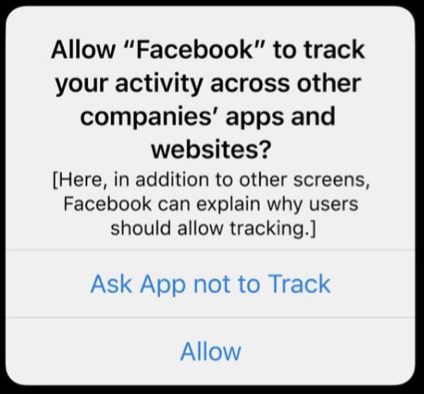
Facebook has been trying to fight Apple on this by stating that it will hurt small businesses.  They took out newspaper ads, ran Facebook ads against it, and explored other options, but the rollout has already started.  In fact, some people started receiving this pop-up in late December 2020.

What Happens When People Opt Out Of Being Tracked?

What does opting out mean for your Facebook ads?

You will not be able to track online conversions from users on mobile devices like you used to, and your retargeting audiences will change or will be missing iOS users.

One positive thing to note – when people interact with your ads in the Facebook app, that behavior is still able to be tracked.  So, you can still see the stats for your videos, reactions, comments etc.

However, once a person clicks on an ad and is taken to another site, the Facebook Pixel will not be able to identify that person.  This means that you can’t track if they convert and you cannot retarget them.

What Happens When People Opt In To Being Tracked?

Currently, Facebook is estimating that about 10 – 15 percent of people will opt-in to being tracked.  

If a person has opted-in to being tracked, there are some changes to that ability as well according to Facebook:

  • You will only be able to track conversions that happen within 7 days after clicking your ad (instead of the standard 28 days)
  • All tracking and statistics may be delayed up to 3 days
  • Personalized ads on audience networks will be very difficult to serve and this functionality may be discontinued

Here is a quick summary of what this means for your Facebook Ads:

  1. You will no longer be able to retarget iOS website visitors
  2. You will not be able to exclude your current customers from seeing your ads using the “Audiences” feature
  3. Your conversion tracking numbers will no longer be accurate

The question on everyone’s mind is “What can we do to limit the impact of this change?”

How To Tell If This Change Will Affect Your Facebook Campaigns

If you want to see how this change will affect you, you can see how many people are clicking on your ad or viewing your video broken down by device.  Facebook has a view setting for you to check out.

Open your ads manager and click on “Breakdown” > “By Delivery” > “Impression Device”.  This view will show you the results of your campaign, broken down by device.  

In the example below, you can see that iPhones and iPads account for 50% of our video thruplays.
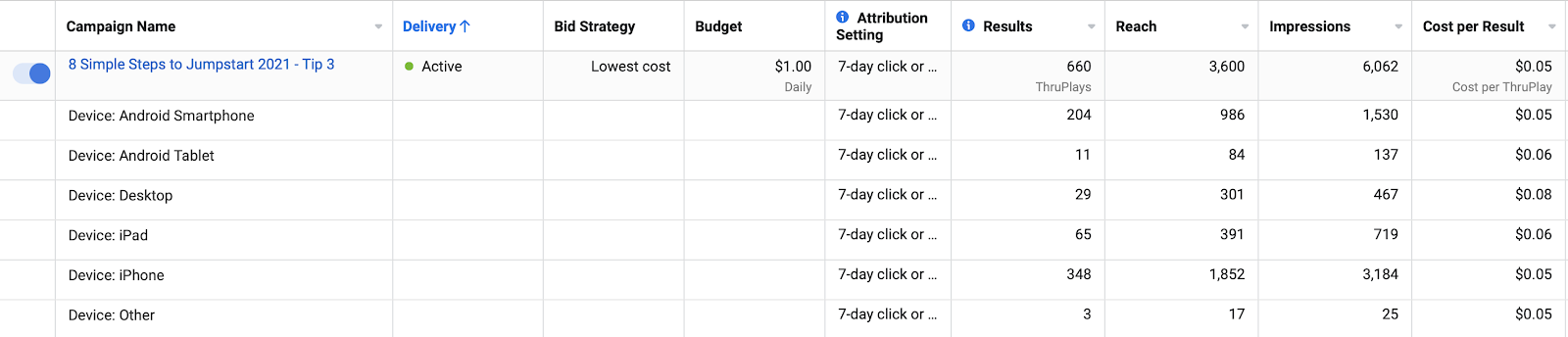
If your campaigns are targeting a large percentage of iOS users and you use retargeting, you’ll definitely need to take mitigating steps to account for this update.

How To Mitigate The Damage To Your Facebook Ads Caused By The iOS 14.3 Change

Facebook has outlined 2 quick steps to take right away to manage these changes.

Step 1 – Verify Your Domain Through Facebook

In order to track ANYTHING on your website with the Facebook Pixel, you need to go through the verification process.  This will require access to your DNS records.

Open your Facebook Manager and go to “Business Settings”.  Select the “Domains” option inside of “Brand Safety” on the menu, then click the blue “Add” button.

Enter your domain name and follow the instructions to verify your domain through adding a TXT entry to your DNS records.

Step 2 – Make Sure You Only Use 8 Tracking Events Going Forward

A tracking event on Facebook allows you to track the actions that people take on your site.  For instance, you can keep tabs on how many people purchase a specific product.

Some examples of tracking events are:

  • PageViews
  • Leads
  • Purchases

And more.

To see how many events you are currently tracking, go to your “Events Manager” inside your Facebook Manager.  

If you have 8 or less, you are fine to keep your tracking strategy the same.  If you have 9 or more, you will need to choose the 8 that are the most important to you.  Make sure that you have them in priority order.

How to Overcome the Main Issues That Result From Limited Tracking From the Facebook App

What are the alternative ways to create retargeting audiences?

  • Collect email addresses first in your funnel.  Then, use these email addresses to create a custom audience in Facebook by uploading a csv file.
  • Create a retargeting audience by using an informational video that would be very helpful to your target audience as an ad.  Then, retarget the people that watched more than 50% of the video.
  • Set up custom conversions through the Facebook API to allow you to collect the numbers that you need.  There may be a manual step within this process, but it will allow you to collect the information to make informed decisions about your advertising budget.

In conclusion, iOS 14.3 has started to go live and will affect your Facebook retargeting efforts if you don’t take any action at all.  Tracking your visitors and your conversions will not be an option from anyone using an Apple mobile device.

Be sure to verify your domain name and check if you are below 8 tracking events.  Then, start implementing alternative plans to create audiences of your ideal client.

Need help creating a plan to account for these changes or do you want help putting it all into action?  Give IFTS a call at 412.715.6266 or email me (si@iftdesign.com) to ask about our small business special for the iOS 14.3 change!
How To Get More Clients Using Facebook

The best social media platform by far that all small business owners should be on is Facebook. With over 2.6 billion monthly users, this social network absolutely dominates the online space. According to a study done by Pew Research Center, 74% of Facebook users visit the site every day, which is more than any other social network. Finding success with using Facebook to market your business isn’t hard, but it does take some time to figure out how to best utilize the platform to engage with your customers and drive more leads.

Running your own business can be very stressful on it’s own, but finding ways to get new clients and keep them coming in can be one of the greatest challenges. In this post, we will be sharing a few strategies that will help you get more clients through Facebook.

1. Create a Facebook page for your small business

It’s totally free to create a Facebook page for your business and it only takes a few minutes! Complete these 3 easy steps so you can begin to reel in leads and make sales!

2. What should I post on my business Facebook page?

Now that you have your page set up, what should you post about? Don’t be afraid to switch up your strategy and share different versions of written and visual content such as:

  • Tips and tricks
  • Blog posts you have written or from other relevant websites
  • Engage with other facebook pages and share their posts
  • Ask questions to engage in conversation
  • Share photos or videos that your audience would benefit from
  • People love to see what happens behind the scenes! Show them “a day in the life” or what it looks like when packing orders if that suits your business!

3. When should I post on my Facebook page?

Timing your posts depends on your audience and when they spend their time engaging on social media sites. You can post as many times a day as you want, but make sure to be consistent with posting at least one thing every day. The best way to figure out what the best time to post for your business is to test different times with similar content. Consistency with testing is going to accurately measure results so be sure to use the same or very similar content when it comes to testing so that your results are not skewed. If you want more information on specific times to post that may work for you, check out our Best Time to Post on Social Media blog. Here, we go into more detail on experimenting with your social channels to find the perfect time to engage with your audience and how to get started on the right foot!

4. I don’t have much time to post on Facebook!

I know what you’re thinking; posting on Facebook one to three times a day can sound overwhelming.. Especially if Facebook is not the only social platform you are active on! This is where a social media management tool comes in handy to take care of posting for you. With a tool like Hootsuite or Sprout Social to name a few, you can schedule all of your posts in advance, saving you time to spend on other areas of your business. Check out our previous post where we go into detail about the top 3 social media management tools to help manage all of your pages and profiles in one place!

5. Use Facebook Ads!!

Facebook offers paid placement ads on their website and mobile apps where your content, special offers, website and posts can get in front of customers with a few clicks. What’s even better is you can target your ads to a very specific demographic. Now you may be wondering how much it costs to run facebook ads. The answer to this question depends on your budget and your goals but you can allocate as little or as much as you want per day. Although Facebook ads can reach a mass group of users, don’t put your entire marketing budget behind Facebook ads. Test with a small budget and scale up from there as you find out what works best for your business.

6. Actively participate in Facebook groups

Join facebook groups where you feel that your ideal client might be present. For example, if you are a graphic designer, you might want to join groups that include bloggers or small business owners as these are people who could benefit from your services. Now, you don’t want to come off as spammy or self promoting right off the bat, so what you can do is just be outrageously helpful when people ask questions in the group. Group members will take note of your expertise and hopefully check out your profile that should be linked to your business’s Facebook page. This technique does require some time and effort, but is one of the best ways to get leads from Facebook.

These strategies will help you to increase your engagement on facebook and generate leads that will hopefully turn into loyal customers!

Top 3 Social Media Management Tools

A strong social media presence can help your business in a multitude of ways, but keeping up with posting on multiple social platforms can be a chore. Thankfully, there are social media management tools out there to make the job easier and help you manage every one of your social profiles and pages in one place, so you can spend more time on other aspects of your business. These tools are designed to save you time and help you build an audience.

In this post we compare the top 3 social media management tools, Sprout Social, Buffer, and Hootsuite, if you need help deciding which may be the best fit for you.

What makes a good social media management tool?

Buffer, Sprout Social and Hootsuite all cater to a broad range of social networks. Facebook, Instagram, Twitter, and LinkedIn – the four most popular social channels are compatible with all 3 of these social media management tools.

People mainly turn to social media management tools for the convenience of scheduling posts which makes it extremely easy and convenient when coordinating multiple campaigns.

Given the ability to schedule and post across all of your social networks at once is going to save you a lot of time- especially when you wear many hats within a business. If the convenience of posting to all of your social accounts at once isn’t enough, you also have the ability to tag locations on Facebook and add hashtags on Instagram posts.

Top 3 social media scheduling tools

  1. Buffer

Buffer is the most straightforward tool to use for scheduling your social media posts and also allows you to measure your performance on social sites, create reports, and gain insights to grow engagement.

Buffer supports the 4 most popular social channels: Facebook, Instagram, Twitter, and LinkedIn, and Pinterest updates can be scheduled for pro users.

Buffer is great for collaboration within teams – but only if you are willing to pay for a more expensive plan.

Buffer’s free version includes one user, 3 social media accounts and 10 posts per profile. Their Pro plan is ideal for those who are just getting started. This plan is $15/month and includes one user, up to 8 social accounts and 100 scheduled posts. An option for growing brands would be the Premium package ($65/month) where you can add up to 8 social accounts, schedule 2,000 posts and have 2 users. Now, Buffer has an ideal option for larger teams coming in at $99/month that includes up to 25 social accounts, 2,000 scheduled posts and 6 users on the account.  

  1. Sprout Social

Sprout Social is a great all in one tool for managing and scheduling all of your social media accounts through one platform. 

Sprout Social stands out for its ability to handle team interaction. Several team members can collaborate on drafts and you can distribute permissions or request approval before posts are published. Sprout Social also makes it easy to assign tasks to other team members. Although Sprout Social is the best management tool for team-based social media management, you have to pay the monthly fee per user.

Sprout Social offers a free 30-day trial. After that, prices start at $99/user per month for up to 5 different social profiles. They offer additional plans that include more profiles and features.

  1. Hootsuite

Hootsuite is the best management tool for scheduling as well as analytics. With this tool, you can connect 35 social networks including the top 4 – Facebook, Instagram, Twitter, and LinkedIn. 

If you are looking to make use of the analytics feature, Hootsuite is the tool for you. Hootsuite will help you understand the results generated from your social posts to measure your performance. From there, you can generate reports to use within your organization.

Hootsuite works great for individuals as well as teams. You can assign access to team members and customize permissions for each individual user. You can even assign specific tasks to your team members (like responding to comments or incoming messages), then approve the outgoing responses before they’re sent.

There are 3 different plans available that include unlimited scheduling, where the difference lies in the amount of users and number of social profiles that can be connected. Professional plan allows one user and up to 10 social profiles. Team plan allows 3 users and up to 20 social media profiles. Business plan allows 5-10 users as well as up to 35 social media profiles.

Which social media tool is best for you?

Hoostuite takes the cake at being the all-in-one tool that has the biggest list of compatible networks. It offers more analytical tools that go just beyond scheduling your own posts. The business plans are moderately priced, so if you’re looking to use it within a large organization it’s likely worth it. For no-frills social media management, Buffer is the most straightforward tool that focuses on sharing your posts while it allows for simple team interaction. Buffer is ideal for your typical business that is just getting started and doesn’t have a ton of resources to devote to social media. Sprout Social ranks #1 as it has the best collaborative features of the three but it comes at a premium price point.