
The Effectiveness of Video Marketing For Your Small Business

If you have been paying attention to social media and online trends over the past few years, you will have noticed that video is taking over. Video is one of the most effective ways to reach your audience, and it is only going to become more popular in the coming years.

In fact, most Facebook Ads that are videos out perform their image-only counterparts at a scale of at least 10 to 1.

As a small business owner, you may be thinking that video marketing is out of your budget or too time-consuming. However, there are many ways to incorporate video into your marketing strategy without breaking the bank or taking up too much of your time.

In this article, we will discuss why video marketing is so effective for small businesses and how you can take small steps to begin incorporating video into your marketing strategy.

Why should you as a small business owner invest your time in video marketing?

Video is an incredibly powerful tool for reaching your target audience. Video content is more engaging and easier to consume than text-based content, making it more likely that your target audience will actually watch and remember your videos.

But how do you know your customers really care about video?

In an effort to better understand how, why, and where customers did their research before choosing to support small businesses, Digital Marketer recently conducted a survey.

When presented with the opportunity to watch videos introducing a business and/or showcasing its goods and services, 51 percent of customers stated they would be more likely to patronize that small business. Only 16 percent of those surveyed had the opposite opinion.

This insight proves just how important it is for small businesses to have a presence on platforms like YouTube, Instagram and Facebook, where videos are easy to find and consume.

Not only are potential customers more likely to watch videos about your business, but they’re also more likely than ever before to take action after watching them. In fact, four times as many consumers would rather watch a video about a product than read about it.

Whether you’re looking to increase brand awareness, drive website traffic, or generate leads and sales, investing your time in video marketing is a smart move for small businesses.

Is video marketing really that effective?

Yes! Video marketing is an incredibly effective way to reach your target audience as a small business. Here are a few reasons why:

  1. Video is an engaging medium that can capture attention better than text or static images.

Did you know that humans process visuals 60,000 times faster than text? Video is a more engaging medium that can capture attention and hold it for longer than text or static images.

Not only that, but our brains are able to simultaneously process images, whereas our minds process words sequentially. 

Why is this important? Information is easier to retain if it is easier to process.

  1. Video allows you to tell a story and connect with your audience on a deeper level.

Video is the perfect medium for telling a story. A well-crafted story can evoke emotion and connect with your audience on a deeper level, which is essential for building trust and credibility.  Clients are more likely to buy if they know, like and trust you.

  1. Video is shareable, which means it has the potential to reach a wider audience than other marketing channels.

Get your best clients to do the work for you!

If you create compelling, informative, and entertaining videos, your audience will be more likely to share them with their friends and followers. This means your videos have the potential to reach a much wider audience than if you were relying on other marketing channels.

What Videos Can Your Small Business Make to Attract New Customers?

Now that you know why video marketing is so effective, you may be wondering what types of videos you should create to attract new customers.

Here are a few ideas:

  1. Introductory Video

An introductory video is the perfect way to give potential customers a taste of what your business is all about. This type of video can be used to introduce your business, explain what you do, and talk about your unique selling points.

  1. Product Video

A product video is a great way to showcase your products or services in action. This type of video can be used to demonstrate how your products or services work, highlight their features and benefits, and show off any customer testimonials you may have.

  1. How-To Video

A how-to video is a great way to provide value to your audience and show them that you are an expert in your field. This type of video can be used to teach your audience how to do something related to your business, like how to use your products or services.

  1. Customer Testimonial Video

A customer testimonial video is a great way to build trust with your target audience. This type of video features a satisfied customer talking about their experience with your business. Customer testimonial videos are an excellent way to show off your happy customers and highlight the positive impact your business has had on their lives.

  1. Video Blog

A video blog is a great way to keep your audience up-to-date on what’s going on with your business. This type of video can be used to talk about new products or services, share company news, or give insights into your industry.  Most audiences really enjoy those behind the scene peeks because it’s like you are sharing a secret.

How can small businesses get started with video marketing?

Now that we’ve established why video marketing is so important for small businesses, let’s talk about how you can get started. If you are ready to start incorporating video into your marketing strategy, there are a few small steps you can take to get started on the right foot.

If you’re feeling overwhelmed by the thought of creating videos, don’t worry. You don’t need to have a Hollywood budget or hire a professional production team to create effective videos. In fact, some of the most successful videos are shot on smartphones and edited with basic video editing software.

To get started, focus on creating short, informative videos that highlight your products or services. You can also create “how-to” videos, customer testimonials, and behind-the-scenes footage to give your audience a look at what goes into running your business.

Once you have a few videos under your belt, start promoting them on social media, on your website, and through email marketing campaigns. You can also create a YouTube channel to house all of your videos in one place.

What Are You Waiting For?

Video marketing is a powerful tool that every small business should be utilizing. By taking small steps to incorporating video into your marketing strategy, you can reach a wider audience and connect with your customers on a deeper level.

If you need help getting started, contact IFTS today at 412-715-6266. We can help you create high-quality videos that will reach your target audience and achieve your business goals.

How To Create and Optimize Your Company’s YouTube Video (With A Secret Step That Not Many People Know About)

Painting FAQ videos

Did you know that every day YouTube has over ONE BILLION hours of video watched, which results in billions of views?

Is your business taking advantage of having videos on YouTube?  If not, today is a great day to start!

Most people think that creating a video for their business is really time consuming or that you need expensive equipment to start – Not true! All you need is your smartphone and a location that is relatively quiet with good lighting.

Choose Your Video Location Carefully

Find a room where there is a window in front of you so the natural light illuminates your face. Make sure that there is no distracting clutter in the background.

Prop up your phone so that it is pointed at you and you are centered in the frame. Another option for this is to purchase an inexpensive stand that holds your phone. Most of these stands also come with a remote control so that you can press “record” more easily.

Choose An Outfit To Film In

When choosing an outfit to film in, pick something that represents your brand. If you’re in a professional field, you can never go wrong with a suit and tie. If you’re in a service business, a polo or T-shirt with your logo makes sense.

Make sure that there aren’t any distracting patterns on what you are wearing. Patterns can appear fuzzy or out of focus on camera. Noisy jewelry is also a negative. You want your microphone to pick up what you are saying rather than your bracelet clanging off of your watch. 

Following these guidelines will ensure the professionalism of your video, and it will make you look good. 

Choose Your Video Topic

A lot of businesses have videos all over their website about themselves…and this is where they go wrong.

Your clients don’t really care about you, they just want to know that you are the best company to solve their problems. So, prove it!

Choose 5-10 questions that you are asked regularly, then answer them on video.  Don’t use industry jargon, and speak as if you are talking to a potential client.  

On an aside – A lot of people wonder if they should write scripts when filming videos like this.  It really depends on you.  Write a script, create an outline or conduct a practice run; do whatever makes you feel most comfortable.  You want to do your best to sound natural and relaxed, so your expertise shines through.

Stumped for ideas?  Go to https://answerthepublic.com/ and enter your business type or a problem that you solve. This website will give you frequently asked questions about the topic.

Edit Your Video For YouTube

This is the part of the process that most people find difficult. There are multiple ways to edit your video easily that don’t require expensive video software, like Adobe Premier Pro. If you have a Mac, you can use iMovie. There are also many apps on your phone that will allow you to edit a video you have created.

Whatever software you decide to use, make sure your sound is clear. If it allows you to add background music, choose something that is unobtrusive and appropriate for your business.

Secret Step That Most People Don’t Know About – Do Keyword Research For Your Video

Once you have your video completed, you’ll want to do a little research on keywords that go with it. Keyword research helps tell you:

  • Most googled phrases about your topic
  • How many times per month something is searched
  • How difficult it is to rank for that keyword or phrase
  • And more!

Use a tool like SEMrush or Ubersuggest for your research. Both options have free account versions.

In this example, we will use SEMrush.

Let’s say that you are a painting company, and you created a video on how to prep a house to paint. 

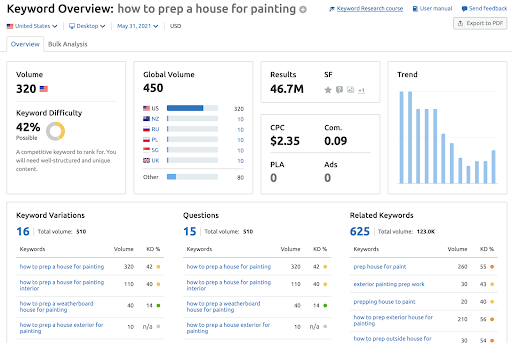
Go to SEMrush and type in “how to prep a house for painting” to see the search statistics that go with that phrase:

Painting company SEO statistics

As you can see, this keyword phrase is googled 320 times per month.  That means it’s a great phrase to use in the title of my video. The keyword difficulty is 42%, so it tells me that we will need well-structured and unique content to rank, which is exactly what my video is for.

The keyword research also shows me: 

  • Variations on the keyword that I could use in my video description
  • Common questions that are googled about my keywords
  • Related keywords that can act as secondary keywords that can be used in my video description on YouTube (more about this later)

When choosing a title for your video, be sure to choose a keyword phrase that is googled at least 100 times per month (rule of thumb).  Be sure to also choose 1-3 other keywords or phrases that go with your video that are searched over 20 times per month.

Upload Your Video To YouTube

You’ve created your video and have your research, so you are ready to upload your video to YouTube and have clients find you!

Before you upload your video, change the name of your video file to be the title of your video, separated by hyphens.  

So, in this example, I would name my video “How-to-prep-a-house-for-painting.mp4”

Then, go to your YouTube channel and hit the “Create” button.  Once you upload your video, YouTube has multiple fields that you can fill in.  The most important field is the “Title” field.  This is where we would put “How To Prep A House For Painting In 2021”.  If possible, it’s a great idea to add the year in the title to let YouTube know that this is the most up to date information available on your subject.

The next most important field is the description, which can be 5000 characters.  This is where you will tell people about the video, and why they should watch it.  Remember the secondary keywords that you chose?  This is the place to use them.  

You can’t use the same keyword phrase over and over again.  This is called “Keyword Stuffing” and YouTube/Google don’t like to see it.  So, you use keywords and phrases that are similar to your primary keyword (your title).

Another good rule of thumb is to place a link to a page on your website within the description. It helps you build backlinks and send people to your website if they are interested in your product or service.

YouTube will also ask if the video is made for kids (to create an age restriction if needed) as well as a few other questions that you should be able to answer easily.

Once the video has processed, the last thing that you will want to do is set the thumbnail.  This is the image that YouTube will use to represent your video before it is played.  Typically, we recommend creating an image that is 1280x720px and following the YouTube tips on creating an effective thumbnail: https://creatoracademy.youtube.com/page/lesson/thumbnails

BONUS – What To Do After Your Optimized Video Is Live On YouTube

Once you have your optimized video live on YouTube, don’t stop there.  You took the time to create it, now promote it!

There are multiple ways to get your video out there:

  • Post a link to the video on your social media
  • Share the video on LinkedIn
  • Send the video to your clients
  • Send the video to your prospects
  • Share the video with partner companies that you have

In addition to promoting your video, you can also use the content again!  Upload your video to a tool like otter.ai to create a transcript of it. Use this transcript to create a blog entry on your website and link to the video. This allows you to give information about your business topics to multiple audiences, and it helps with your SEO (search engine optimization).

Start creating your content on a weekly or bi-weekly basis to see your traffic increase and your videos start to rank.

If all of this seems overwhelming and you’d like some help getting started, call IFTS today and ask about our “Beginner’s Video Package” at 412.715.6266.