Is Your Business Ready for 2021 - 8 Simple Steps to Take to Make 2021 Your Best Year Yet

Are you a small business owner ready to say “Bye Felicia” to 2020?
I think that we all are!
However, if there was one thing that 2020 taught us, it was that your online presence is now more important than ever…and this doesn’t just mean your website. Your online presence consists of many pieces, like your website, your Google My Business Profile, your social media spaces and so much more.
Want 2021 to be your best year yet? In this article, we are going to cover 8 simple steps that you can take in January (2 per week) to help your business get ahead of the game!
Week One will cover choosing the best keywords for your business and improving your onsite SEO.
Week Two will take you through everything that you need to do in order to improve your Google My Business profile and start getting leads through Google Local Search.
Week Three covers EVERYTHING that you need to do to create content for the whole year and how to save time and money while doing it.
Finally, Week Four forces you to up your video game and start using the second largest search engine in the world.
Are you ready? Let’s get started!
Week One – Up Your Onsite SEO Game and Be Found More Easily In the Search Results
STEP 1 – Figure Out What Keywords Are Best For You
Is your website working for you as well as it should be? Are people finding your business online? If not, your search engine optimization, or SEO, may be to blame.
To improve your SEO, the first step is to create a list of popular keywords or phrases that you want to rank for. To create this list, I recommend a combination of brainstorming, asking your current clients what they typed in to find you and an online keyword research tool called SEMrush. You can use the free version to find the information that you need.
Take thirty minutes and brainstorm the keywords that you think your ideal clients would type into Google or Bing. When this is done, send an email to a few of your best clients and ask what they would type in to find you. It’s always great to get into their minds.
As an example, one of our clients is a personal injury firm in Greensburg, PA. Their brainstorming list included the following:
- Personal injury law firm in Greensburg PA
- Personal injury attorneys Westmoreland County
- Greensburg Personal Injury Attorneys
- Personal Injury Attorneys
However, when they asked a few of their clients what they typed in Google to find them, they received a slightly different list:
- Personal injury lawyer
- Personal injury lawyer near me
- Personal injury lawyer Greensburg
- Greensburg lawyer personal injury
They found out that while they were calling themselves attorneys on their website, more of their clients were typing in lawyer! They also discovered that none of their clients even thought to use the county that they were located in.
Want to know what keywords you are currently ranking for as well? Be sure to add them to your list! IFTS can send you a free report with that information. Enter your information below. You should receive your report within 10-15 minutes.
Once you have your list, you are ready to use SEMrush! This tool will help you figure out what the most popular phrases are on your list.
First, sign up for your free account here: https://www.semrush.com/signup/?src=header
Then, after you have created your account and are signed in, you are ready to start using this tool. Enter the first keyword phrase from your list into the search bar.
In this example, we will use the phrase “Personal injury lawyer Greensburg”. The following results are returned to us:
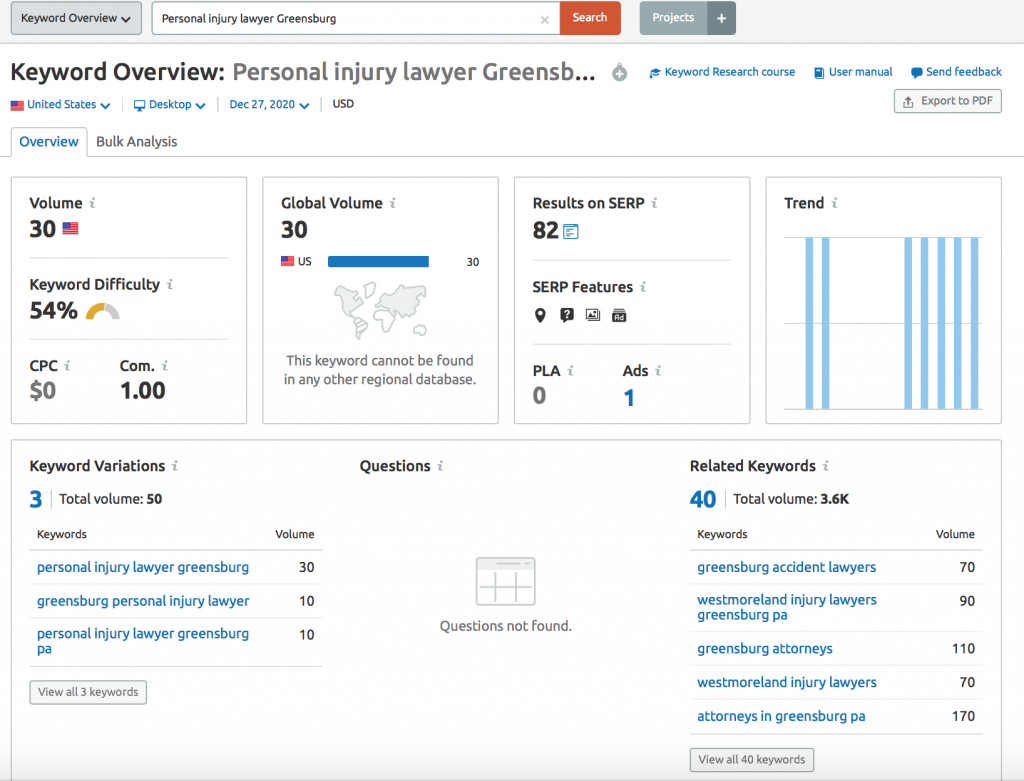
This tells us that the number of times that this phrase is searched monthly on Google in the United States is 30 times (the VOLUME). The keyword difficulty (or how hard it is to rank organically for this phrase) is 54%. Anything under 60% is normally a great keyword to rank for quickly.
The other important results to look at are the “Keyword Variations” and the “Related Keywords”. The keyword variations will show you common variations on your searched phrase. The related keywords list shows you phrases similar to the one that you searched. This is a great way to find phrases that you may not have thought about.
Repeat this process with all of your keywords from your list. If the “Related Keywords” list has any good suggestions, add them to your list as well. We recommend creating a spreadsheet that looks like the one below:

Once you have the data for your whole list, go through and highlight the keywords that are searched often and have a lower keyword difficulty. These will be perfect keywords to target across your online presence.
Keep this list for the rest of the steps in this process. It is the basis of everything else!
STEP 2 – Incorporate Popular Keywords and Locations into Your Page Titles and Headers
Now that you have your list of popular keyword phrases, you will need to use them in your website. You will want to choose one or two keyword phrases to be the main focus for each page of your website.
The first important place to use keywords is your page title. The page title is the text in the browser tab. It is also the text that shows as the title in the Google search results.
A good rule of thumb for a page title is to use the following convention:
“Keyword 1 – keyword 2 | Name_of_Company Location_of_Company”
So, for our example, a good homepage title for our law firm may be “Personal Injury Lawyers – Accident Attorneys | Law Firm Name Greensburg, PA”. This lets Google know exactly what your page is about and who your company is.
Create new page titles for each page of your website. In WordPress, you can do this using the Yoast plugin. If your website is in SquareSpace, you can change this in the general page settings. If you have a website developer, just let them know the text that you want to use.
After you have changed your page titles, you will want to be sure that each page of your website has one <h1> header on it and that it contains one of your important keywords in it. This header is the most important and it is another sign to Google that tells them what your page is about.
Week Two – Quickly Improve Your Google Local Presence
STEP 3 – Perfect Your Google My Business Profile
If your business depends on people finding you locally, your Google My Business profile is a great advertisement. If you have not claimed your business profile yet, go through that process described here by Google: https://support.google.com/business/answer/2911778?co=GENIE.Platform%3DDesktop&hl=en
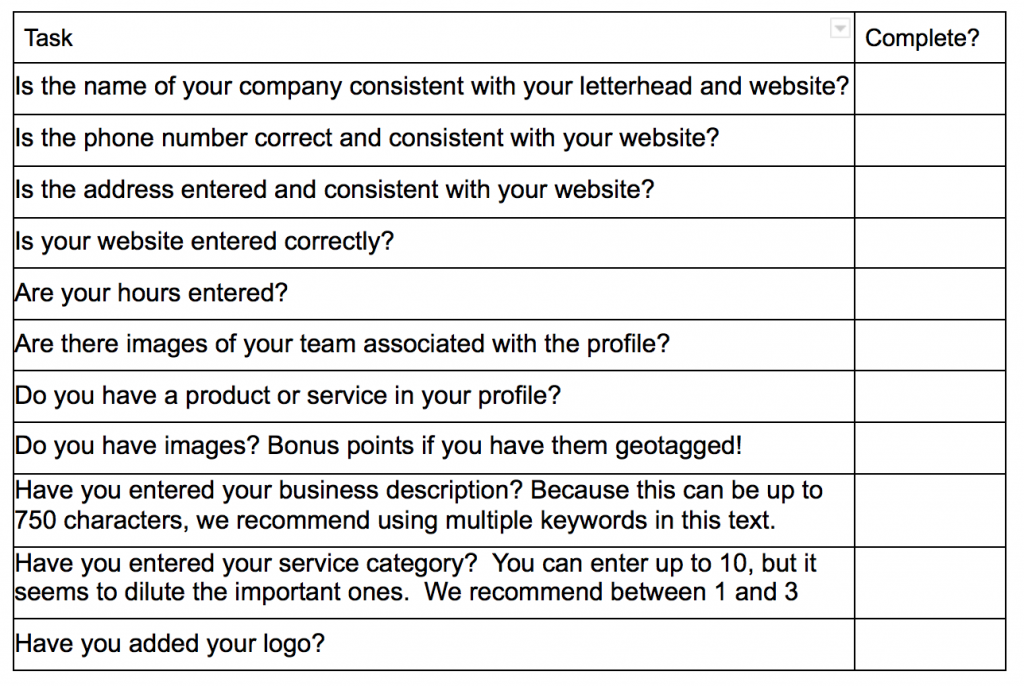
Once your profile is claimed, there are 11 things to complete to make sure that your profile is optimized. We have listed them below in an easy to use checklist:
Get the Top 3 Social Media Post Templates for Law Firms to Grow Your Following and Get New Clients
Engage with prospects and save time with your FREE Canva template kit. This kit features the top 3 social media posts for law firms and directions on how to brand them for your own firm in 5 minutes or less.

Enter your email below and get the templates sent directly to your inbox along with an instructional video on how to make personalized edits.
For more in depth information on filling out your profile, check out this article: https://blog.iftsdesign.com/introducing-google-my-business/
STEP 4 – Get More Reviews (and Answer Them)
When Google is deciding whose business to show in the Google Local area (also known as the map pack or 3 pack), they look at a multitude of factors. One main factor is the proximity of the person to your business location. Unfortunately, you can’t do anything to affect this. Another factor that Google will look at is the number of reviews and your overall rating, which is where you can shine!
Google’s number one priority is to be helpful to their end user (the searcher). So, they want to show people the best option for their query. It is up to you to prove that you are that option!
Create a system for requesting reviews from your satisfied clients. If you have one-time clients, ask them for a review via email or text at the end of their purchase cycle. This also gives you an opportunity to have one last touch point.
If you have clients that have a renewal cycle, ask them for a review at the end of that process. This is a nice way to end the renewal and get you credit for doing a great job!
A common objection that we hear is that people don’t know what to say. Make it easy on your clients! Send them an email with a direct link to leave a review on Google as well as a suggested list of questions to answer for the review. This also allows you to “sneak” keywords into your questions…and hopefully, they will repeat those keywords in their answers!
The most important thing to remember about reviews – when you receive a review, reply to it!
This works in a positive manner for your business in multiple ways. First of all, the person that left the review feels appreciated because you took the time to thank them. Prospects who are looking at your profile will see that you read/reply reviews and care about your clients. Finally, it helps with your local SEO because you and your clients are using keywords and phrases in the review and reply.
Need help getting more reviews? Check out our article on “10 Proven Ways to Get More Online Reviews for Your Business.”
Week Three – Make Posting to Social Media A Breeze
It’s hard to have a consistent social media presence without a plan and the right tools to do it! Week 3 is where this is addressed. You should be able to spend less than 4 hours per month to create and post all of your content!
STEP 5 – Sign up for a OneUpApp Account
There are multiple social media scheduling apps available. The one that we recommend is OneUpApp. One of the main reasons is because it connects and posts to LinkedIn, Facebook, Instagram, Twitter and most importantly, Google My Business.
Google has said that starting in 2021, they will be looking to see who is utilizing their GMB profile updates. These updates will start to be shown on Google Maps. So, if you have recent, consistent updates, your profile is sure to stand out!
To sign up for an account, go here: https://www.oneupapp.io/register
There is a small cost associated with OneUpApp, but because it connects to all of the profiles that you need, it’s worth it! Most free scheduling apps do not connect to Google My Business.
Take a few minutes and connect your social media profiles to finish the account set up. You will now be able to schedule posts to all of your social media accounts at one time! This will save you a huge amount of time and make your business look professional while doing so.
STEP 6 – Create a Schedule for the First Half of the Year (and repeat for the second half)
Now that your social media scheduler is set up, you need to create some content to post. To create this content, start with another list.
Write down every question that you receive from your clients on a regular basis. Most companies can come up with at least 10 or 20. Make sure to include questions, even if you think that the answer is obvious because it may not be obvious to your client.
Aim for 24 questions, which allows you to address one question every week for 6 months.
Why questions, you may ask? As we mentioned before, Google wants to be as helpful as possible for their end users. They want to answer their questions, which is what your content will be doing.
Can’t think of 24 questions? Again, we will turn to SEMrush and your keyword list!
Let’s use the term “Personal Injury Attorneys” as an example. The results for the term are below:
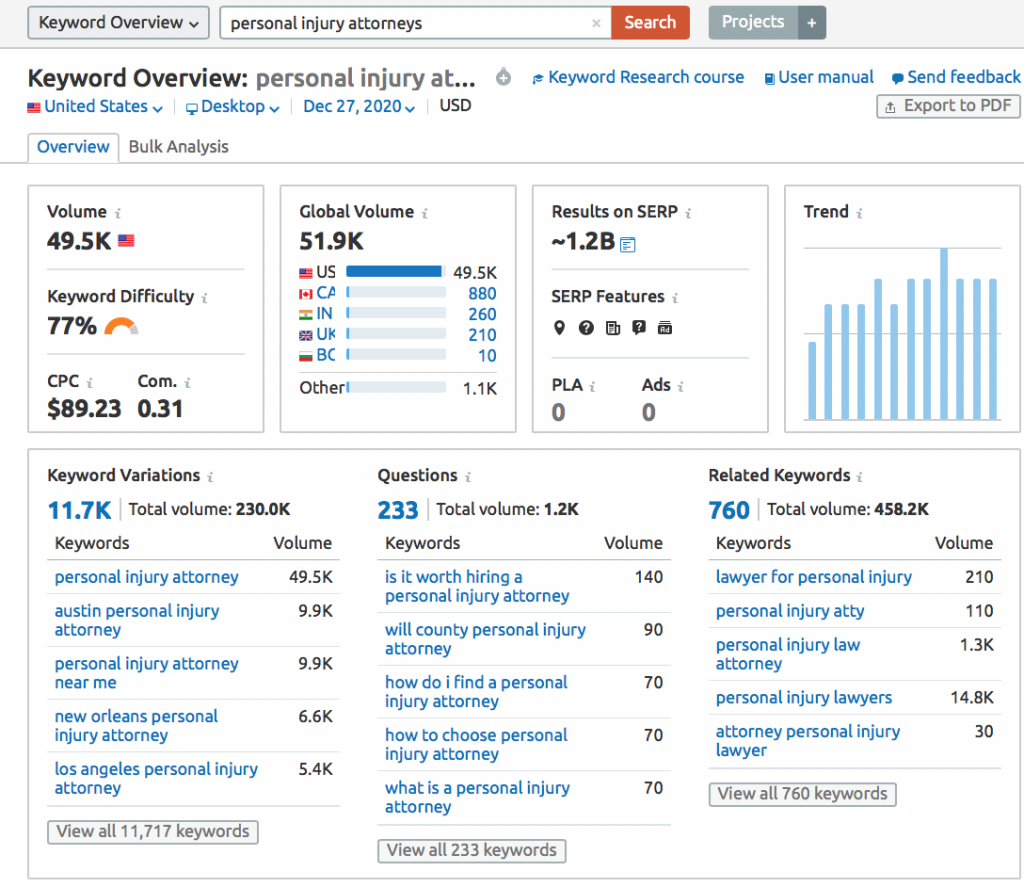
Look at the section titled “Questions”. This gives you frequently searched phrases that pertain to your keyword phrase. So, one question that an attorney should put on their list is:
“Is it worth hiring a personal injury attorney?”
Once you have your list of 24 questions, put them in an order that makes sense. Typically, I suggest putting them into main categories if possible and addressing one main category per month.
As an example, let’s say that the personal injury firm mainly handles cases that revolve around auto accidents, medical device defects, trucking accidents and workplace injuries. These would be great main categories and each one could have 6 questions associated with it.
Assign a week to each question in your list.
There are 2 ways to create the actual content itself. The one that you pick depends on your personality.
Option 1 – Write down the answer to the question. Then, once you have your answer written, record yourself reading the answer as a video.
Option 2 – Record yourself answering the question in video format. Try to keep your answers within 60 seconds. Then, use a free transcription service like otter.ai to create the text.
Once you have the text, post it to your blog and schedule it to release the Monday of the week that it is assigned. Make sure that the page title contains the main keyword in the question. Be sure that your <h1> is the question itself.
Next, edit the video if you want. There are multiple video editing software apps out there that make editing a breeze.
Upload the finished product to YouTube and schedule it to release the Tuesday of the week that it is assigned. Again, be sure to make the title of the video the question itself. The description should have the question repeated in it plus a small summary of the answer. Bonus points if you have incorporated keywords into your answer!
Now, here is a posting schedule to get a week’s worth of content from one question:
Monday: Post the link to your blog
Tuesday: Post the link to the YouTube video
Wednesday: Pull out one helpful sentence from the text and create a quick “quote” post. This can be done using the free version of Canva in less than 2 minutes.
Thursday: Post an additional fact that goes along with the question. You can do this with plain text or you can create another “quote” post.
Friday: Post a link to the video from the week before with the label “In case you missed it” (Obviously, this cannot be done the first week, but it works for every other week)
You get bonus points for using hashtags!
Once you know what you want to post, sign into OneUpApp and schedule the posts. To learn how to schedule posts, check out their video here: https://www.oneupapp.io
I’d recommend scheduling at least one month at a time. This way, you can take a small amount of time from your day and get all of your social media for the month done in less than 2 hours!
Once you get through the first 6 months, you can just repeat your content. The average life of an online post is less than one month, so don’t worry about people seeing repeats. I promise, they will not remember.
Week Four – Take Advantage of Offsite SEO Opportunities
STEP 7 – Optimize (and Create if Needed) Your YouTube Channel
If you don’t already have a YouTube channel, you are missing out on a traffic opportunity. YouTube is the second most popular search engine and it’s owned by Google!
Create your YouTube channel for your business if it doesn’t exist already. Need help with this task? Follow these instructions from YouTube: https://support.google.com/youtube/answer/1646861?hl=en
Once you have signed in, you can start optimizing your company’s channel! Try using the following tricks:
- If you can, use a keyword in your channel’s name. This can help your channel show up for organic searches. For example, an easy way to do this for a law firm would be to name the channel “[COMPANY NAME] – Your Personal Injury Law Firm in Greensburg, PA”.
- Make sure to completely fill out the “About Us” section. Be sure to include relevant keywords.
- Include a link back to your website. If people want to learn more about your company, make it easy for them to do so. It also helps with your SEO rankings.
- Fill out your channel keyword tags. This tells the search engines what your channel is about and who you are.
- Create a “trailer” video for your channel, if one does not already exist. Typically, this should be a 30-60 video that introduces you, your business and lets people know what they should expect to learn about in your videos.
- People typically decide whether to watch a video within the first 15 seconds, so make that time count! Try to grab your audience’s attention with a big motion, a relevant prop or a question that makes them say “I want to learn more about that!” Bonus points if you can include a major keyword phrase in this time as well.
- Do you have videos that would group well together? Create a playlist with them and send your viewers on a journey through your material. Try to create at least 2 playlists.
STEP 8 – Check Out Your Current Backlinks (and Create a Plan to Get More)
A backlink is a link from another website to your own site. Most businesses will have backlinks from a multitude of places, such as:
- Local chamber of commerce
- BBB
- Social Media Profiles
- Local News Story
- Company that you collaborated with
- etc
One major factor that Google looks at when it comes to deciding who shows up first in search results is the number of backlinks that a page has. Now, when the Google algorithm was first invented, it would only look at the volume of links. This paved the way for link farms and other dishonest means of creating backlinks. However, this is no longer the case.
Google now looks at the number of links that you have along with the authority score of those sites. Authority score is basically a measure of trustworthiness. So, more links is not necessarily a good thing. They have to be links from a reputable source.
To see the backlinks that you currently have, go back to SEMrush. Enter your domain name into the search.
The results will show you the number of backlinks that you have as well as the number of referring domains. The referring domains are the websites that contain links to your website.
In the example below, you can see that there are 498 backlinks from 35 domains.
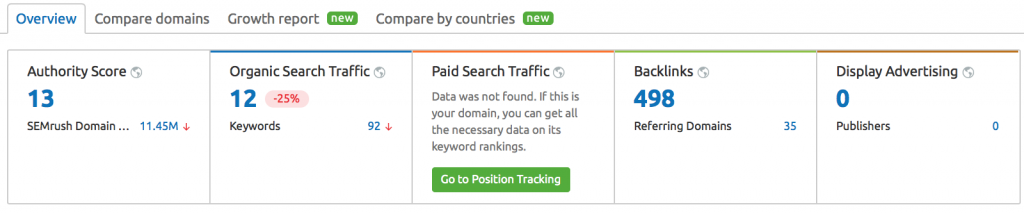
If you click on the backlink number, it will show you some of the links and referring domains. With a paid plan, you can actually see all of the links and the referring domains.
Now that you have your baseline, you are ready to start building links.
One way to build links is to make sure that you are in all of the top local business directories. IFTS offers a list of the top 25 places to get a free business citation here: https://blog.iftsdesign.com/local-citation-pdf/
Another way to build links is to look at your competitors. Make a list of your top ten competitors and enter their domains into SEMrush. How many backlinks do they have? You should have a goal to have more backlinks than them.
You can also look to see who is linking to them by clicking on their backlink number. Check out the referring domains. Go down the list and look at each backlink. Is it a niche directory that you hadn’t heard of? Submit your listing there. Is it a local business group? Enter your name as well. Is it an organization that accepts articles from people in your area? Send them a link to yours!
Backlink building is tough and requires you to stay on top of the task. Choose a ten minute time period each week and start working on this. Aim to gain 1-3 new backlinks per month.
Congratulations! You Made It Through All 8 Tasks!
This is just the beginning, but by jumpstarting January 2021, you’ll be setting yourself and your business up for success in the new year.
Have any questions or need help with any of the tasks listed above? Send me (Stacey Ivol) an email at si@iftsdesign.com or give IFTS, Inc. a call 412.715.6266 for a FREE consultation.