The Ultimate Guide to Turning Your Podcast into a Youtube Video

If you want to take your podcast to the next level, you might be wondering if you should start putting videos on YouTube. 

Video is one of the most popular types of content on the internet, and it can be a great way to reach more people. But before you start filming yourself talking into a microphone, there are a few things you should know. 

In this article, we’ll show you how to turn your podcast into a professional-looking YouTube video that keeps people interested and helps you grow your audience. We’ll also tell you how to choose pictures that go with your audio and how to make your video work best on YouTube. 

So, if you want more people to listen to your podcast, keep reading to find out how to turn it into a YouTube video.

Why turn your podcast into a YouTube video?

You might think that YouTube is just for watching videos, but more people listen to audio on YouTube than anywhere else! 

According to the Music Consumer Insight Report, 47 percent of the time people spend streaming music around the world is on YouTube. In fact, YouTube even beat Spotify to become the biggest platform for listening to podcasts in the US. 

People don’t seem to mind staring at a screen that doesn’t change while they listen to something they like. So yes, you can be successful even without a video on YouTube! Many are happy to just sit there and listen without watching while they go for a walk, work out, or fold some laundry. 

Adding some visual interest, though, will grab viewers’ attention and keep them interested when they aren’t just listening. It also lets you add more information that might not be possible in an audio-only format.

Your podcast’s online presence could be more than doubled if you upload it to YouTube! It potentially gets you in front of billions of Youtube users every day, and it’s a great way to make your content available to your audience no matter where they are.  

So before you record that next episode, it’s worth brainstorming ideas about how you can turn your podcast into a YouTube video.

Steps to Getting Started with Youtube

Step 1: Decide what type of video you want to create

There are a few different ways you can go about creating a video version of your podcast. The first is to simply take a video of yourself while recording your podcast. This is the easiest way to create a video, but it can be a little boring for your audience if they’re just watching you sit and talk.

You could also record your podcast on your webcam. You don’t need to buy any fancy equipment to do this. Simply plug your microphone into your computer, use the built-in camera, and use Zoom or QuickTime to record yourself while you speak. Make sure that your podcast microphone is being used instead of the computer’s built-in microphone in your audio settings.

 If you decide not to film yourself, add pictures and short video clips to your audio for visual interest. This is a great way to keep people watching, and it lets you easily add extra information that might not be possible with just sound. 

It’s important to choose high-quality images that fit your brand’s style and aren’t a distraction, so make sure they relate to your topic and add value

Step 2: Record your audio 

Once you’ve decided what type of video you want to create, it’s time to start recording. When recording your audio, it’s important to speak clearly and at a consistent volume. You also want to avoid any background noise that might be distracting to viewers. 

Your sound file alone is an MP3 type of file, which can’t be uploaded to Youtube. Because the video site requires MP4 video files, you will have to have some type of video to go along with your podcast, even if it’s just one image, so that it “plays” and uploads to the site like a video would.

 Step 3: Converting your audio file into a video

If you want to spend even less time uploading your podcast to YouTube, keep reading. 

Create a background image first by using free graphic design software such as Canva or Envato Elements. Both already have YouTube video templates, so you’re not starting from scratch. Adding your logo and changing the colors is pretty simple, and there are thousands of graphics available to really customize your video. 

What should be included in that graphic? 
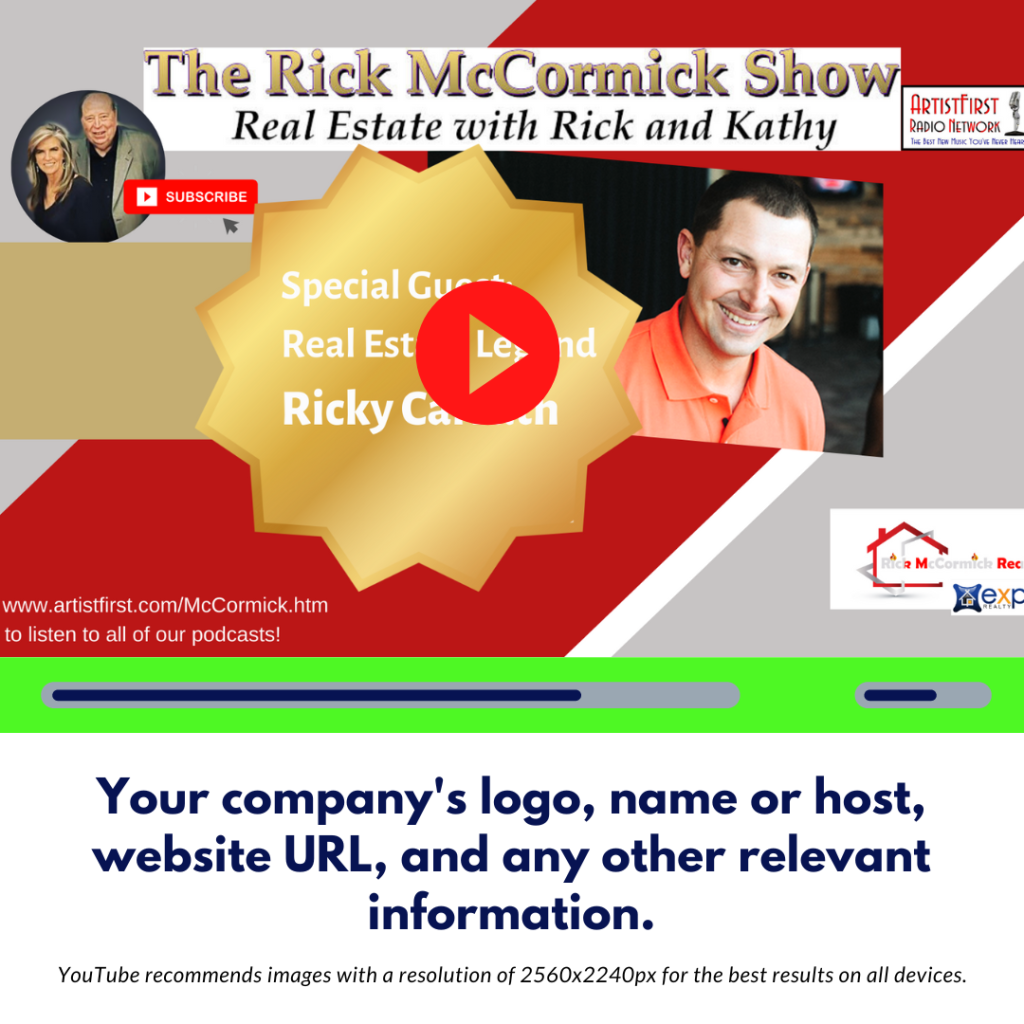
Your company’s logo, name or host, website URL, and any other relevant information. YouTube recommends images with a resolution of 2560x2240px for the best results on all devices. When you upload the MP3 audio file of your podcast to a software app like Canva, you can easily add and switch from one image to another with a wide range of customizable effects to go along with the sound.

Be sure to include a call to action page at the end so that people know what to do next. 

You can also add links to your website or other social media and encourage people to like, share, and subscribe to your channel.
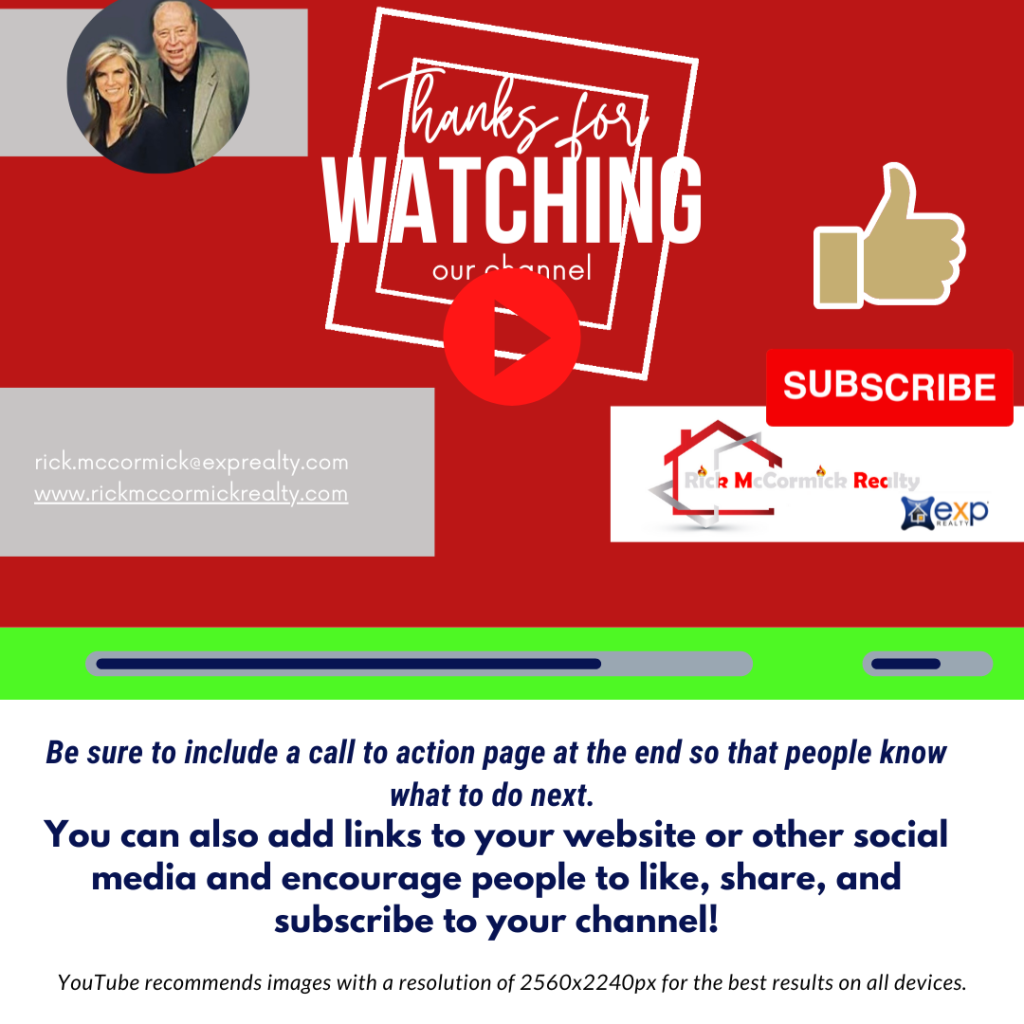
Finally, you now have an MP4 file to upload to YouTube!

Step 4: Optimize your video for YouTube

 After you’ve added your designs and recorded the sound, you need to make sure your podcast is ready for YouTube. It’s important to use keywords that are related to the content when optimizing it. You should also think about adding captions and/or subtitles. 

YouTube says that videos with closed captions get 12 percent more views than videos that don’t. Some polls even show that people are more likely to finish watching videos until the end if there are captions. This is perfect for those times when people might find it easier to watch video content without the sound on. 

Don’t worry, YouTube has its own built-in AI that captions your videos for free once they are uploaded. It may not always be 100% accurate, so remember that the higher the audio quality you provide, the better the AI-generated transcription will be. 

Once you have your Youtube channel with your uploaded videos, you can access and edit the closed captions. Click on the Subtitles section and select the icon below.
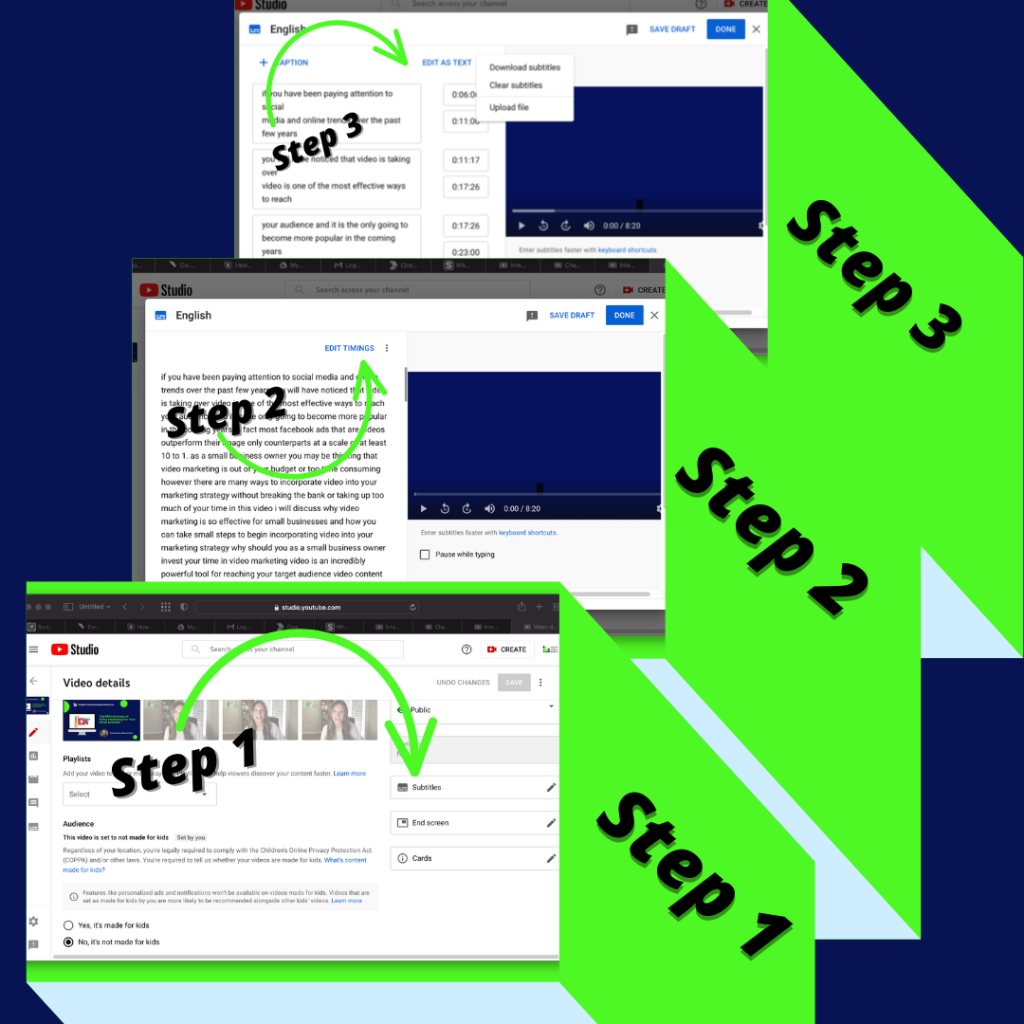
You can either edit your subtitles directly within YouTube or upload your audio subtitles using a site like https://otter.ai/home, which will ensure your audio text is indexed and searchable on the internet. This will help your videos rank higher in search engines by turning every word that is captioned into metadata and making it more likely that your videos will show up in Google searches.

Shorter Podcast Clips, Are They Still Worth it?

As we covered in our last blog post, video marketing is definitely worth your time. 

Because YouTube has such a large audience, it’s one of the best places to put podcasts and other types of content. People enjoy YouTube because it’s popular and it’s what they know. 

But what if you don’t have the time right now to post full episodes of your podcast on YouTube? 

That’s okay! You can still promote it by posting shorter clips from each episode. 

This is great for several reasons. Listeners are more likely to download the whole episode on their favorite podcast app, which could mean more endorsements. Also, people are more likely to share a short video than an entire episode that lasts 45 minutes. And finally, they are perfect for sharing on social media.

With a little effort, you too can turn your podcast into a YouTube full length video or short video clip that will help you reach a wider audience! 

If you are looking for help in this area, our team at IFTS is here for you. We are committed to your success and will take the stress out of creating marketing content! Contact us today for a free one hour consultation at 412-715-6266.
The Effectiveness of Video Marketing For Your Small Business

If you have been paying attention to social media and online trends over the past few years, you will have noticed that video is taking over. Video is one of the most effective ways to reach your audience, and it is only going to become more popular in the coming years.

In fact, most Facebook Ads that are videos out perform their image-only counterparts at a scale of at least 10 to 1.

As a small business owner, you may be thinking that video marketing is out of your budget or too time-consuming. However, there are many ways to incorporate video into your marketing strategy without breaking the bank or taking up too much of your time.

In this article, we will discuss why video marketing is so effective for small businesses and how you can take small steps to begin incorporating video into your marketing strategy.

Why should you as a small business owner invest your time in video marketing?

Video is an incredibly powerful tool for reaching your target audience. Video content is more engaging and easier to consume than text-based content, making it more likely that your target audience will actually watch and remember your videos.

But how do you know your customers really care about video?

In an effort to better understand how, why, and where customers did their research before choosing to support small businesses, Digital Marketer recently conducted a survey.

When presented with the opportunity to watch videos introducing a business and/or showcasing its goods and services, 51 percent of customers stated they would be more likely to patronize that small business. Only 16 percent of those surveyed had the opposite opinion.

This insight proves just how important it is for small businesses to have a presence on platforms like YouTube, Instagram and Facebook, where videos are easy to find and consume.

Not only are potential customers more likely to watch videos about your business, but they’re also more likely than ever before to take action after watching them. In fact, four times as many consumers would rather watch a video about a product than read about it.

Whether you’re looking to increase brand awareness, drive website traffic, or generate leads and sales, investing your time in video marketing is a smart move for small businesses.

Is video marketing really that effective?

Yes! Video marketing is an incredibly effective way to reach your target audience as a small business. Here are a few reasons why:

  1. Video is an engaging medium that can capture attention better than text or static images.

Did you know that humans process visuals 60,000 times faster than text? Video is a more engaging medium that can capture attention and hold it for longer than text or static images.

Not only that, but our brains are able to simultaneously process images, whereas our minds process words sequentially. 

Why is this important? Information is easier to retain if it is easier to process.

  1. Video allows you to tell a story and connect with your audience on a deeper level.

Video is the perfect medium for telling a story. A well-crafted story can evoke emotion and connect with your audience on a deeper level, which is essential for building trust and credibility.  Clients are more likely to buy if they know, like and trust you.

  1. Video is shareable, which means it has the potential to reach a wider audience than other marketing channels.

Get your best clients to do the work for you!

If you create compelling, informative, and entertaining videos, your audience will be more likely to share them with their friends and followers. This means your videos have the potential to reach a much wider audience than if you were relying on other marketing channels.

What Videos Can Your Small Business Make to Attract New Customers?

Now that you know why video marketing is so effective, you may be wondering what types of videos you should create to attract new customers.

Here are a few ideas:

  1. Introductory Video

An introductory video is the perfect way to give potential customers a taste of what your business is all about. This type of video can be used to introduce your business, explain what you do, and talk about your unique selling points.

  1. Product Video

A product video is a great way to showcase your products or services in action. This type of video can be used to demonstrate how your products or services work, highlight their features and benefits, and show off any customer testimonials you may have.

  1. How-To Video

A how-to video is a great way to provide value to your audience and show them that you are an expert in your field. This type of video can be used to teach your audience how to do something related to your business, like how to use your products or services.

  1. Customer Testimonial Video

A customer testimonial video is a great way to build trust with your target audience. This type of video features a satisfied customer talking about their experience with your business. Customer testimonial videos are an excellent way to show off your happy customers and highlight the positive impact your business has had on their lives.

  1. Video Blog

A video blog is a great way to keep your audience up-to-date on what’s going on with your business. This type of video can be used to talk about new products or services, share company news, or give insights into your industry.  Most audiences really enjoy those behind the scene peeks because it’s like you are sharing a secret.

How can small businesses get started with video marketing?

Now that we’ve established why video marketing is so important for small businesses, let’s talk about how you can get started. If you are ready to start incorporating video into your marketing strategy, there are a few small steps you can take to get started on the right foot.

If you’re feeling overwhelmed by the thought of creating videos, don’t worry. You don’t need to have a Hollywood budget or hire a professional production team to create effective videos. In fact, some of the most successful videos are shot on smartphones and edited with basic video editing software.

To get started, focus on creating short, informative videos that highlight your products or services. You can also create “how-to” videos, customer testimonials, and behind-the-scenes footage to give your audience a look at what goes into running your business.

Once you have a few videos under your belt, start promoting them on social media, on your website, and through email marketing campaigns. You can also create a YouTube channel to house all of your videos in one place.

What Are You Waiting For?

Video marketing is a powerful tool that every small business should be utilizing. By taking small steps to incorporating video into your marketing strategy, you can reach a wider audience and connect with your customers on a deeper level.

If you need help getting started, contact IFTS today at 412-715-6266. We can help you create high-quality videos that will reach your target audience and achieve your business goals.


What Should You Consider Before Hiring A Web Design Company?

So, you’re looking for a well-designed website that keeps people engaged while still being simple to use AND converts visitors into clients? 

Get in line! 

A website that is proactive in addressing your requirements and business goals has become more essential than ever before.  In this day of information overload, having an online presence that reflects the unique features of your business or services while still being simple enough to not only attract but also retain customers is essential. You need to stand out among the almost 2 billion websites that exist today.

Remember – there is no need for consumers to waste time on a confused or dysfunctional website when there are hundreds (often thousands) of alternatives available to them at the click of a button.  

Keep all of this in mind as you conduct research and attempt to determine the most appropriate route when developing your company (or personal) website. There is no reason to squander your time or money, but a few well-timed and well-placed investments may go a long way toward ensuring your success.

Did you realize that some individuals make their entire career designing websites?

Okay, so you probably already knew that, but think about the following scenario: 

Your home requires plumbing or electricity. Considering that these are important factors in your overall quality of life, are you willing to put in the hundreds of hours required to learn how to do it yourself, knowing that the chances of making an error are significant? 

Alternatively, are you planning to engage a professional, certain that their knowledge and skills will ensure that your requirements are fulfilled? 

Another scenario that is commonly encountered:

A business owner will tell us, “My teenage nephew is really good at computers and promised to help set up a website for our company this weekend.”

Does this nephew know about SEO, website speed optimization, CTAs, internal and external linking, Google Business Profile optimization, congruity across your online presence and other factors that help your website rank as well as convert? Our guess is probably not.

Most people don’t know what must go into a website to make it work for your business in 2022.  There are 175 new websites created PER MINUTE every day.  The “If you build it, they will come” mindset no longer works like it did twenty years ago.

Designing a profitable or promotional website is critical to your company’s livelihood, and while DIY projects are a fun and educational way to pass the time and learn something new, the truth is that there is a lot more to online success than meets the eye. 

A professional web design company employs multiple people that are well-versed in the complicated and diverse requirements of many types of websites. 

Throughout their careers, they have gained incomparable expertise that serves as a precious basis for their current endeavors. This experience has given them invaluable knowledge that serves as a priceless foundation when starting a website design project.  This is why I strongly recommend that you hire a professional when it comes to creating your website. 

However, the type of expert you choose is equally crucial. 

Figure out what you need the website to do

Before employing someone, it’s critical to have at least a basic understanding of your own requirements and objectives. Because pro web designers work with a large number of clients, understanding what you want before you talk development with them will guarantee that you and the designer are a good match and will assist them in providing you with exceptional service.

What kind of person or company do you want to work with?

It’s also crucial to be aware of who you’re working with. 

Because of the internet, it is simple for people to market themselves as “experienced professionals” (yet another reason to have a high-quality website!). 

Investigate what you’re looking for; if you come across someone claiming to do it for a significantly lower price, be skeptical; you’ll most likely wind-up spending twice as much money to get a useless site back up and running. 

Don’t be afraid to ask questions! You are knowledgeable about your industry, and they should be knowledgeable about theirs. 

Inquire about their opinions on your project and see whether their ideas are compatible with yours. Look at their previous work and see what other sorts of sites they have worked on and the industries that they are familiar with.

Due diligence is important when choosing a web design company

Another component of “knowing who you’re hiring” is to request a portfolio and references from past customers. Be careful to research the designer’s past work; it’s critical that you choose a firm that can collaborate with you and meet all of your business requirements. Reviewing work from prior clients is a valuable and instructive approach to obtain honest feedback about the quality of the designer’s work, his or her willingness to collaborate, and overall professionalism.

You’ll want to know who will be engaged in the creation of your website after learning more about the firm itself. Web design and development are comprised of several different components. You should inquire as to whether any of the services being supplied will be outsourced and whether the firm has a group of employees with whom they operate on a regular basis. 

Make a list of everything that you want your website to be capable of

You should also check to see if the company provides all of the features that you are searching for. For example, having a mobile-friendly or responsive website that adapts to any screen size might be a distinguishing feature of your site that sets you apart from your competition in certain situations. Find out what sorts of services the web firm provides and make sure that they are in line with your expectations and the requirements of your organization.

Is there a timeline that you have to meet?

Another issue that has to be addressed is deadlines. If you have deadlines, it’s critical that you communicate them to anyone you hire so that they can ensure that your project is successfully completed on time. 

You want to ensure that anyone you employ will devote the necessary time and effort to your project.  Make sure they will develop an appealing and easy-to-use website in a timely manner, so that you are not forced to wait months for your company’s website to go up.

Hiring a web design firm is a good investment for your company, and the appropriate expertise may make a significant difference in your performance and profitability. 

In your hunt for a web designer, make sure you do your homework and be clear on the type of relationship you are seeking. Don’t be hesitant to ask questions or obtain references/portfolios from potential candidates. 

Hiring the right company to design your website is just as important as hiring a web designer in the first place!

Hiring IFTS for your web design needs

Thinking about hiring IFTS, Inc.?  We offer a free one-hour consultation to hear all about your business goals and what you want your website to do for you.  After that meeting, we can provide references and other information about past projects.

To get started, schedule your appointment today by calling 412-715-6266.

Get the Top 3 Social Media Post Templates for Law Firms to Grow Your Following and Get New Clients

Engage with prospects and save time with your FREE Canva template kit. This kit features the top 3 social media posts for law firms and directions on how to brand them for your own firm in 5 minutes or less.

Enter your email below and get the templates sent directly to your inbox along with an instructional video on how to make personalized edits.