
In Case You Missed It – The Most Popular Marketing Articles from IFTS From 2021

Every type of business requires its own set of marketing methods. Whether your painting company is just getting started or is ramping up to meet ambitious growth targets, you’ll need a comprehensive marketing approach to get you there. Your painting company’s growth may become stagnant if you don’t have one, which isn’t where you want to be!

In this article, we are going to recap our top five most popular blog posts from 2021. For more information on any of these topics, be sure to check out the full article or corresponding YouTube video for each topic!

As a painting company, it’s critical that all of your customers, particularly those in your immediate neighborhood, are aware of your existence and can locate you if they need your services. This is referred to as local marketing.

A painting firm can advertise directly to the specific location where it operates through local marketing.

Painting companies who use local marketing methods can attest to the increase in business that comes with it. Here are a few of the advantages you can’t afford to overlook:

  1. Target customers based on their interests
  2. Low-cost
  3. Your business will appear in local search
  4. Lasting business relations
  5. Branding and brand control
  6. Scaling your business
  7. Accessible booking
  8. Keeping track of marketing efforts

Implementing a well-thought-out local marketing plan may help any painting company develop significantly.

Read the full article on this topic where we dive into these 8 benefits of local marketing for painting companies and why you should start implementing these strategies today.

If you want your business to stand out from your competition and you want to dominate local search, you need to focus on developing a system that will generate a consistent stream of positive online reviews for your company.

When someone in your neighborhood searches for a company like yours, you need to appear first in the organic search results and be the obvious pick. 

Google considers internet reviews when determining organic ranking. Quantity, quality, frequency of delivery, and product/service keywords will all be taken into consideration. Then they’ll look at the same thing for your competitors. To appear higher in the rankings, it is critical that your company outperforms its competition in each of these areas.

Here are 10 ways to get more reviews, improve your local search visibility, and boost your company’s online presence.

  1. Create a “Review Generation Strategy” to get reviews on all of the sites that matter to your clients.
  2. Ask your 5-Star Reviewers for referrals
  3. Train your employees to ask for reviews 
  4. Use feedback forms proactively to stop negative online reviews and comments 
  5. Respond to every review to build trust with future prospects and increase your online authority 
  6. Request online reviews from your happiest customers
  7. Ask your 5-Star Reviewers to leave reviews on multiple platforms (or on video) 
  8. Make collecting customer emails part of your onboarding process 
  9. Use SMS texts to request reviews 
  10. You can use incentives, but be cautious with the rules

The value of internet reviews and keeping track of your online reputation is critical to your company’s success.

To read more about these 10 ways to get more online reviews, visit our full article where we dive into the details on how to consistently get multiple positive reviews while improving your visibility online.

Did you know that on mobile alone, YouTube reaches more people in the 18-49 demographic than any American cable television network?

Here are three easy steps to set up your YouTube channel for your painting business!

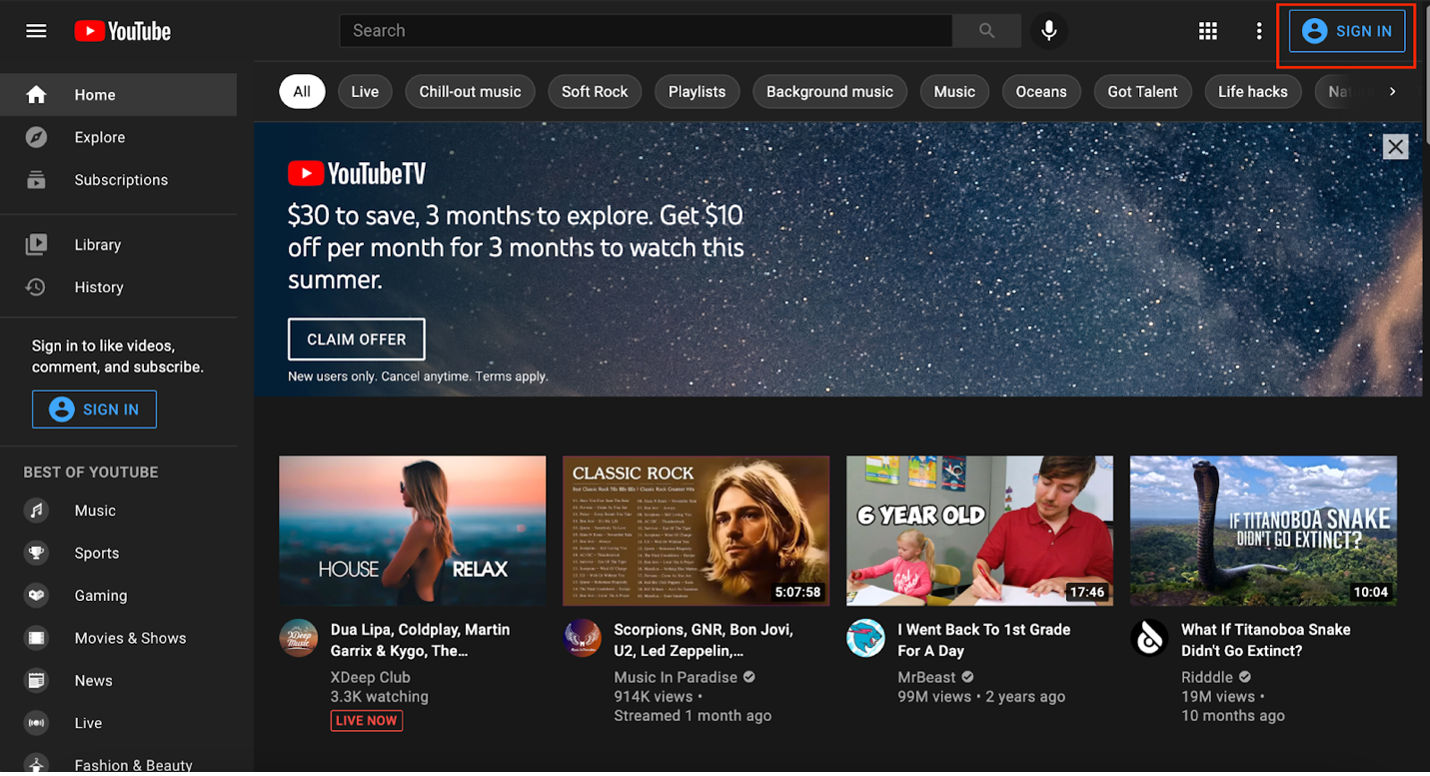
1. Sign in to YouTube

Go to YouTube.com and sign in using the sign in button in the upper right corner. If you already have a Google account, sign in with that email address and password.
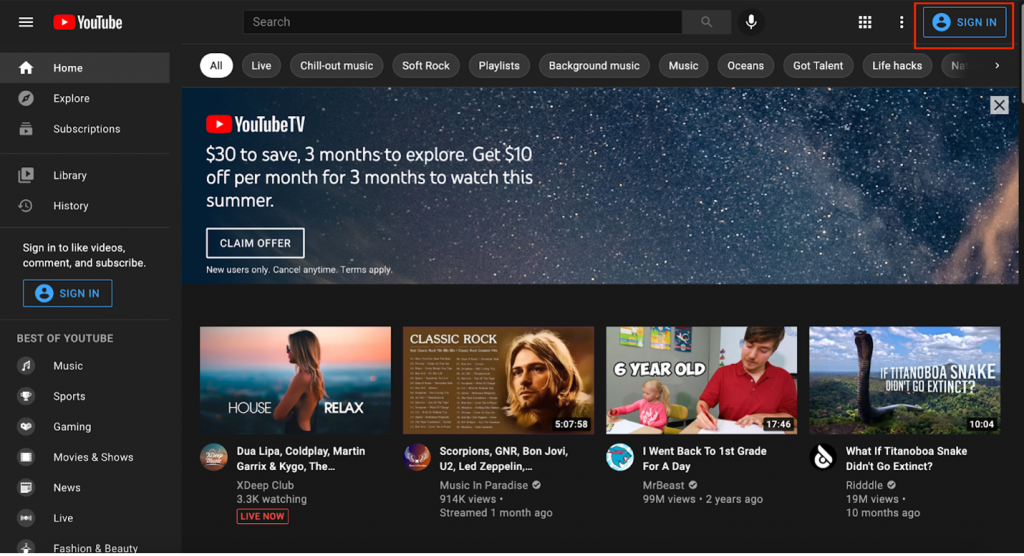
Signing in to YouTube

2. Create Your Channel

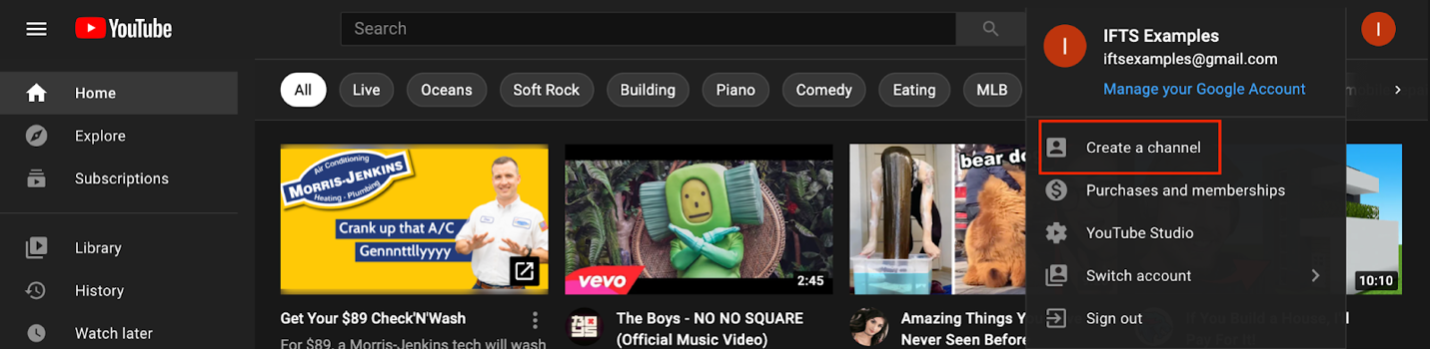
In the top right corner of the screen, you will see your profile icon. Click on the circle icon and select “Create a Channel”.
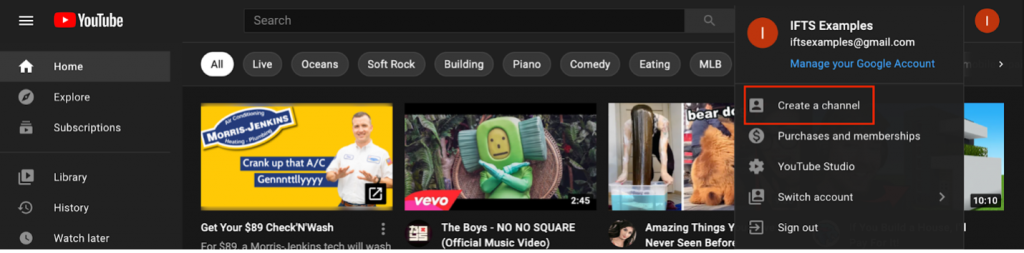
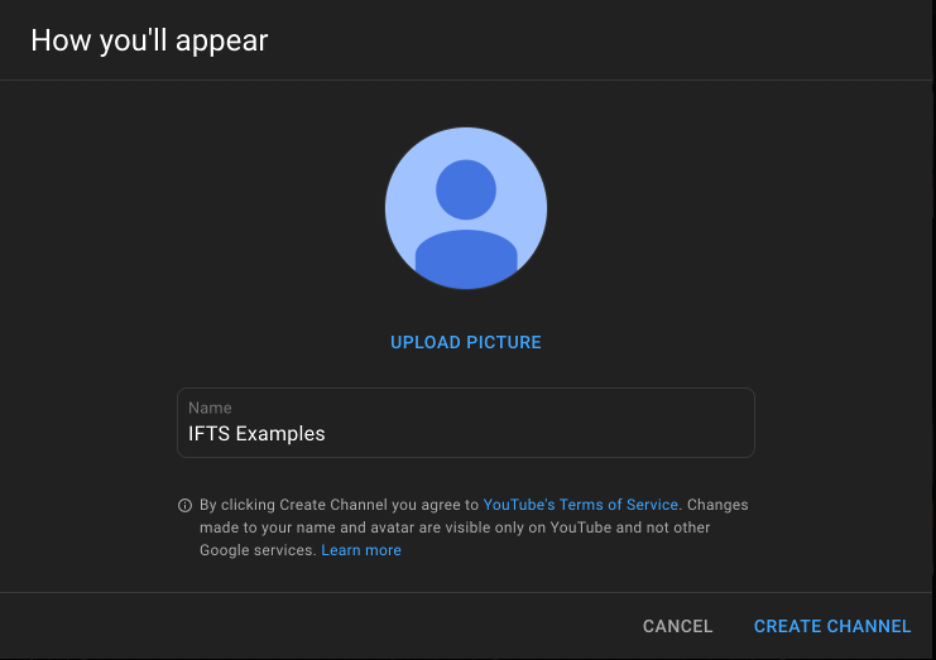
How to create a YouTube channel

From this step, you will be prompted to choose your channel name and profile picture.

3. Customize Your Channel

In this step of creating your YouTube channel, you will focus on making your channel welcoming to visitors. This will also help with your SEO.

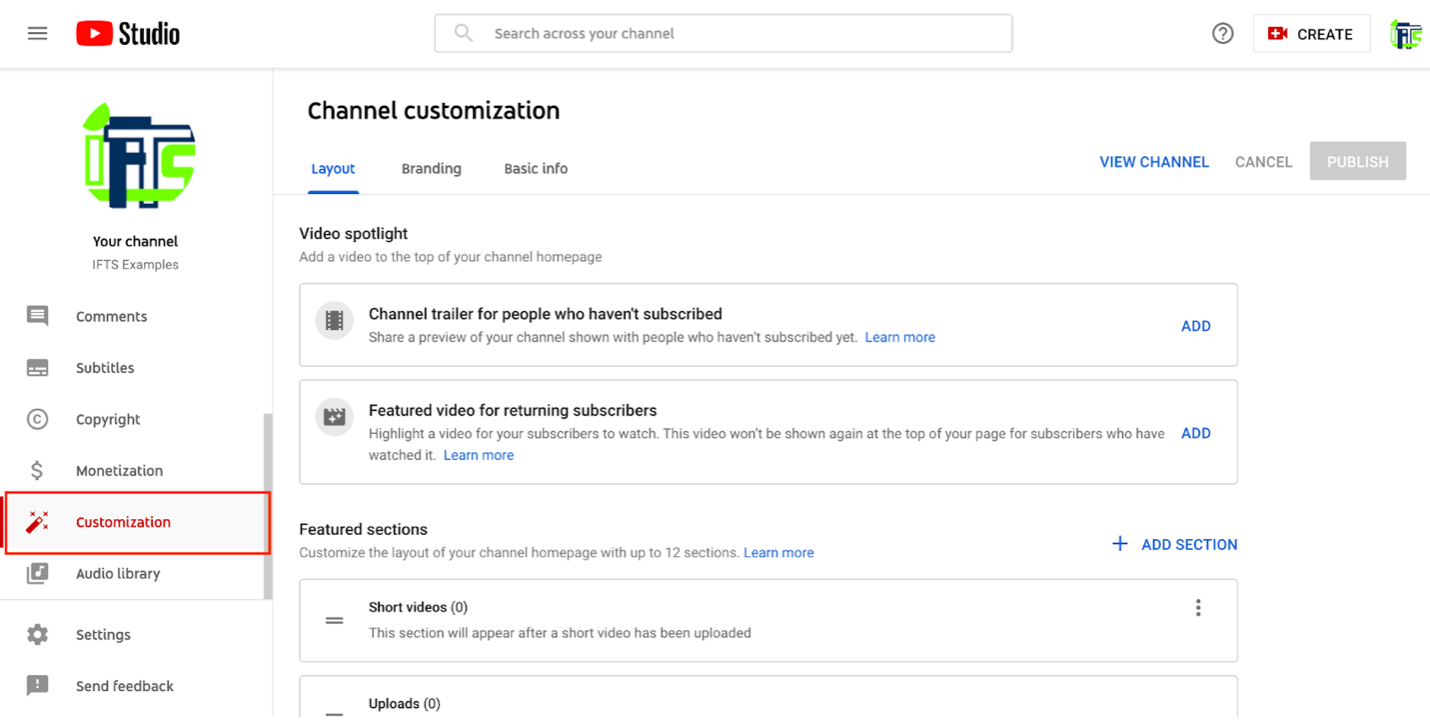
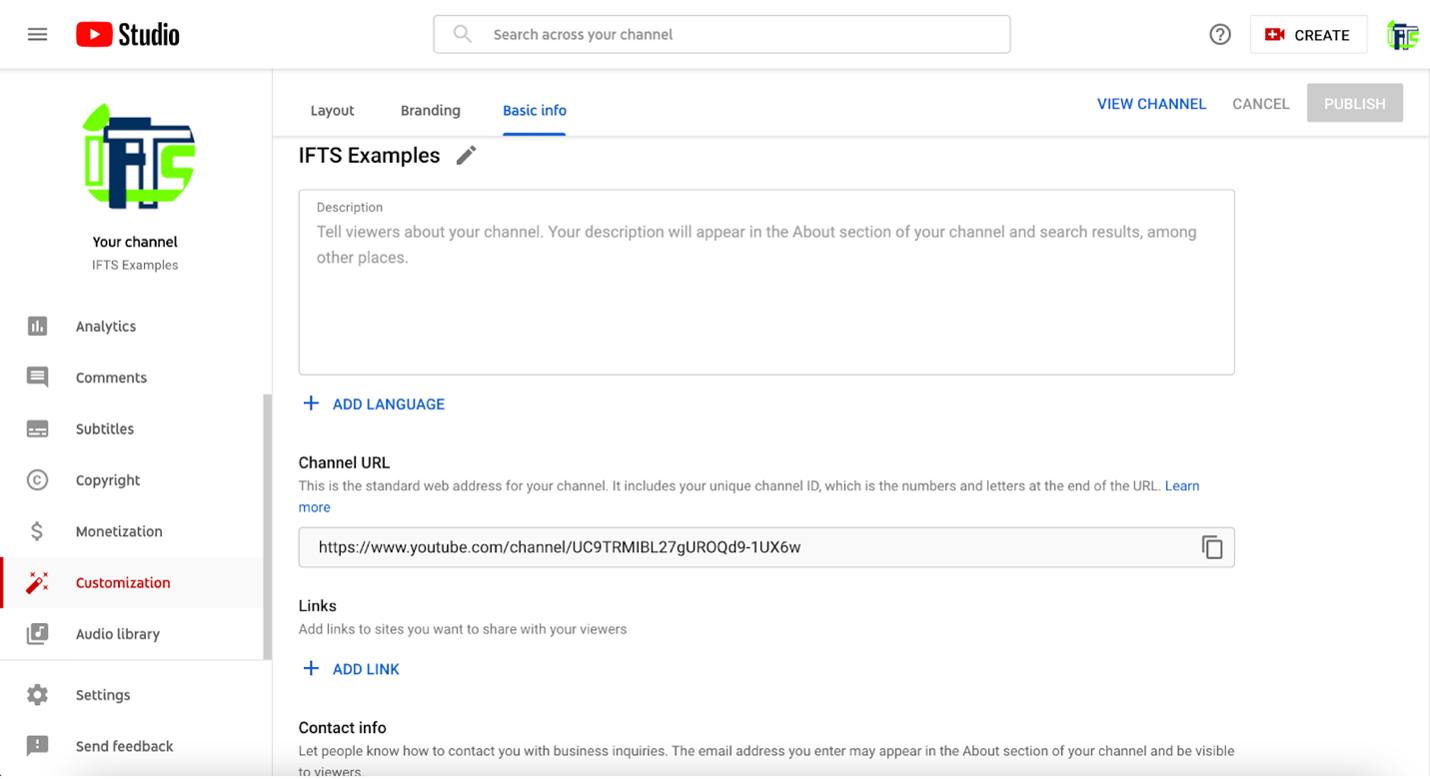
Visit the customization tab in YouTube studio.
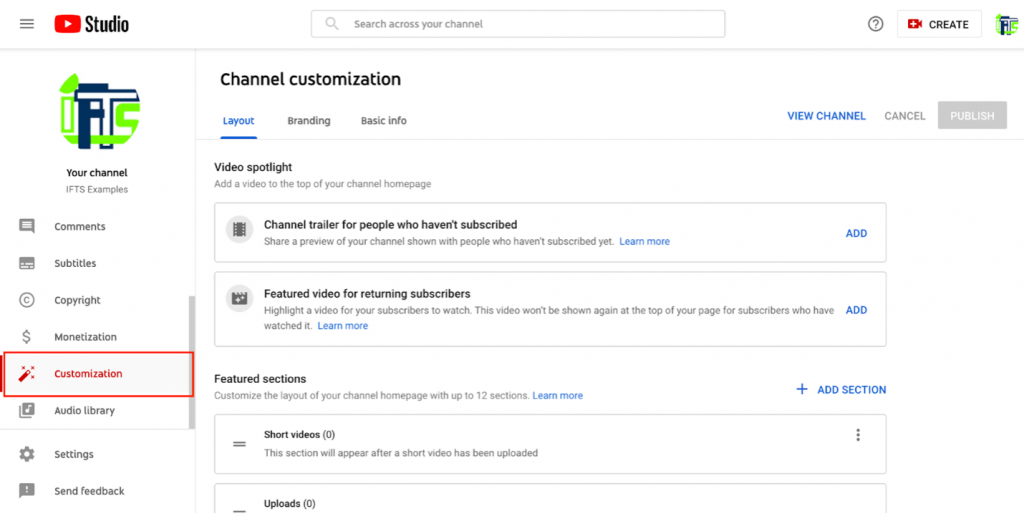
Customize YouTube channel

Here, you will see three tabs – layout, branding and basic info.

Layout

Under this tab, you may choose and manage what people will see when they visit your channel. When someone visits your channel, the main video they will see is the video spotlight. You can include a channel trailer for individuals who haven’t yet subscribed to your channel. This is just a short video showcasing what you do and what viewers may anticipate from your channel.

Branding

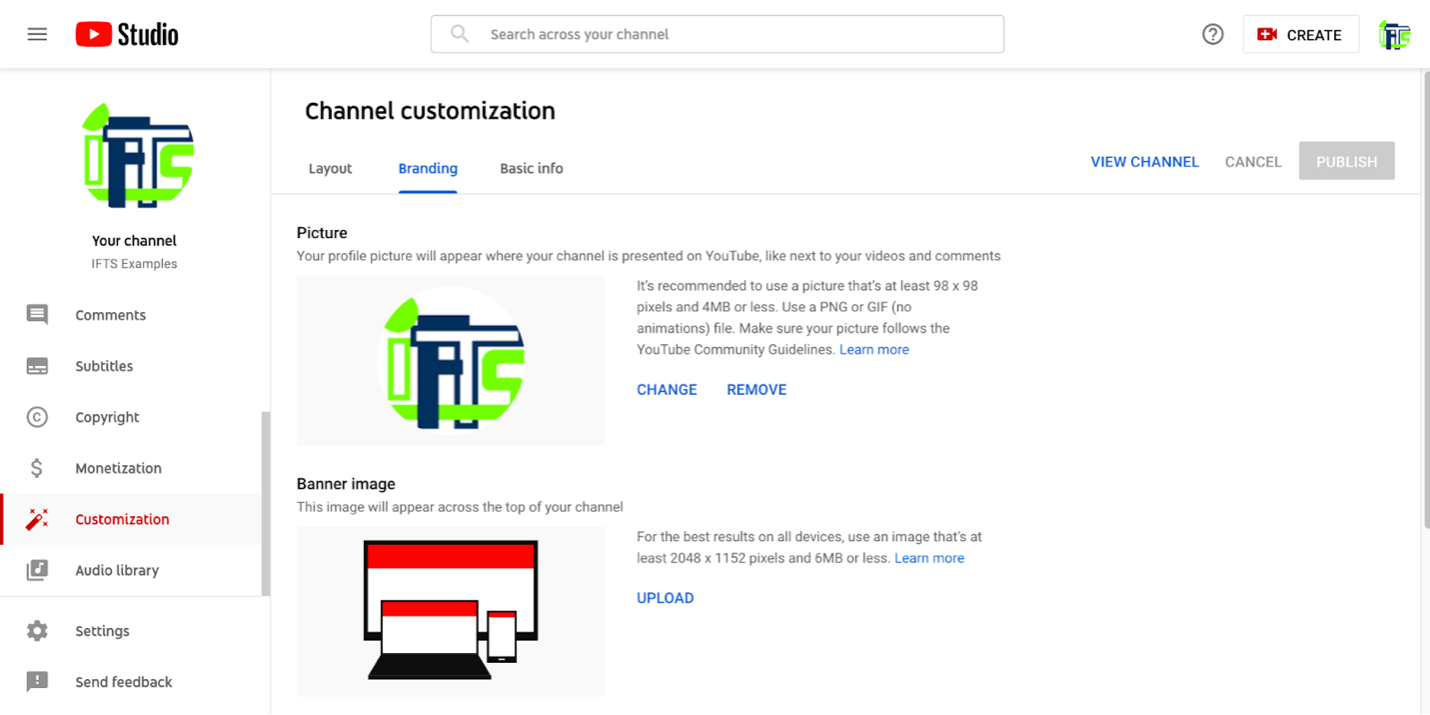
Under this tab, you can edit elements such as your profile picture and banner image. If you know what a Facebook cover photo is, a YouTube banner image is very similar. When someone views your YouTube channel, this banner will show at the top of the page.

Basic Info

You may update your channel name and description under the basic info tab, as well as add translations in other languages, links to sites you wish to share with your viewers (such as your company’s website), and contact information if you want people to email you with inquiries. Make sure to provide a link back to your business.

After making changes to any of these tabs, always be sure to hit the “publish” button to make your edits live on your channel.

To continue reading about how video marketing benefits your painting company, check out the full article here.

Do you find it difficult to find new customers online? If so, social media is your answer!

Painting companies have always depended heavily on word of mouth to gain new clients. While this is still a very relevant – and constructive – method of marketing, technology is allowing modern-day digital advertising to gain momentum. The Internet provides businesses with a variety of options for reaching a larger audience and maintaining control over their reputation. Social media is one such tool.

Social media platforms are more than places for business pages and profiles to be housed. They serve as hubs for individuals to interact, share their thoughts, make suggestions, and express their likes and dislikes – doesn’t that sound a lot like word-of-mouth marketing to you?

Let’s check out the top 5 social media platforms for painting businesses!

1. YouTube

This video-based platform offers areas for sharing photographs, going live with an audience when launching videos, and building a community. Do you want to demonstrate your painting abilities? Maybe you could provide a how-to video on how to paint like a pro? YouTube is your best bet if you want to go the video route.

2. Facebook

For all types of businesses, creating a Facebook Business Page is a top choice. It may be used to develop a range of content geared on attracting, nurturing, and retaining customers. You may use Facebook to publish text, images, videos, contests, and events, as well as create an ecommerce page where you can sell products/services or schedule appointments.

3. Instagram

Instagram has swiftly evolved into the easiest platform to advertise services to a younger target audience, as it attracts a younger demographic than Facebook. Who said that young people aren’t homeowners or that they don’t require painting services? Many individuals, especially DIYers, prefer to spend time on Instagram looking for new ways to spice up their homes.

This site supports photographs and short videos; utilizing the proper hashtags while uploading these will help you gain more followers than you think! The site also has a number of features that allow you to conduct surveys and polls, make lengthier videos, and share interesting content from within the platform.

4. Twitter

Twitter is a wonderful alternative if you’re searching for a formal way to interact with your audience. On Twitter, text material is restricted to 280 characters. As a result, if you need to send a lengthier message, you can start a thread or utilize alternative platforms.

5. LinkedIn

LinkedIn takes the cake when it comes to professionalism. It’s the only social networking site where formality reigns supreme. On LinkedIn, however, you won’t find many active business pages; rather, it’s the business owners and their staff that are more actively and continually seeking connections. On LinkedIn, B2B networking is a major deal.

To learn more about using these platforms and finding the right fit for your business, check out our full article for more information.

Get the Top 3 Social Media Post Templates for Law Firms to Grow Your Following and Get New Clients

Engage with prospects and save time with your FREE Canva template kit. This kit features the top 3 social media posts for law firms and directions on how to brand them for your own firm in 5 minutes or less.

Enter your email below and get the templates sent directly to your inbox along with an instructional video on how to make personalized edits.
Has the Apple iOS update affected your Facebook advertising this year? Now that Apple has implemented new privacy updates to iOS 14.3, users are actually able to see how each app uses their data. 

The most major change is that instead of asking customers to opt-out of having their data monitored, Apple will instead need them to opt-in to having their data tracked.

Facebook has been attempting to counter Apple’s claim that it will harm small companies. They took out newspaper ads, ran Facebook ads against it, and looked at other possibilities, but the rollout has already been in effect for a year. 

What happens when people opt out of being tracked?

When people opt out of being tracked, what does this mean for your Facebook ads?

You won’t be able to track online conversions from mobile users the same way you used to, and your retargeting audiences will shift or be missing iOS users.

What happens when they opt into being tracked?

Facebook has estimated that 10–15 percent of individuals will opt-in to being tracked. What does this mean for your Facebook Ads?

  • You won’t be able to retarget iOS website visitors anymore
  • You won’t be able to use the “Audiences” function to prevent your current clients from seeing your ads
  • Your conversion tracking numbers will become skewed

So, what can you do to limit the impact of this change?

In our full article, we cover steps that you can take to mitigate the damage to your Facebook ads caused by the iOS 14.3 change and how to overcome the main issues that result from limited tracking from the Facebook app.

Do You Need Help Marketing Your Painting Business?

Implementing a well-thought-out local marketing plan may help any painting company develop significantly. IFTS has helped a lot of companies boost their sales using the tactics mentioned in this article. Let us help you too!  Call 412.715.6266 or email si@iftsdesign.com to get started!

Get the Top 3 Social Media Post Templates for Law Firms to Grow Your Following and Get New Clients

Engage with prospects and save time with your FREE Canva template kit. This kit features the top 3 social media posts for law firms and directions on how to brand them for your own firm in 5 minutes or less.

Enter your email below and get the templates sent directly to your inbox along with an instructional video on how to make personalized edits.
How to Set Up A YouTube Channel for Your Painting Company

Creating a YouTube channel for your painting company

Did you know that YouTube reaches more people in the 18-49 demographic on mobile alone than any American cable TV network?

Setting up a YouTube channel for your painting company is easy and only takes a few minutes. In this article, we are going to walk you through 3 easy steps to set up your YouTube channel and explain how video marketing can benefit your business. 

Set Up Your YouTube Channel In 3 Easy Steps

1. Sign in to YouTube

Go to YouTube.com and click the sign in button in the top right corner of the page. If you have an existing Google account, use that email and password to sign into YouTube. 

Signing in to YouTube

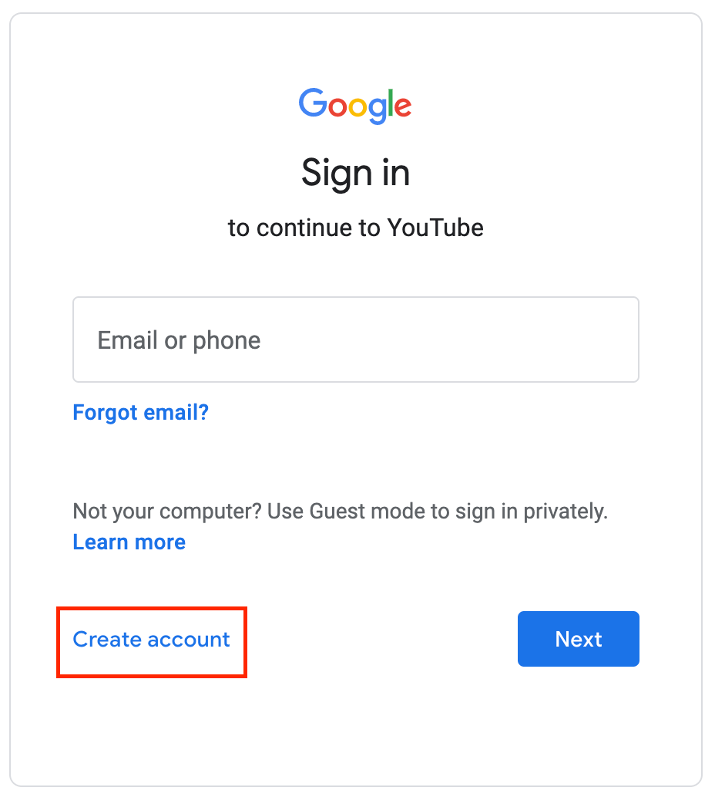
If you do not already have a Google account, you can easily create a Google account directly from YouTube by clicking ‘create account’. 

How to create a Google Account

Keep in mind that a Google account and a YouTube account are not the same thing.  This is a common misconception.

Your Google account can be used to sign into YouTube to watch and like videos or subscribe to your favorite channels. When you are signed in, you will also get personalized recommendations based on your activity.

Now, having a YouTube channel allows you to upload your own videos for your painting business to have a public presence on YouTube.

2. Create Your Channel

In the top right corner of the screen, you will see your profile icon. 

Click on the circle icon and select “Create a Channel”.

How to create a YouTube channel

From here, you will be prompted to choose your channel name and profile picture

Choosing a YouTube channel name

3. Customize Your Channel

This step will help make your channel welcoming to visitors and help with your SEO.

First, visit the customization tab in YouTube studio.

Layout Tab

Customize YouTube channel

Under the “layout” tab, you can select and organize what users will see when visiting your channel. A video spotlight will be the main video that someone will see when visiting your channel. For those that aren’t subscribed to your channel, you can add a channel trailer. This is nothing but a quick video that highlights what you create and what people can expect from your channel.

You can also add featured sections that will allow you to organize your content in any way you’d like for viewers to see when they arrive at your channel homepage.

Branding Tab

branding your YouTube channel

Under the branding tab is where you can find the customizable elements such as your profile picture and banner image. 

Your profile picture is going to appear wherever your channel is represented on YouTube. Your profile picture must meet the following requirements:

  • JPG, GIF (not animated), BMP or PNG file
  • Recommended 800 X 800 px image
  • Square or round image that renders at 98 X 98 px

If you know what a Facebook cover photo is, a YouTube banner image is very similar. This is a banner that will appear at the top of the page when someone visits your YouTube channel. With this, you can show off your personality and a little more about yourself and your painting company.

For the best results, your banner image must meet the following criteria:

  • Minimum dimensions of 2048 X 1152 px with an aspect ratio of 16:9
  • Safe area for text and logos at the minimum dimensions: 1235 X 338 px
  • File size: 6 MB or smaller

Basic Info Tab

customizing basic info on YouTube Channel

Under the basic info tab, you can make edits to your channel name & description, add translations in other languages, add links to sites that you want to share with your viewers (such as your company’s website) and add contact information if you would like people to be able to email you with inquiries.  Make sure to link back to your business.

After making changes to any of these tabs, always be sure to hit the “publish” button to make your edits live on your channel.

Now it’s time to create content for your YouTube channel! 

Most people think that creating a video for their business is really time consuming or that you need expensive equipment to start – Not true! All you need is your smartphone and a location that is relatively quiet with good lighting.

Create and optimize your painting company’s YouTube videos to get the most out of your YouTube channel. In this blog post, learn how to create your videos from choosing a location, to finding a topic and editing your video. (We even include a secret step that not many people know about.)

How Video Marketing Benefits Your Painting Company

Did you know that  72% of people say that they would rather learn about a new product/service by watching a video over reading text? 

Video marketing allows you to promote your business on social channels that can increase overall engagement while educating your audience in a creative way.  In other words, it gets more eyeballs on information that you provide.

Developing a strong video marketing strategy for your painting business can provide the following benefits:

1. Reach a wider audience

With a large percentage of people preferring to watch an informative video over reading text, you have an opportunity to reach even more of your target customers. Think about the benefit of someone being able to watch you explain the benefits of painting your kitchen cabinets over replacing them or why you should hire a professional to remove wallpaper in your home.

2. Increase Revenue

Did you ever think that creating videos could put more money in the bank? Businesses that implement a video strategy increase their revenue 49% faster year-over-year than those that do not use video.  Many painting companies are not yet utilizing these methods, so put yourself ahead of the competition and be a familiar face to your clients even before they meet you.

3. Increase Number of Shares

Social video generates 1200% more shares than text and image content combined. By creating quality video content, you have a better chance of passively raising more awareness for your painting company. With YouTube users sharing 400 hours of new video every minute, your business is set to establish a connection with users and therefore, drive leads.

4. Allows you to show off your work and your hardworking team!

When it comes to choosing a painting company, people are mostly interested in 2 main things – the cost of your painting services as well as the QUALITY! This is your perfect opportunity to show them the high-quality work that they will receive when they choose your business to paint their home.

With video marketing, you can also answer frequently asked questions in a video format, letting a possible prospective client put a name to a face as you help answer their questions. This can ultimately instill a feeling of trust in that individual and you may have just scored yourself a new client!

These are just a few of the benefits of video marketing for painting companies. It can’t be stressed enough that it is important for your business to stay on top of evolving video marketing trends to remain relevant in the digital world as more and more people turn to online video for information and advice in addition to entertainment.

YouTube is not just for cat videos anymore!

Need help setting up your channel or getting started with video marketing?  Give IFTS a call at 412.715.6266 and set up a free one-hour video roadmap session.  We’ll look at what you have done so far in the video space and set up a roadmap for you to follow to get yourself in front of more clients fast!

How to Set Up Your YouTube Channel for Law Firms

How to create a YouTube channel

Did you know that YouTube reaches more people in the 18-49 demographic on mobile alone than any American cable TV network?

Setting up a YouTube channel for your law firm is easy and only takes a few minutes. In this article, we are going to walk you through 3 easy steps to set up your YouTube channel and explain how video marketing can benefit your law firm.

Set Up Your YouTube Channel In 3 Easy Steps

1. Sign in to YouTube

Go to YouTube.com and click the sign in button in the top right corner of the page. If you have an existing Google account, use that email and password to sign into YouTube.

Signing in to YouTube

If you do not already have a Google account, you can easily create a Google account directly from YouTube by clicking ‘create account’. 

How to create a Google Account

Keep in mind that a Google account and a YouTube account are not the same thing.  This is a common misconception.

Your Google account can be used to sign into YouTube to watch and like videos or subscribe to your favorite channels. When you are signed in, you will also get personalized recommendations based on your activity.

Now, having a YouTube channel allows you to upload your own videos for your firm to have a public presence on YouTube.

2. Create Your Channel

In the top right corner of the screen, you will see your profile icon.

Click on the circle icon and select “Create a Channel”.

How to create a YouTube channel

From here, you will be prompted to choose your channel name and profile picture

Choosing a YouTube channel name

3. Customize Your Channel

This step will help make your channel welcoming to visitors and help with your SEO.

First, visit the customization tab in YouTube studio.

Customize YouTube channel

Layout Tab

Under the “layout” tab, you can select and organize what users will see when visiting your channel. A video spotlight will be the main video that someone will see when visiting your channel. For those that aren’t subscribed to your channel, you can add a channel trailer. This is nothing but a quick video that highlights what you create and what people can expect from your channel.

You can also add featured sections that will allow you to organize your content in any way you’d like for viewers to see when they arrive at your channel homepage.

Branding Tab

branding your YouTube channel

Under the branding tab is where you can find the customizable elements such as your profile picture and banner image. 

Your profile picture is going to appear wherever your channel is represented on YouTube. Your profile picture must meet the following requirements:

  • JPG, GIF (not animated), BMP or PNG file
  • Recommended 800 X 800 px image
  • Square or round image that renders at 98 X 98 px

If you know what a Facebook cover photo is, a YouTube banner image is very similar. This is a banner that will appear at the top of the page when someone visits your YouTube channel. With this, you can show off your personality and a little more about yourself and your firm.

For the best results, your banner image must meet the following criteria:

  • Minimum dimensions of 2048 X 1152 px with an aspect ratio of 16:9
  • Safe area for text and logos at the minimum dimensions: 1235 X 338 px
  • File size: 6 MB or smaller

Basic Info Tab

customizing basic info on YouTube Channel

Under the basic info tab, you can make edits to your channel name & description, add translations in other languages, add links to sites that you want to share with your viewers (such as your firm’s website) and add contact information if you would like people to be able to email you with inquiries.  Make sure to link back to your firm.

After making changes to any of these tabs, always be sure to hit the “publish” button to make your edits live on your channel.

Now it’s time to create content for your YouTube channel!

Most people think that creating a video for their business is really time consuming or that you need expensive equipment to start – Not true! All you need is your smartphone and a location that is relatively quiet with good lighting.

Create and optimize your firm’s YouTube videos to get the most out of your YouTube channel. In this blog post, learn how to create your videos from choosing a location, to finding a topic and editing your video. (We even include a secret step that not many people know about.)

How Video Marketing Benefits Your Firm

Did you know that  72% of people say that they would rather learn about a new product/service by watching a video over reading text? 

Video marketing allows you to promote your firm on social channels that can increase overall engagement while educating your audience in a creative way.  In other words, it gets more eyeballs on information that you provide.

Developing a strong video marketing strategy for your firm can provide the following benefits:

1. Reach a wider audience

With a large percentage of people preferring to watch an informative video over reading text, you have an opportunity to reach even more of your target customers. Think about the benefit of someone being able to watch you explain the benefits of hiring an attorney to create a will or how a DUI firm helps people get their DUIS expunged from their records by following the proper sequence.

2. Increase revenue

Did you ever think that creating videos could put more money in the bank? Businesses that implement a video strategy increase their revenue 49% faster year-over-year than those that do not use video.  Many law firms are not yet utilizing these methods, so put yourself ahead of the competition and be a familiar face to your clients even before they meet you.

3. Increase number of shares

Social video generates 1200% more shares than text and image content combined. By creating quality video content, you have a better chance of passively raising more awareness for your firm. With YouTube users sharing 400 hours of new video every minute, your firm is set to establish a connection with users and therefore, drive leads.

4. ‘Humanize’ your firm

Let’s be real… Some of those who are looking for answers to frequently asked law questions may find it ‘boring’ or will most likely be unenthused as they search for answers that have to do with divorce or bankruptcy etc. With video marketing, you can answer these questions in a video format, letting a possible prospective client put a name to a face as you help answer their questions. This can ultimately instill a feeling of trust in that individual and you may have just scored yourself a new client!

These are just a few of the benefits of law firm video marketing.  It can’t be stressed enough that it is important for your firm to stay on top of evolving video marketing trends to remain relevant in the digital world as more and more people turn to online video for information and advice in addition to entertainment.

YouTube is not just for cat videos anymore!

Need help setting up your channel or getting started with video marketing?  Give IFTS a call at 412.715.6266 and set up a free one-hour video roadmap session.  We’ll look at what you have done so far in the video space and set up a roadmap for you to follow to get yourself in front of more clients fast!