10 Of Our Favorite Marketing Hacks For House Painting Companies In 2022

Would you like to know about our 10 favorite super sneaky marketing hacks that you can implement today?

We use these marketing secrets to help our painter clients rank their website #1 for their favorite keywords, get more organic traffic and ultimately, get more leads to grow their business.

In this article, we are going to cover ten actionable strategies that you can use RIGHT NOW.

The best part?

You don’t have to be super tech savvy or Elon Musk to get them implemented.

Let’s start this section with our favorite Google Business Profile hacks.

Hack #1 - Social Proof Will Get You More Leads

The best two platforms to get reviews on are:

  • Google
  • Meta (Formerly Facebook)

Google reviews are the best type of reviews that you can receive because not only do they talk you up and show people how great you are, they also help your website with its SEO.  As an added bonus, once you have 100 reviews, your star rating will be shown when you run Google ads.

Meta reviews are great to have as well because of the platform’s popularity in a house painting company’s target market.  Most house painters that we work with have a target audience of women that are between the ages of 35 to 64.  Consequently, that is the majority of Meta users.  By using this platform, you are more likely to get in front of your ideal client than any other social media option.

If you can get a video testimonial from a client, that can go a long way as well.  A lot of people get stuck on the logistics of creating the video, but it shouldn’t be that hard.  You can interview them via Zoom and record that call or just have them use their phone to record a quick video. 

The more authentic the video looks, the better.  This is for two reasons.  One – if the video is over-produced, it will seem scripted and less credible.  Two – if people see that someone took time out of their day to create a quick video for you, it shows that they really liked you and your work.

Once you have these videos, be sure to put them everywhere a potential audience may look.  This could include:

  • YouTube
  • Your website
  • Social Media
  • Your Google Business Profile
  • and more!

Reviews are a great way to show how great you are without you ever having to say a word.

Want some help getting more reviews?  Check out our article on implementing a review system.


Hack #2 - Get Your Listing On Google Maps

Getting your business listed in the Google Maps results is based on many factors.  A few big ones are:

  • how close the searcher is to your business location 
  • your review ranking and volume (which we discussed above in Hack #1)
  • profile completeness
  • local signals

To start, make sure that your profile is completely filled out with correct information.  Your name in the Google Business Profile should match exactly the name on your website.  This goes for your address, website, and phone number as well.  Then, be sure that your business categories and services are filled in completely.  

The final part of your profile that should be completed is the “Photos” section. Be sure to add as many photos as you can as this is a feature that not many painters take advantage of.

For a complete walkthrough of filling out a Google Business Profile, check out our article here: https://blog.iftsdesign.com/introducing-google-my-business/

“Local Signals” are another big factor for showing up early on Google Maps.  These are website links to your website from other local businesses or services.  A few examples of this would be:

  • a back link from the local chamber of commerce
  • a back link from a local scholarship that you sponsored
  • a mention or link to your business from a local paper

Anything that you can do to get your business associated with your area is a great “local signal” to Google.

Hack #3 - Ask and Answer Questions Via Your Profile

An easy way to get keywords and locations associated with your Google Business Profile is through the question and answer section.

Previously, you were not able to add questions to your profile yourself,  You had to wait for someone to ask and then you could answer them.  This has now changed.

The Q&A section of your Google Business Profile is a great way to show all of your most frequently asked questions up front to prospective customers.

Write down the 10 questions that you receive all of the time from prospects and then answer them in 3-5 sentences.  While you are answering them, be sure to use common keywords/phrases as well as locations that you want associated with your house painting business.

Once you have accomplished this task, copy and paste them to your Google Business Profile.

Now, we’ll move to our favorite Paid Ad Hacks.

Hack #4 - Solve Your Prospects’ Small Problems For Free In an Ad

What are the questions you most commonly get asked? If you’ve already implemented Hack #3 from this article, you should have this list already.

Side Note – Need some inspiration?  Check out https://answerthepublic.com/ or https://neilpatel.com/ubersuggest/ for commonly asked or searched questions in your field.

Make videos answering these questions and position yourself as the expert in your area.  Again, just like the testimonials, the videos do not have to be fancy or highly edited.  They should be authentic and can be filmed with your cell phone.  Some painters will even film on the job site.

Sample Common House Painter Questions To Get You Started:

How often should I paint the exterior of my house in this area?

  • What is the best time of the year to stain a deck?
  • How many coats of paint should be used on the exterior of your house?
  • How many coats of paint should be used on the interior of your house?
  • What does it mean for a painting company to be bonded and insured?
  • Should I paint my kitchen cabinets or should I replace them?

Once you have your videos, post them to your social media, YouTube channel and on your website.

You should also run them as Meta ads to your local audience.  You don’t have to spend a lot of money, just one to five dollars per day.  This helps you get in front of a fairly large group of people in a small amount of time.

These videos will help you create an audience that already knows/likes/trusts you when it comes to painting topics.  When they have a painting project come up, you will be the one that they know they can trust.

Hack #5 - Make Your Ad Stand Out

When creating your video, you want to be sure to stand out amongst the crowded marketplace.

The first way to do this is to use contrasting colors to the platform that you are running the ad on.  If you are going to run the ad on Meta (Facebook), we recommend having a red or yellow bar at the top of the video because it helps you stand out from the Meta blue color scheme.  An easy way to do some small edits to your video is through Canva.  

Don’t want to take the time to do any edits to the video?  Try wearing a brightly colored red or yellow shirt.

The second way to stand out is to immediately call out your audience or target market.  So, if you were advertising kitchen cabinet painting to the residents of Dallas, you could start your video with the sentence: 

“Are you living in the Dallas area and thinking about redoing your kitchen?”

Or, you could do some video editing and add that sentence as text to the beginning of the video.

A final way to stand out is to start your video with a big action or a memorable prop at the beginning.  You want to grab someone’s attention – movement or something unexpected will typically draw the eye.

A few big actions you could try:

  • come in through a door
  • big wave and a smile
  • use a paint sprayer or other tool of the trade
  • jump into the frame

A few memorable props you could try:

  • Comically large-sized paintbrush
  • Wall of stacked of paint cans
  • stand halfway up a ladder

The important thing to remember is you want to get their attention within the first 3 seconds of the video and keep them watching.  These tactics all use “pattern interrupt”.  This basically means – do something to get a person to stop scrolling through their feed and watch your video/read your ad.

Hack #6 - Use Retargeting Ads In Multiple Ways

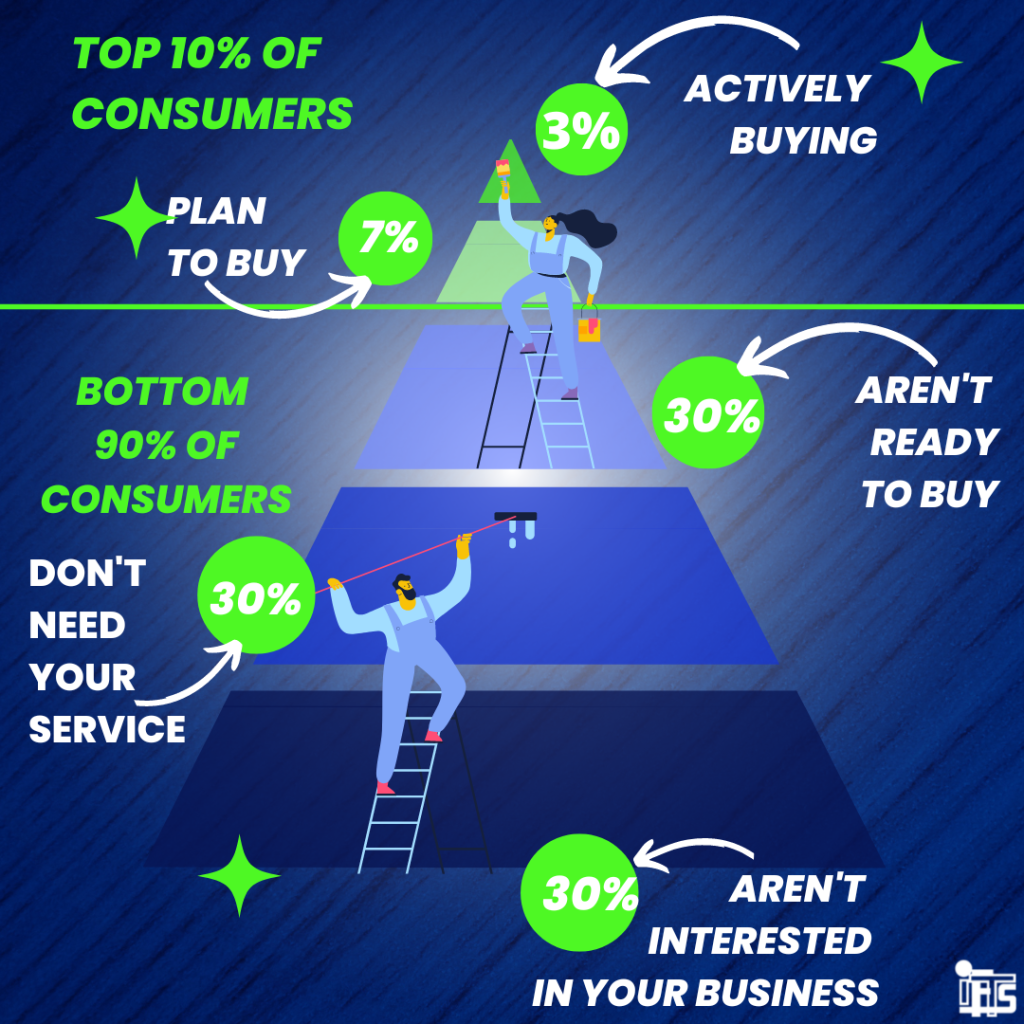
The average consumer is only prepared to make a purchase about 3% of the time. 

So, how do you attract the other 97% of people?

Retargeting Ads

Retargeting allows you to stay in front of someone that is interested in your services until they are ready to make a purchasing decision.  If you are advertising on Meta (Facebook), you can do this in 2 ways:

  • Meta Pixel
  • Video Viewers

The Meta Pixel is a small piece of code that you install on your website.  It then tracks who has visited the site and allows you to show them ads on Meta.  

One caveat – The usefulness of the Pixel has diminished over time as Apple now requires users to opt in to being tracked.  Only about 10% of people opt in (not surprising).  Advertisers now have a much harder time reaching Apple users via this method.

The other way you can retarget someone is through their video views.  Meta tracks who watches your videos and for how long.  So, you can advertise to people that have watched at least a certain percentage of a video.  

We recommend retargeting people who have watched at least 25% – 50% of a video.

Sample Retargeting Strategy For House Painters

A good video strategy for painters is to run 3-5 FAQ ads to women 35-64 in your local area.  Then, retarget the women who have watched at least 25% of one of the videos with an ad that has a special offer or a more direct call to action.

Finally, let’s cover our favorite psychological marketing tricks.

Hack #7 - Get an Awesome Business Card With Your Picture

One strategy that isn’t commonly used by painters is to get a really nice business card with your picture on it.

Why use your picture?

First of all, people want to do business with people, not a faceless business.  Secondly, it will help them remember who you are.

Now, how nice is nice, you may ask…

Stand out from the crowd of people that are handing out the white, one sided business cards that they ordered by the thousands from VistaPrint for under $50 and get a card that is plastic, like a credit card.  Check out plasticprinters.com for decent pricing.

Not only that, make the card graphically pleasing and “cool looking” by having it designed professionally.  Look on fiverr.com for a great deal on the design aspect.

Because the card is so nice, people feel bad about throwing it away.  So, you’ve got a tangible remarketing tool that they will keep, unlike other painting companies.  This will set you apart from the cheap lookalike cards that are thrown away easily.

[On an aside] We do recommend having 2 sets of cards created.  One set should be plastic and lux for giving away to potential customers.  The other set can be on paper.  These paper ones should be given away to people that may not necessarily hire you, but you may use as a contact or meet at a networking event.

Hack #8 - Make Your Voicemail Work For You

Your clients should never reach your voicemail.  Preferably, you’d have a call center in place to make sure that they never had to talk to a machine.

However, if the perfect set of circumstances happen and they do manage to reach your voicemail, there is one phrase you should add to the end of the message:

Add “I will call you in the next 15 minutes”

When people hear this, they will be much more likely to leave a message because they have that expectation of receiving a call back soon.  Even if you aren’t able to call back in that amount of time, you still get a chance at that lead.

Hack #9 - Give a Compliment At the Beginning

People want to be liked and this plays into that psychology.

Before you start an estimate, give a compliment to the prospect.  It could be about the house, the neighborhood, a family picture, furniture, their pet etc.  People like people who like them.  People also HIRE people who they like.

Most of the time, people don’t remember what you say, but they do remember how you make them feel.  This applies to most human interaction.  So, if you make them feel good about themselves at the beginning, the feeling should carry through the whole experience.  

By making a prospect feel good about themselves, it puts you in a better position for you to get their business.

Hack #10 - Go Get Started

Getting started is half the battle.  Choose one thing from this list that you want to accomplish in the next 24 hours and GO DO IT!  You’ll be ahead of 95% of your competition.

Want Some Help?

Is there something on this list that you would like to implement, but aren’t quite sure how or don’t have the time to do?

This is where IFTS comes in.  We have been working with house painters (and other businesses) for over 5 years on all aspects of their marketing.  Give us a call at 412-715-6266 or send us an email (si@iftsdesign.com).  We’d love to help you grow your painting company.

Get the Top 3 Social Media Post Templates for Painting Companies to Grow Your Following and Get New Clients

Engage with prospects and save time with your FREE Canva template kit. This kit features the top 3 social media posts for painting companies and directions on how to brand them for your own business in 5 minutes or less.

Enter your email below and get the templates sent directly to your inbox along with an instructional video on how to make personalized edits.

How To Create A Custom Audience On Facebook…And The 7 Audiences Every Business Needs To Create In 2022

Do you want to start using Facebook Ads more efficiently?  Are you utilizing the available data to advertise to your ideal clients?

If so, Facebook Custom Audiences are for you!  So, what exactly is a “Custom Audience”?

Well, Facebook defines a Custom Audience as: 

An ad targeting option that lets you find your existing audiences among people who are on Facebook.

You can use sources like customer lists, website or app traffic, or engagement on Facebook, to create Custom Audiences of people who already know your business.

As of December 2021, you can create up to 500 of these audiences per account.

Once you create a custom audience, they can be used as the targets in Facebook Ads.  Think about how great it would be to remind your clients of a special deal that your company has going on without sending repetitive emails each time.  

These audiences will give your company a multi-pronged approach to your marketing plan.

In this article, we are going to cover seven audiences that every business will need when they use Facebook Ads in 2022.

Facebook Audience One – Your Clients

Obviously, the best set of people to advertise to in any business is your current clients.  They already know, like and trust you.  This makes any sale easier.
In fact, it costs five times as much to attract a new customer than keep an old one, so treat them like gold!

Step 1 – Create your list

To create this audience, your first step is to create a list of your current clients with their names, emails, and phone numbers (if available).  Save this list in a .csv file.  This list should contain at least 100 people.

You shouldn’t have to create this list by hand.  Most CRMs and mail automation programs have this exact step as an option.

Step 2 – Open The Facebook Audience Tool

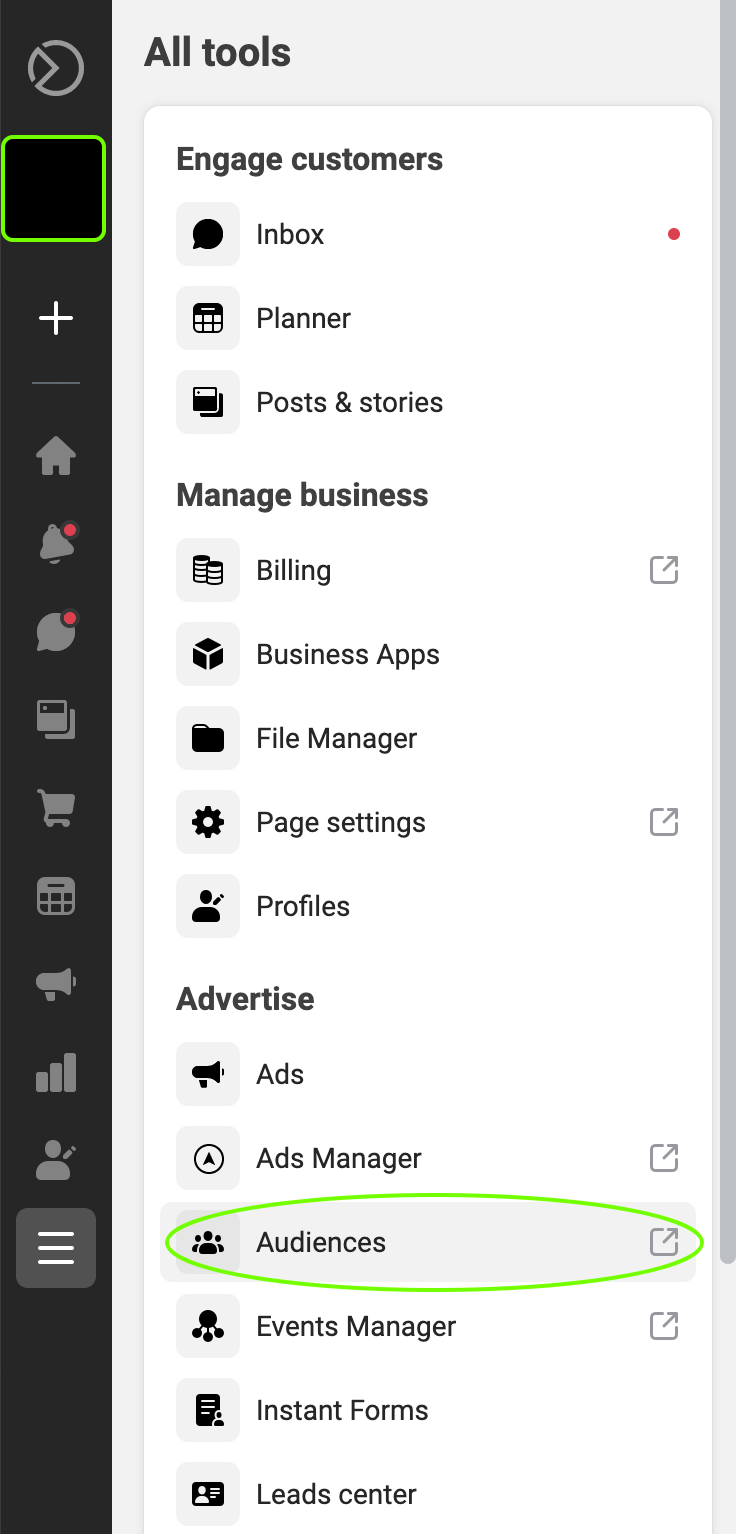
Once you have your list created, go to business.facebook.com.  In the menu, go to “All Tools” and select the “Audiences” option.

Once you click on “Audiences”, it will open the “Audience” tool in a new tab on your browser.  This will display any audiences that you have created already.

Step 3 – Audience Creation Wizard

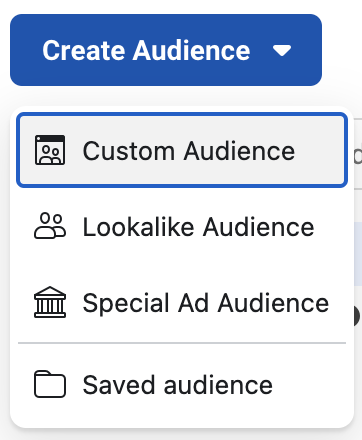
Click the “Create Audience” button on the left to get started.

Audience-Home-Page

In the drop-down, select the “Custom Audience” option.

Create-Audience-Dropdown

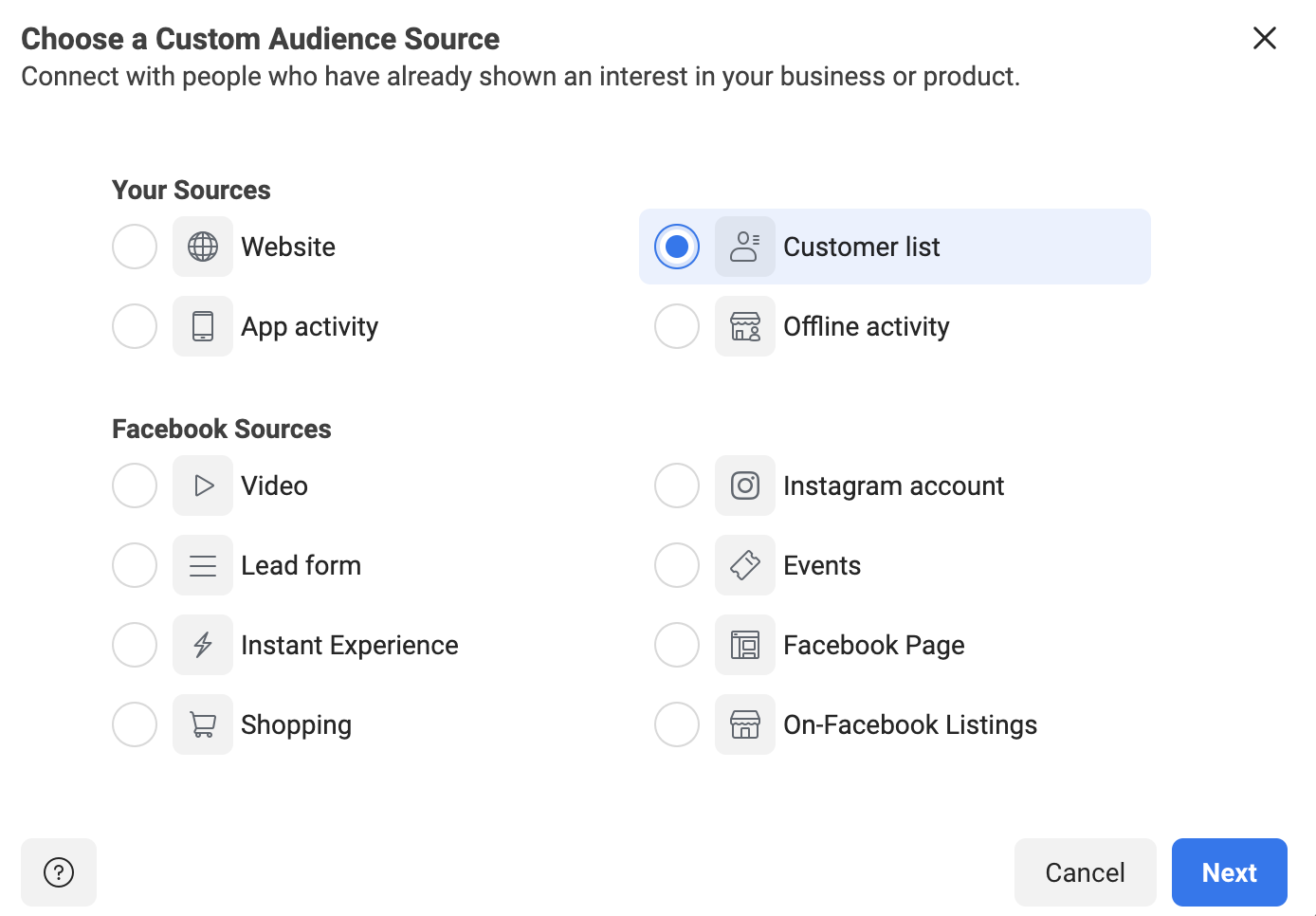
Once “Custom Audience” is selected, this will open a new dialog box.  This box will allow you to choose the source of the custom audience.  In this case, you’ll select “Customer List” and click “Next”.

Chose-Custom-Audience

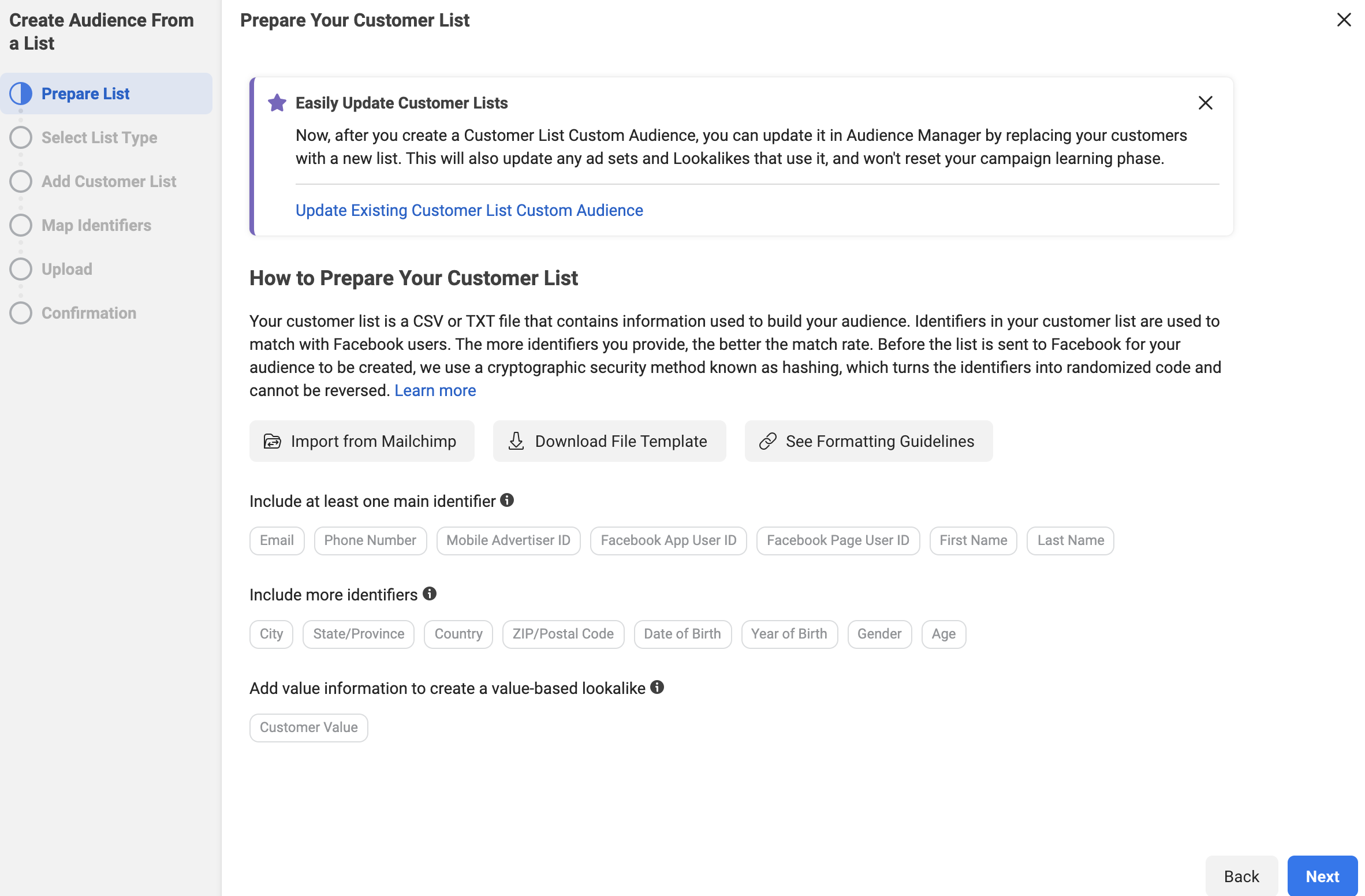
The next screen is a helpful explanation from Facebook that tells you exactly what information they will look for in your list.

Prepare-Customer-List

Click “Next” when you are done reading it.

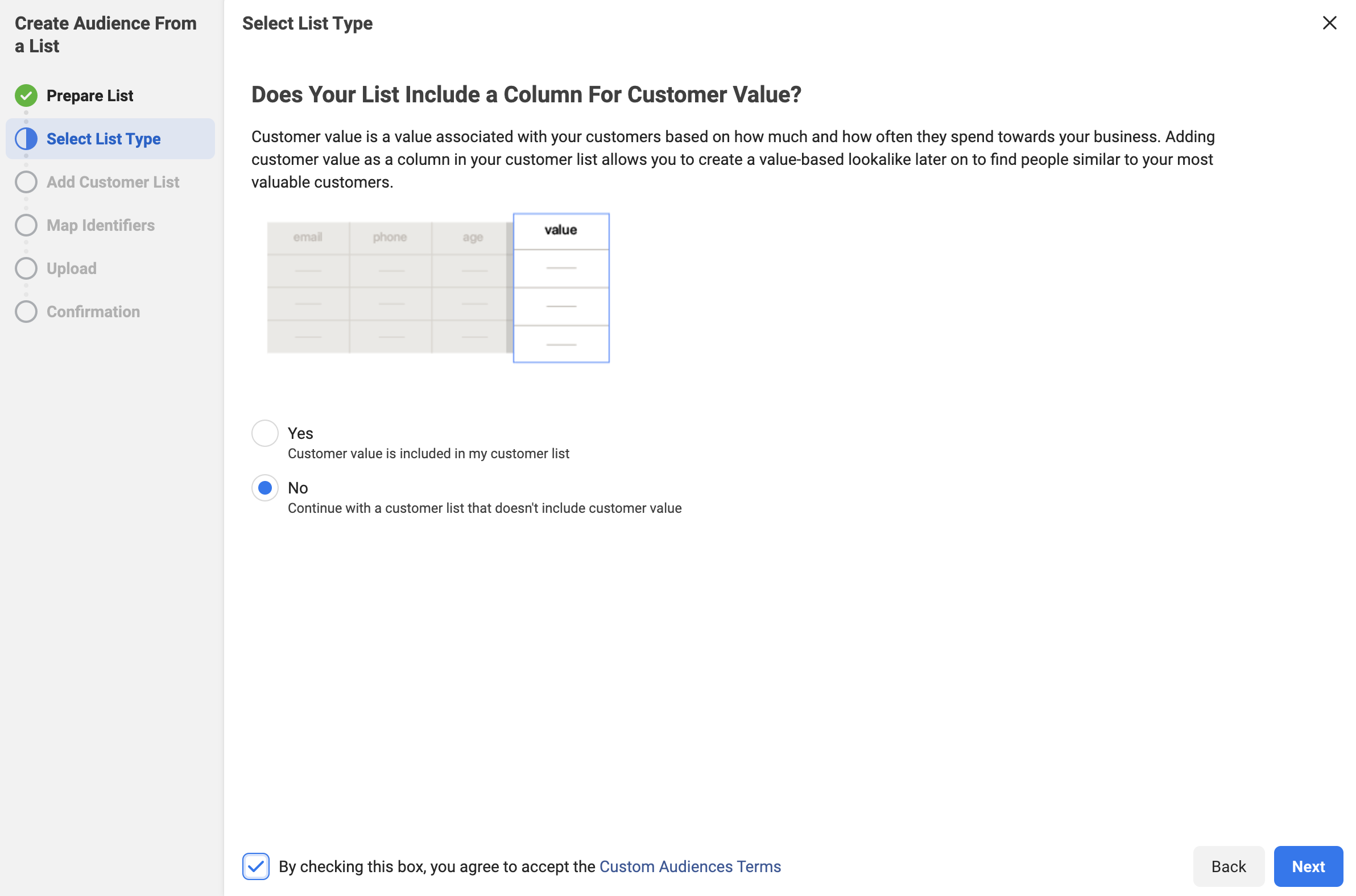
The next screen will ask if you are using a “Custom Value” column.  This is a more advanced technique that we will be covering in future blogs.  For now, we recommend selecting “No”, accepting the terms from Facebook and clicking “Next”.

No-Customer-Value

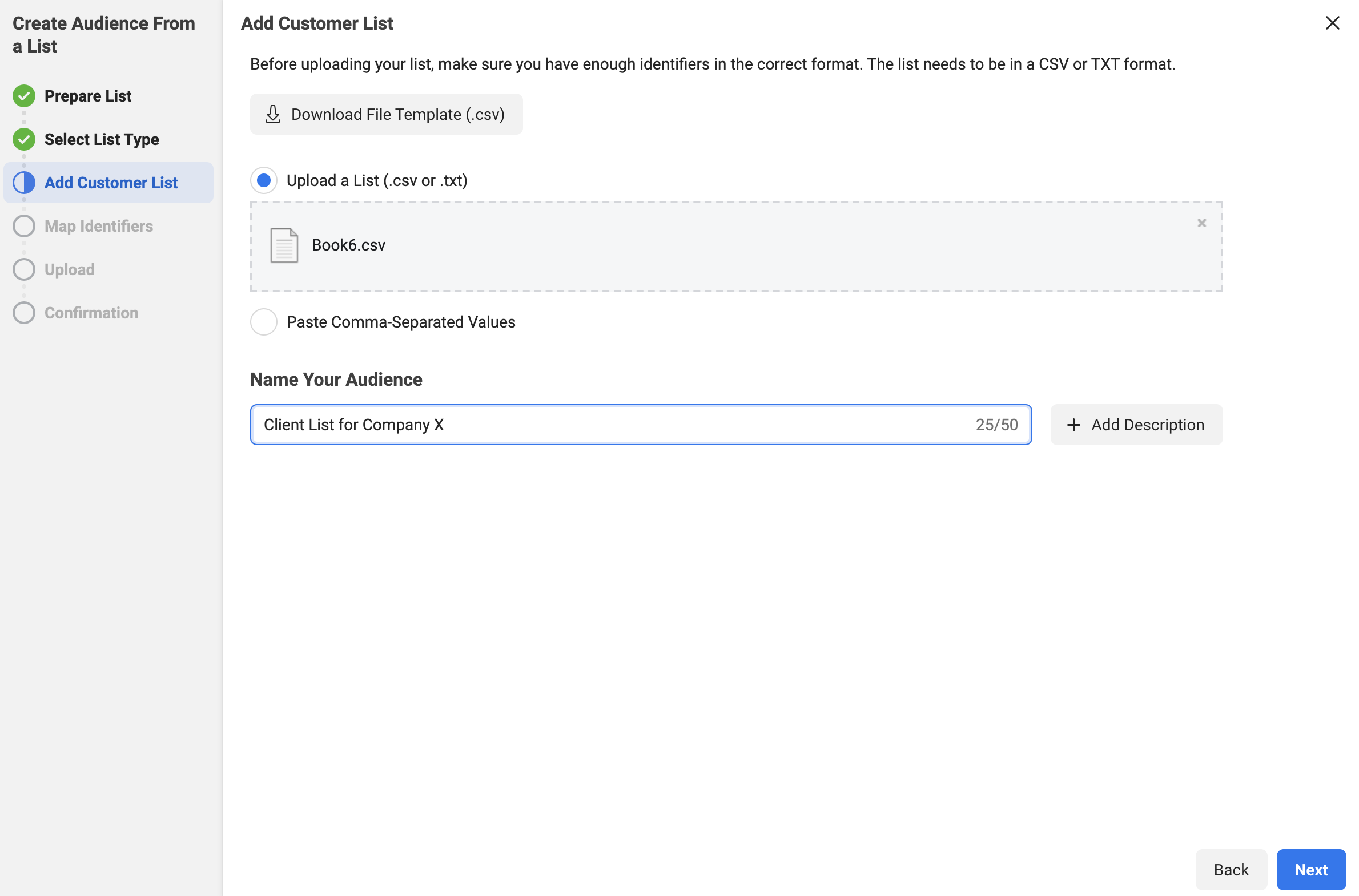
In the next step, you can either upload the .csv file that you created of your clients, or you can copy and paste it in for Facebook.

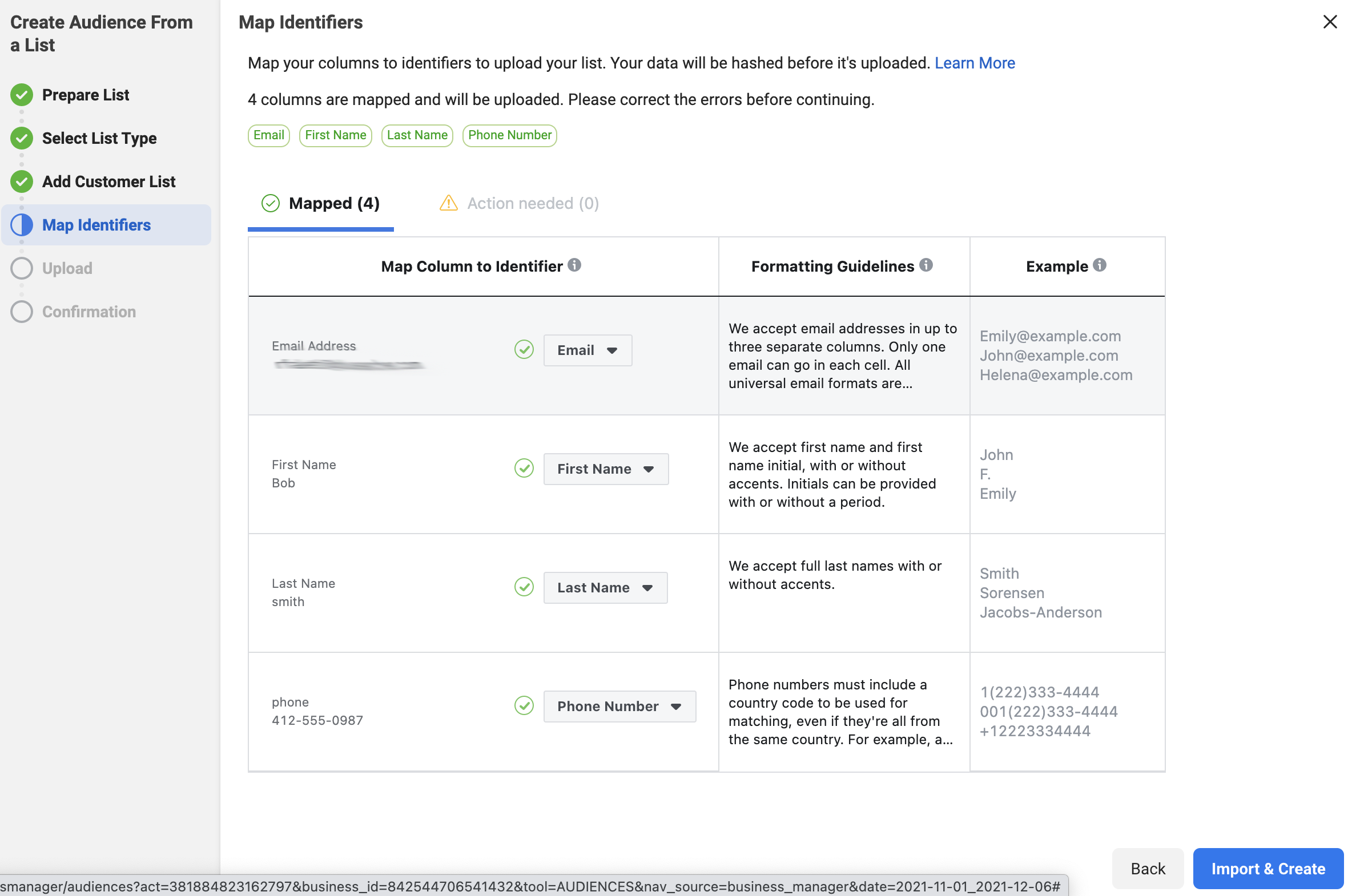
In the example below, we uploaded our .csv file.  The file had four rows: email, first name, last name, phone number.  

Once the list is uploaded, you’ll want to name the audience something descriptive.  In the image, we named this audience “Client List for Company X”.

Upload-Audience-and-Name

Side Note: There is a button “+ Description” that you can use as well.  This gives you an additional 100 characters to describe your audience if you’d like.  We would recommend using these descriptions once you start creating a lot of audiences and need more information to keep everything organized.

Click “Next” once you have completed both steps.

Facebook will review the data and attempt to identify the columns that you entered in the .csv file (or the pasted data).  If they can identify the column, they will show the information on the “Mapped” tab.  It normally can distinguish the email and phone number easily.  If it can’t tell what the data is, it will place the information on the “Action Needed” tab.  Then, you’ll need to go to that tab and ID the columns for Facebook.

Once the columns that you want the data from are mapped, click on the “Import and Create” button.

Map-identifiers

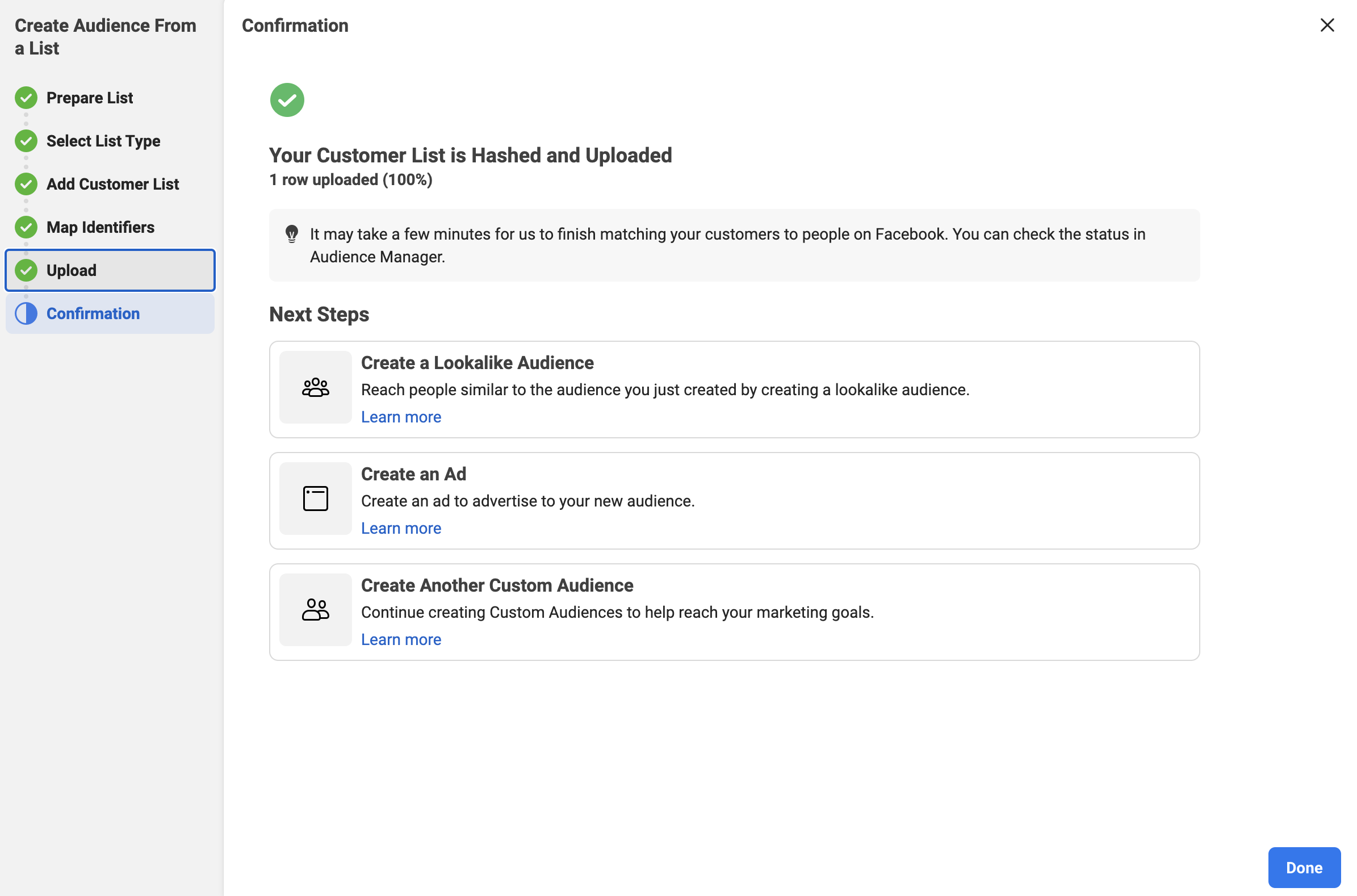
This creates the list and gives you confirmation, as seen below:

Client-List-Created

Click “Done” and it returns you to the main audience page.

You now have a custom audience of your clients to use when running Facebook Ads.

You can also watch our step-by-step video on how to create this audience.

Facebook Audience Two – Your Prospects

The second most valuable list that your company owns is your list of prospects.  This is the list of people that you have interacted with before but haven’t quite been able to convert them to clients.  They could also be clients that you lost, but think that you could win back.

Wouldn’t it be nice to get your helpful information in front of them in a casual way?  

Facebook Ads help you put social proof and videos that show off your knowledge depth right in the feed of your prospects!

To make an informed purchase choice, your potential customers often need to see and hear from you many times.  In fact, a 2011 study from Google found that a buyer needs 7 hours of interaction across 11 touch points in 4 locations.  Advertising to your prospects with engaging video ads is a great way to accomplish this.

To create this custom audience, you will follow the exact same steps that you took in the “Facebook Audience One – Your Clients” section with two exceptions – instead of creating a .csv file of your clients, you will create a .csv file of your prospects.  Again, remember that this list needs to have at least 100 people.

The other difference is that you’ll need to name this audience “Prospect List for Company X” (or something similar.

Again, depending upon your CRM and/or mail automation program, you should be able to easily export this information.

Facebook Audience Three – Your Clients “Lookalike”

You’ve now made an audience that contains your clients and an audience that contains your prospects.  Wouldn’t it be great if you could find other people to advertise to who are similar to your current consumers?

You can now with a “Lookalike Audience” from Facebook.

So, what is a Lookalike Audience?

Facebook defines it as:

A lookalike audience uses an existing Custom Audience you select for its source audience. To create a lookalike audience, our system leverages information such as demographics, interests and behaviors from your source audience to find new people who share similar qualities. When you use a lookalike audience, your ad is delivered to that audience of people who are similar to (or “look like”) your existing customers.

When you create your lookalike audience, you can use a percent range to choose how closely you want your new audience to match your source audience. The size you choose depends on your goals. Smaller percentages more closely match your source audience, but larger percentages create a bigger, broader audience.

Now, let’s create a lookalike audience for your clients.

Step 1 – Open The Facebook Audience Tool

Go to business.facebook.com for your company.  In the menu, go to “All Tools” and select the “Audiences” option.

Facebook-Audiences-Option

Once you click on “Audiences”, it will open the “Audience” tool in a new tab on your browser.  This will display the 2 audiences that you have created already.

Step 2 – Select the Lookalike Audience

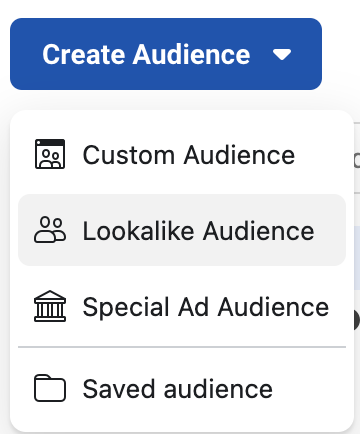
Click the “Create Audience” button on the left to get started.

Audience-Home-Page

In the drop-down, select the “Lookalike Audience” option.

Lookalike-Audience-Selected

Step 3 – Create the Lookalike Audience

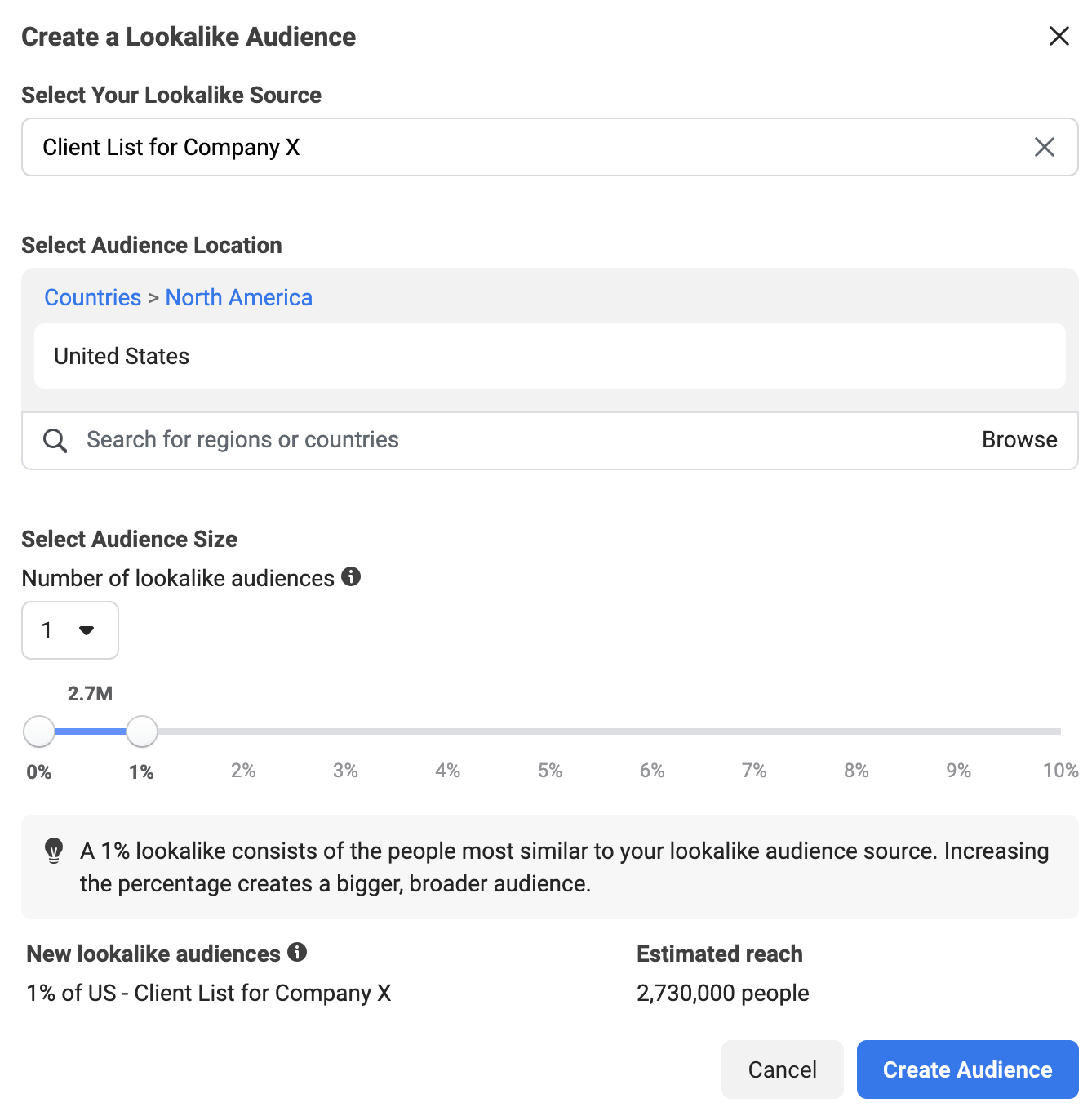
It will ask you to select your lookalike audience.  This is where you will choose the “Client List for Company X” that you just created.

Then, you will need to choose a location for the audience.  You will want to enter the country that you are targeting.

We recommend keeping the percentage at one, as you get a more honed-in audience that is similar to your clients.

Finally, click “Create Audience” to complete the process.

Lookalike-Audience-Create

Facebook Audience Four – Your Prospects “Lookalike”

Wouldn’t it be great if you could find other people to advertise to who are similar to your current prospects as well?

Again, you can do this using the “Lookalike Audience” functionality offered by Facebook.

To create this lookalike audience, you will follow the exact same steps that you took in the “Facebook Audience Three – Your Clients Lookalike” section, with one exception – instead of selecting the “Client List for Company X”, you will select the “Prospect List for Company X”.

Following this process will give you a set of people to advertise to that are similar in many ways to your prospects! Start by getting them to know, like and trust you with videos and other helpful information.

Facebook Audience Five – People That Have Engaged With Your Page

Engagement is a key factor when you look at any paid ad or organic post on Facebook.  “Engaging” actions can include a like, a reaction, a comment and more.  It’s basically the label for when someone takes an action with your post or ad.  

It stands to reason that if someone has taken the time to engage with your content, it would make sense to put more of your paid content (with calls to action) in front of them, right?  

This is where Audience Five, the people who have engaged with your page, comes in. 

Let’s create this audience!

Step 1 – Open The Facebook Audience Tool

Go to business.facebook.com for your company.  In the menu, go to “All Tools” and select the “Audiences” option.

Facebook-Audiences-Option

Once you click on “Audiences”, it will open the “Audience” tool in a new tab on your browser.  This will display the audiences that you have created already. 

Step 2 – Select the Custom Audience Type

Click the “Create Audience” button on the left to get started.

Audience-Home-Page

In the drop-down, select the “Custom Audience” option.

Create-Audience-Dropdown

Once “Custom Audience” is selected, this will open a new dialog box.  This box will allow you to choose the source of the custom audience.  In this case, you’ll select “Facebook Page” and click “Next”.

Step 3 – Select the Criteria

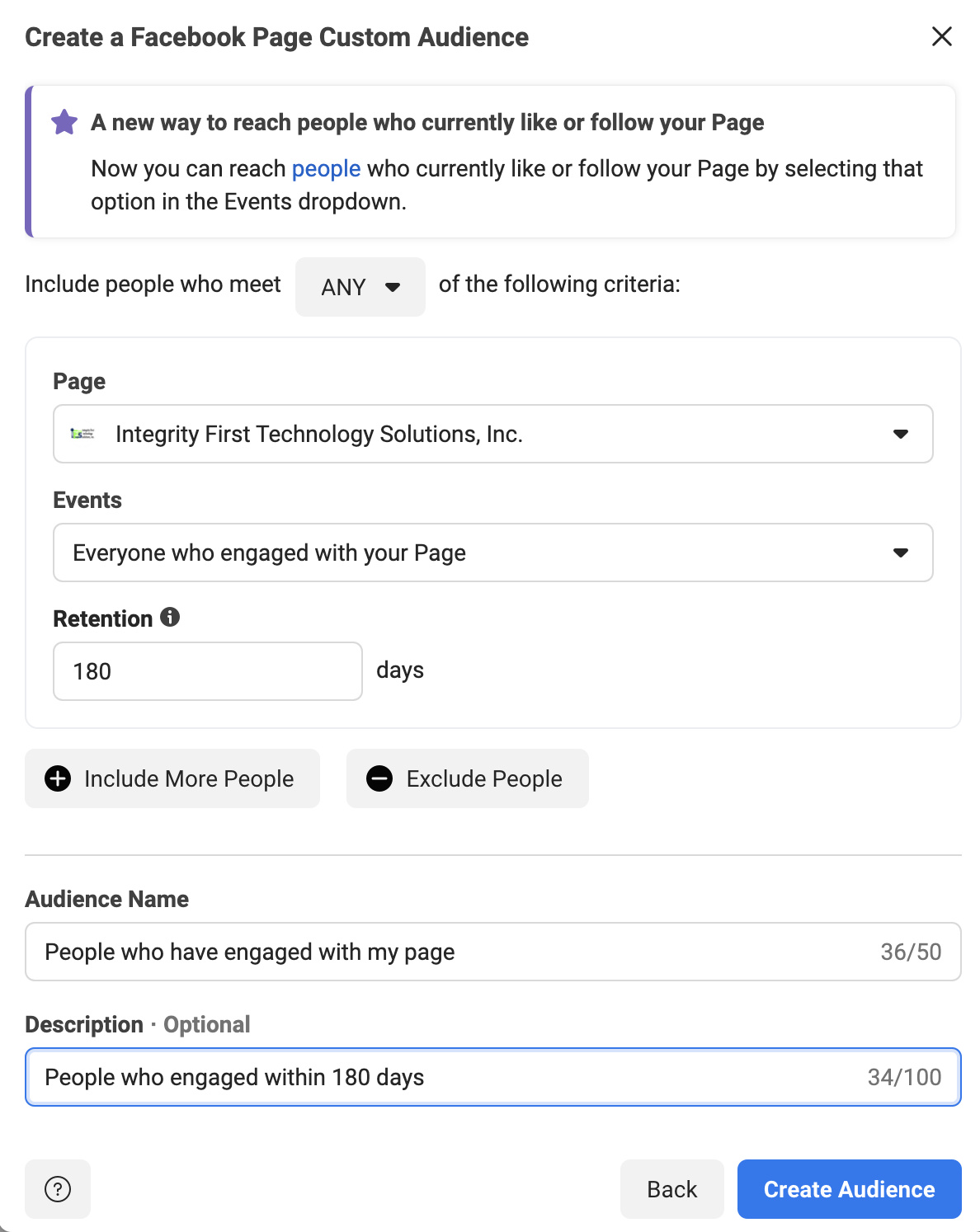
Make sure that your Facebook page is selected, as shown below.

Then, choose the option “Everyone who engaged with your Page” with a retention of 180 days.  Some companies will recommend a year, but 180 days is the maximum that we recommend. 

Add a descriptive name for this audience, like “People who have engaged with my page”.  Facebook also gives you a “Description” field if you want to expand on the title.  You may want to put the retention amount in here for reference.

Create-Audience-Engage

Once all your fields are filled out, click on the “Create Audience” button.

Facebook will create the audience, then give you a confirmation message.  Click “Done” and you’ll be returned to the main “Audience” page.

Facebook Audience Six – People That Have Been On Your Website Via The Facebook Pixel

Showing ads to people that have been on your website already is the core tenet of what marketers call “Remarketing”.  This is essential for a successful marketing plan.

In fact, studies show that only 3% of buyers are ready to act at any given time.  This is why remarketing is so important.  It allows you to put your business in front of potential buyers multiple times so you can progress the relationship by building trust.

One way to know who has visited your website is via the Facebook Pixel.  This is a tracking cookie provided by Facebook.  If you don’t have your Facebook Pixel installed, follow these instructions from Facebook to successfully set it up.

Now, there are a few exceptions to this rule.  

Due to a privacy debate between Apple and Facebook,  the people typically not tracked are on iOS devices.  They actually have to opt-in to being tracked via the app.  Less than 10% of these users have done so.

The other exception is that a person could have assorted browser privacy settings on, which would disallow tracking on their computer.  

Despite these exceptions, you can still have a decently sized audience based on the data from the Facebook Pixel.

Let’s create this audience!

Step 1 – Open The Facebook Audience Tool

Go to business.facebook.com for your company.  In the menu, go to “All Tools” and select the “Audiences” option.

Facebook-Audiences-Option

Once you click on “Audiences”, it will open the “Audience” tool in a new tab on your browser.  This will display the audiences that you have created already.

Step 2 – Select the Custom Audience Type

Click the “Create Audience” button on the left to get started.

Audience-Home-Page

In the drop-down, select the “Custom Audience” option.

Create-Audience-Dropdown

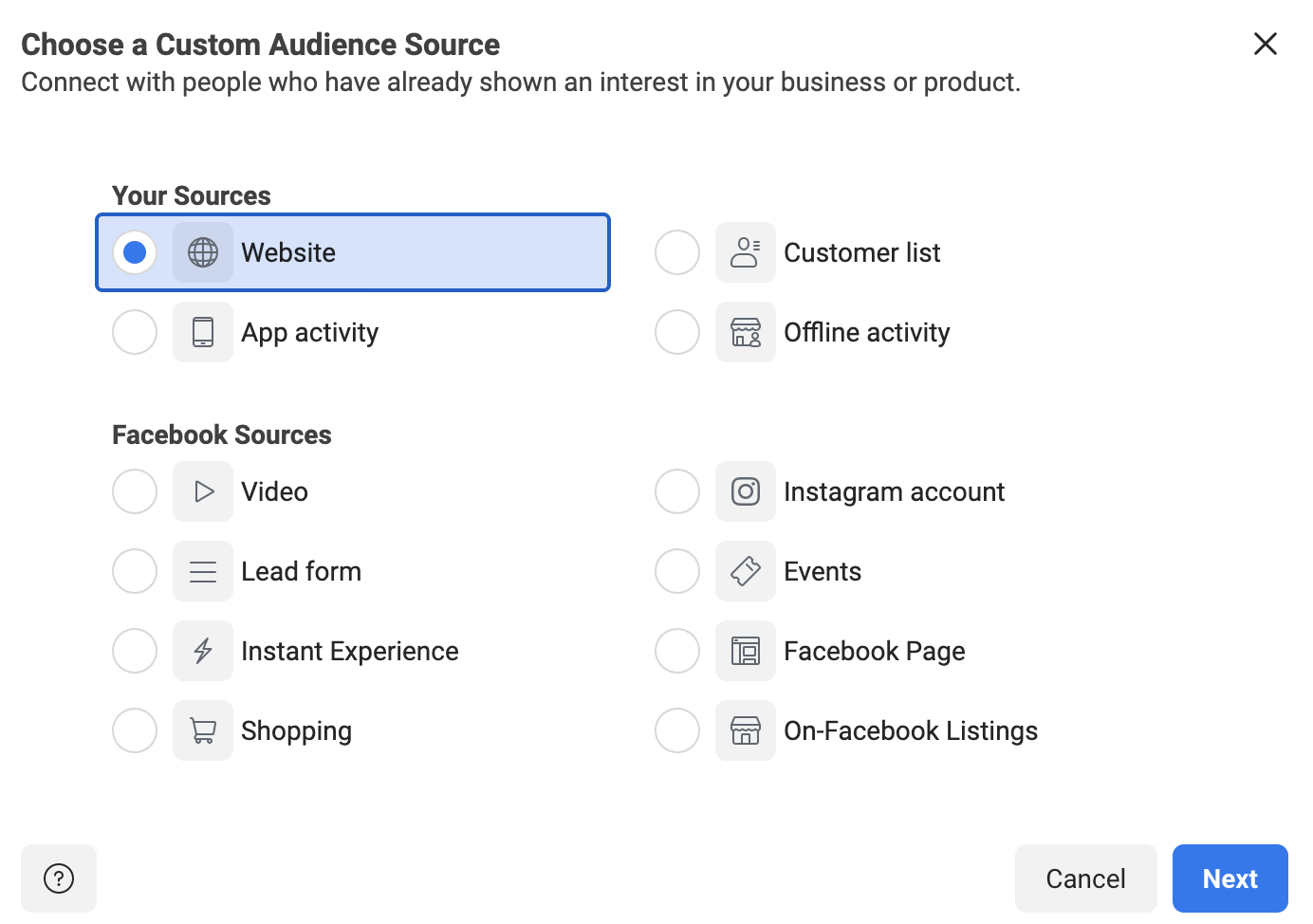
Once “Custom Audience” is selected, this will open a new dialog box.  This box will allow you to choose the source of the custom audience.  In this case, you’ll select “Website” and click “Next”.

Create-Pixel-audience-select-website

Step 3 – Select the Custom Audience Pixel Criteria

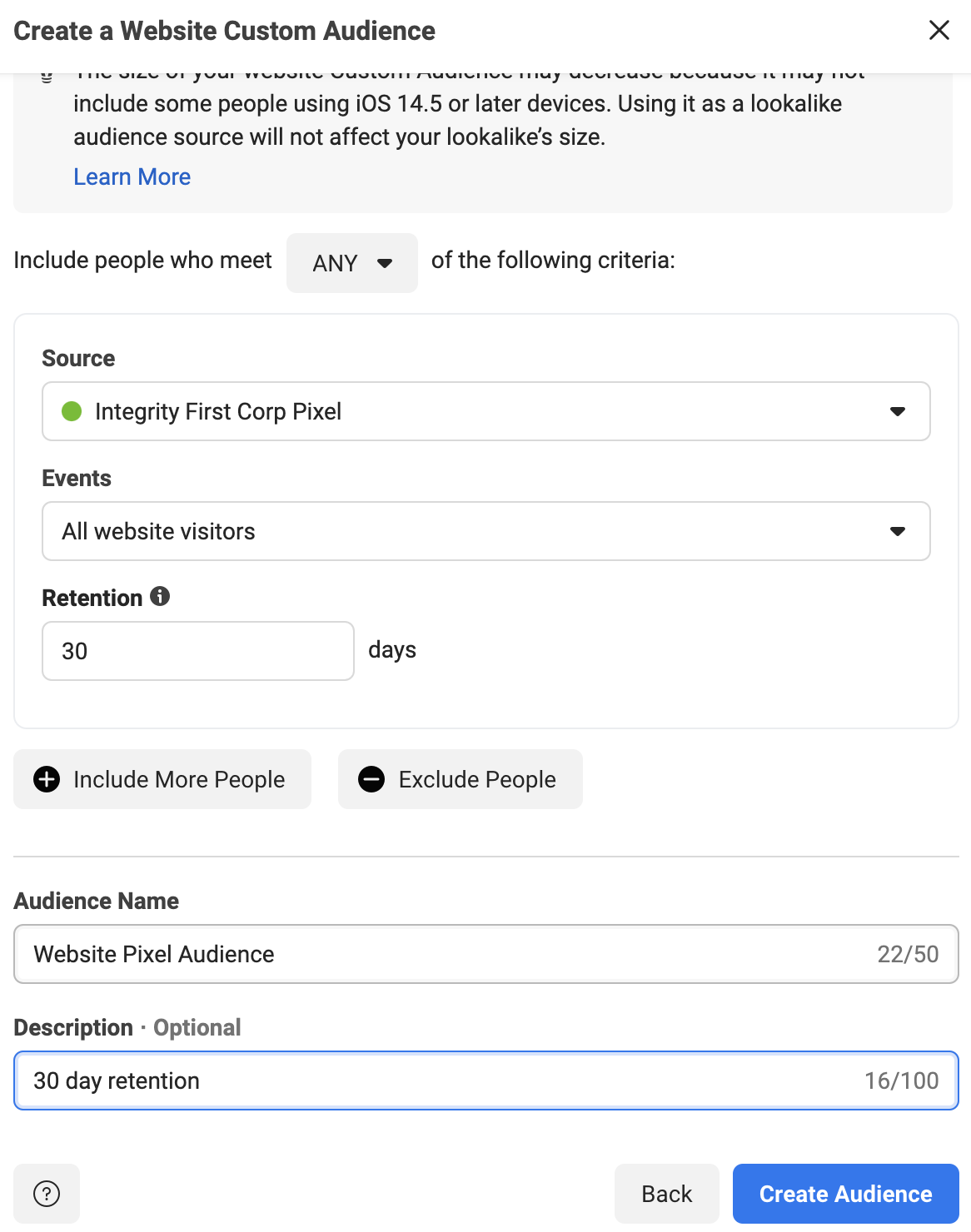
You’ll be given a selection of the Pixels that you have access to.  Choose the Pixel that is installed on your website.

Under “Events”, you have a few choices.  You can choose people that have been on any page of your website.  You can also specify exact pages or URLs that contain certain words.  Another option is selecting users by time spent.

In this example, we are just going to target anyone that has visited our website before.

Again, you can select the “Retention”, which is how far back in time you want the list to remember people.  We recommend anywhere between 30-180 days, depending upon what your business does.  With higher-priced items and services, a longer retention may help you convince the people that take a while to research.

Obviously, we can get more detailed in the targeting by adding more criteria with the “Include More People” button, but we will cover that in future articles.

Fill in your “Audience Name” and the “Description”, then click the “Create Audience” button.

Create-Pixel-Audience-Select-Criteria

Facebook will create the audience and give you a confirmation message.  Click “Done” to complete the process.

Facebook Audience Seven – People That Have Watched Specific Facebook Videos

This audience will help you pick up some of the people that you lost to the iOS security updates.  Because you can’t track them with the Pixel, you need to have a way to track them on Facebook.

“Video Watches” is the perfect stat for this!  Facebook tracks who watches every video that you advertise and for how long they watch.

Create a video, or set of videos, that ONLY your ideal client would watch.  Make it very specific to the problems/pain points that they have, then advertise it with a goal of “Video Views” to a broad audience in your service area.  We suggest running these ads at $5-$10 per day.  At the end of 2 weeks, you should have an excellent set of people to retarget.

Let’s create the last audience!

Step 1 – Open The Facebook Audience Tool

Go to business.facebook.com for your company.  In the menu, go to “All Tools” and select the “Audiences” option.

Facebook-Audiences-Option

Once you click on “Audiences”, it will open the “Audience” tool in a new tab on your browser.  This will display the audiences that you have created already. 

Step 2 – Select the Custom Audience Type

Click the “Create Audience” button on the left to get started.

Audience-Home-Page

In the drop-down, select the “Custom Audience” option.

Create-Audience-Dropdown

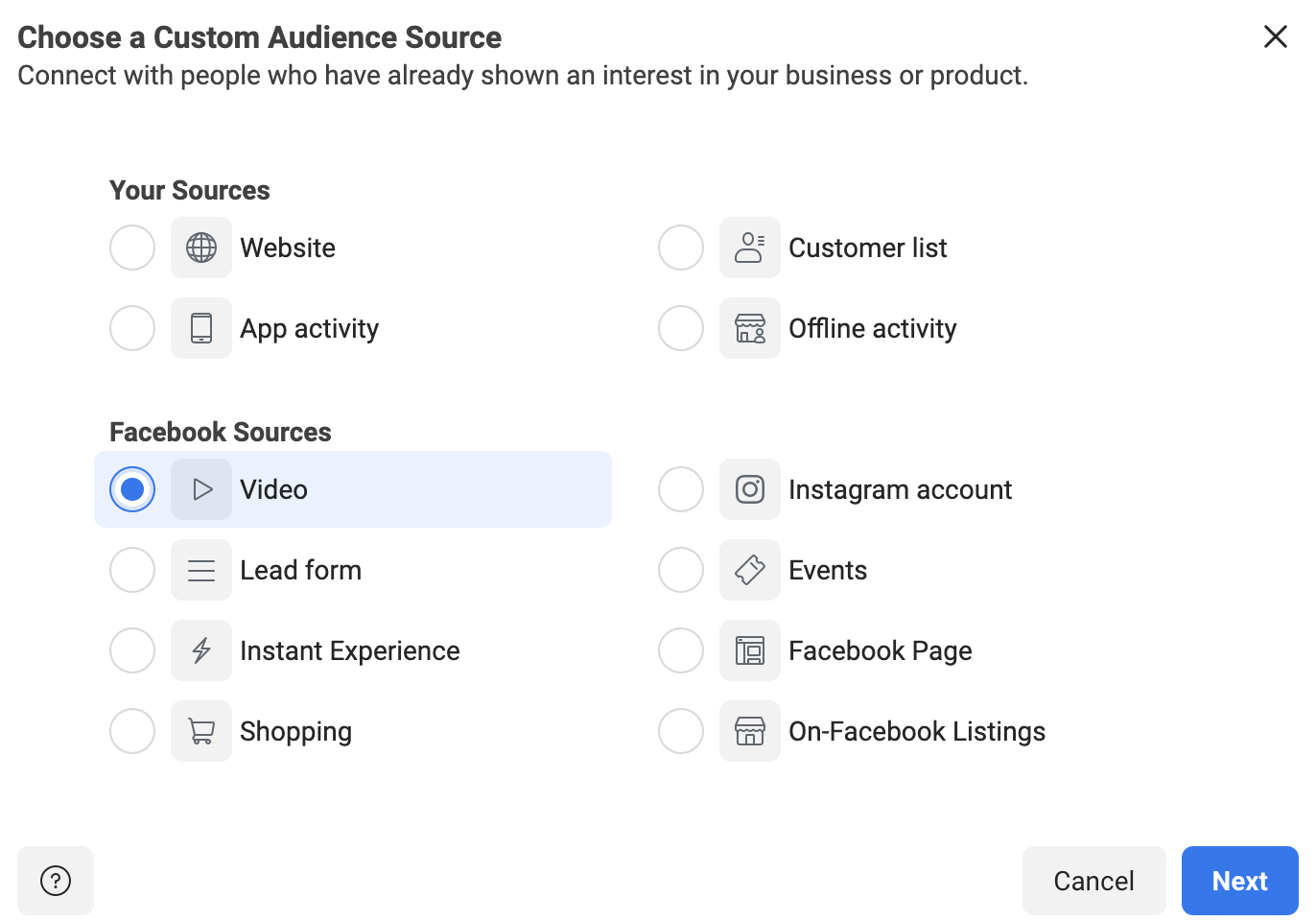
Once “Custom Audience” is selected, this will open a new dialog box.  This box will allow you to choose the source of the custom audience.  In this case, you’ll select “Video” and click “Next”.

Create-Pixel-audience-select-video

Step 3 – Select the Custom Audience Criteria

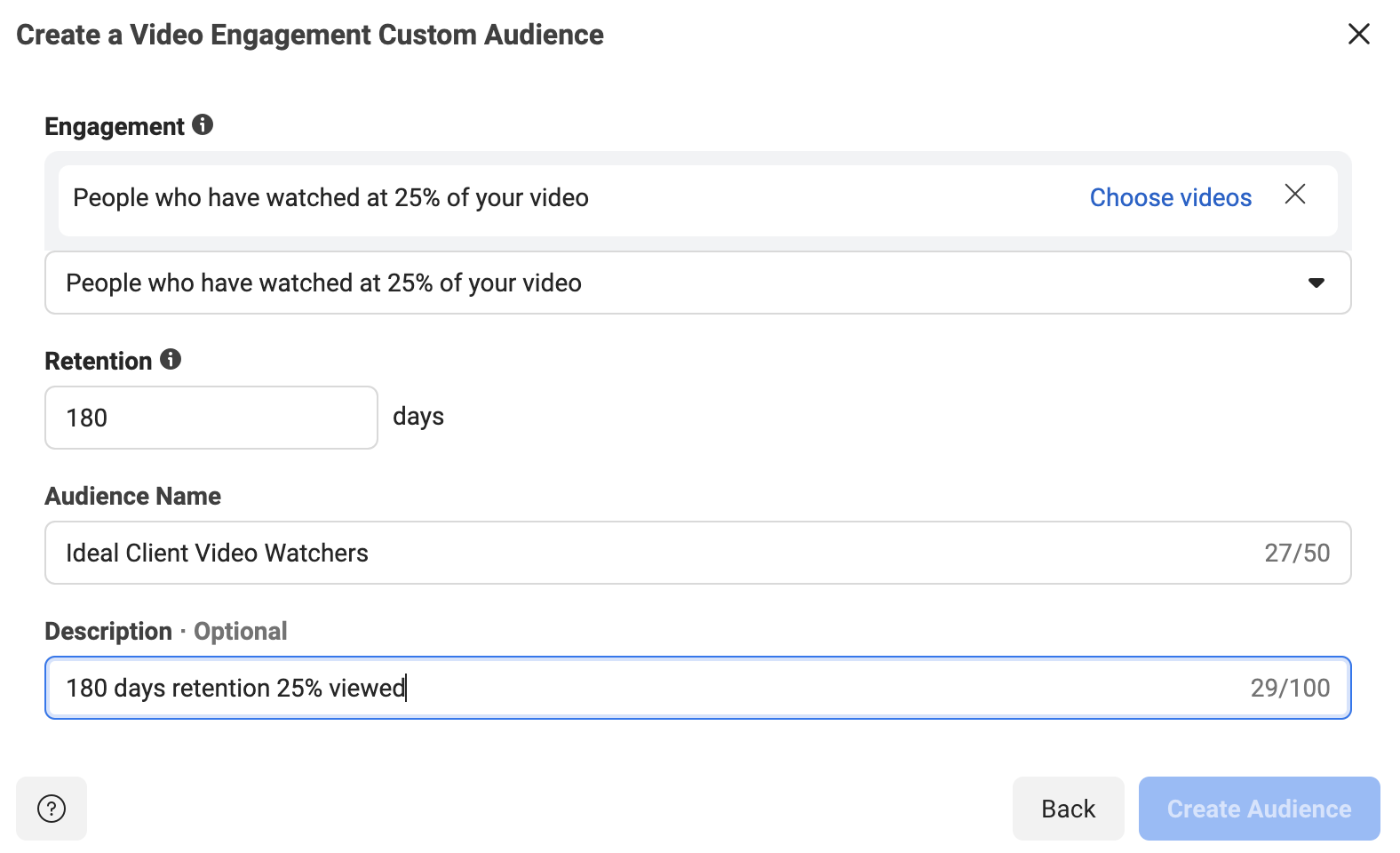
In this next step, you’ll need to choose what percentage or length of time people must spend watching your video.  25% tends to be a good metric to choose.  No one is going to watch over one-fourth of a video about something that they aren’t really interested in.  

So, in the dropdown, select the “People who have watched 25% of your video” option.  Again, we recommend the Retention between 30-180 days.  

Add the “Audience Name” and “Description” as well.

Create-Video-Watcher-Audience

The last step is to choose the video (or set of videos) that you used to target your ideal client.  Click the “Choose videos” link.

You can select videos from your Facebook page or your Facebook ads.  To see all of your videos, you will need to change the “Video Source” dropdown in the upper left.

Select the videos that you used to target your ideal client.  They should show in the right side-column once selected.

Choose-Videos

Once you have your videos chosen, click “Confirm”.

This takes you back to the “Create Video Engagement Custom Audience” screen, where you have filled out everything else.  Click the “Create Audience” button.

Facebook will create the audience, then give you a confirmation message.  Click “Done” and you’ll be returned to the main “Audience” page.

Go Get Started Creating Your New Facebook Audiences For 2022

You now have everything you need in this guide to create the best audiences for your business to advertise to in 2022!  Don’t settle for less than stellar Facebook Ads results.

Want some help?

If you have any questions about the information in this blog or need help getting started, contact IFTS today for a free consultation.  Call 412-715-6266 or send an email to si@iftsdesign.com.

Get the Top 3 Social Media Post Templates for Law Firms to Grow Your Following and Get New Clients

Engage with prospects and save time with your FREE Canva template kit. This kit features the top 3 social media posts for law firms and directions on how to brand them for your own firm in 5 minutes or less.

Enter your email below and get the templates sent directly to your inbox along with an instructional video on how to make personalized edits.

6 Reasons Why You Should Use Social Media Marketing For Your Local Business

Social media marketing web

It is amazing how many new clients and prospects you will find in your neighborhood by using social media to promote your local business!

On a daily basis, millions of individuals use Facebook, Instagram, and other social media networks. There is a good chance that your potential customers are already “friends” with your competition on social media.  Make sure that you aren’t missing out! It’s impossible for people to realize your business exists unless you’re engaged on social media. It’s critical to have a strong online presence in order to interact with more prospective customers and expand your business in today’s social media era.

Reason To Be On Social Media #1 – Social Media Marketing Is Quick, Affordable and Effective

Using social media to promote your local business on a tight budget is a great option! It’s easy to use, can run ads for as little as $3/day and has great local targeting abilities. You can start advertising your business right now by creating a free business profile. Using the right techniques, social media marketing will bring in more local leads, increase website traffic, and boost revenue.

Reason To Be On Social Media #2 – Social Media Posts and Videos Helps You Create Client Trust For Your Brand

Every single day, millions of individuals throughout the world engage in social media activities. You can create genuine relationships with your fans on social media because of this. Increasing your brand’s visibility and establishing trust with your consumers has never been easier. 

People like to do business with people, so put a face to your business name on social media.  Use this space to give your clients a glimpse behind the scenes at your company.  It’s a solid opportunity to humanize the brand.

Reason To Be On Social Media #3 – Social Media Marketing Helps Promote Your Local Business (And Sales)

You will greatly enhance your click-through rate, your website’s traffic, and your revenues with intriguing posts and videos on your online properties. If you have a product or service that you want to advertise locally, you may simply do it with the help of social media and social sales tools, which are always evolving.  Another great place to do this is your Google My Business Profile.

Reason To Be On Social Media #4 – It’s Easy To Learn LOTS Of Information About Your Clients on Social Media

It’s simple to discover more about your consumers because the information is so accessible on these platforms.

How well-versed are you in the demographics of your target market?

Businesses can learn a lot about their clients by using social media insights and other third-party tools. When you introduce a new local service or product, you can leverage the knowledge you’ve gathered about your target market to design compelling ads.

Reason To Be On Social Media #5 – You Can Easily (And Cheaply) Narrow The Scope Of Your Ads To Your Ideal Audience

Use social media marketing for precise audience targeting.  You will find that most platforms have ads that are fairly inexpensive, which will allow local businesses to compete with the “big dogs” as well. In addition, social media sites provide real-time insights into the performance of your campaigns, allowing you to continually improve your advertising based on real-time information.

Reason To Be On Social Media #6 – You Can Easily Spy On Your Competitors

Keep your friends close, but keep your enemies closer! Local companies may easily “spy” on their competition using social media.  You can see available ads, targeted keywords and more!

Keeping tabs on the competition is easier than ever before thanks to social media. Learn from your rivals’ marketing strategies so you can tailor your own plan to reach more customers.

Want Some Help?

If you want to start marketing your company online, but aren’t sure where to start, let us help!  Call IFTS today at 412.715.6266 or email us at si@iftsdesign.com.